Pattern Refactoring

The first design that works is rarely the one that survives the next requirement. This chapter follows one problem through several reshapings and names the pattern each one needs, or makes unnecessary.
A first solution solves the problem. Then you ask “what will change?” and reshape the design so that kind of change touches one place. That reshaping follows the method of Martin Fowler’s Refactoring, applied to patterns rather than single statements.
The chapter is also a Python
lesson. Many patterns in GoF Design Patterns work
around the limitations of statically typed languages: single
dispatch, closed classes, and types that are not values.
Python’s classes stay open, its types are values, and
functools.singledispatch adds an operation from
outside a class, so some of those patterns become
unnecessary.
The example is a trash sorting simulation, and it evolves across the chapter. A first design works until a new requirement makes it leave trash out of its report. A reshaping confines that change to one new class. Then a second vector of change appears, one the reshaped design leaves unsolved. Read that evolution as a template for your own designs, which can start as an adequate fit for one problem and become a flexible fit for a class of problems.
Simulating a Trash Recycler
Trash arrives at the recycling plant mixed together. The program must sort it by material and report the total value of each kind. To sort the pile, you must recover the type of each piece.
The Trash
Hierarchy
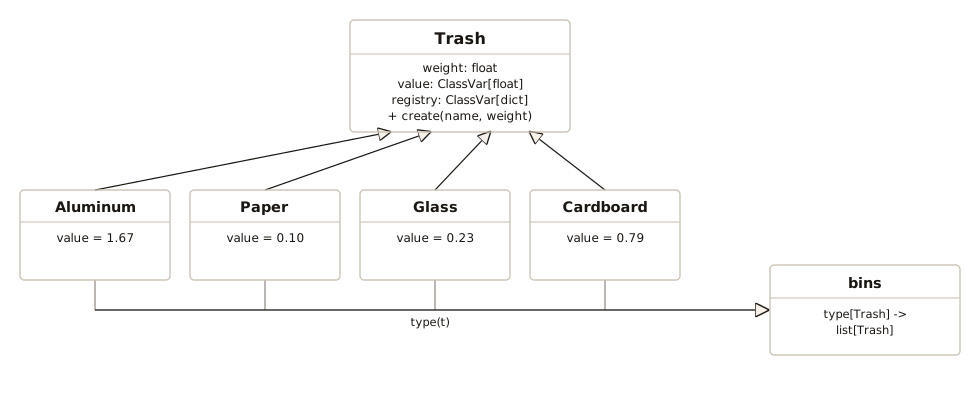
In the Trash hierarchy, each material class
declares a per-pound value. The base class keeps a
registry of its subclasses, which
__init_subclass__() fills automatically. The base
class’s create() method is the dictionary
factory.
# trash.py
from typing import ClassVar
from record import record

type Bins = dict[type[Trash], list[Trash]]

@record
class Trash:
    weight: float
    # Dollars per pound (per subclass)
    value: ClassVar[float] = 0.0
    registry: ClassVar[dict[str, type[Trash]]] = {}

    def __init_subclass__(cls, **kwargs: object) -> None:
        super().__init_subclass__(**kwargs)
        Trash.registry[cls.__name__] = cls

    @classmethod
    def create(cls, name: str, weight: float) -> Trash:
        return cls.registry[name](weight)

class Aluminum(Trash):
    value: ClassVar[float] = 1.67

class Paper(Trash):
    value: ClassVar[float] = 0.10

class Glass(Trash):
    value: ClassVar[float] = 0.23

class Cardboard(Trash):
    value: ClassVar[float] = 0.79

def sum_value(contents: list[Trash]) -> float:
    return sum(piece.weight * piece.value
               for piece in contents)

def report(bins: Bins) -> None:
    for material, contents in bins.items():
        total = sum_value(contents)
        print(f"{material.__name__}: {total:.2f}")
Bins names the shape the sorting sections use, a
dictionary from a material’s class to the pieces made of that
material. The
type Statement introduces this alias form. A
type statement’s right side evaluates lazily, so
the alias can name Trash several lines before the
class statement that defines it.
Python implicitly makes __init_subclass__()
a classmethod, so the @classmethod decorator is
optional. The method’s first parameter is the new subclass.
__init_subclass__() runs once per subclass,
immediately after Python creates that subclass, so each one can
register itself in Trash.registry
automatically.
create() is a class method reading
cls.registry. Factory
warns that this form can mislead.
Aluminum.create("Paper", 1.0) is legal and returns
a Paper. The lookup is safe here. Every subclass
writes to Trash.registry and none defines its own
registry, so cls.registry always
resolves to that one table. Still, call create() as
Trash.create().
@record reads the bare
weight: float annotation and generates
__init__(self, weight: float). The two ClassVar
attributes belong to the class, so they stay out of
__init__().
Each subclass’s value line creates a class
attribute of its own, separate from Trash.value and
from its siblings’ value attributes. Each subclass
restates ClassVar[float]. The type checker treats
the restatement as optional. The checker applies
the base’s declaration to an override, so it rejects
Aluminum(1.0).value = 2.0 with or without the
restatement.
A new material registers itself, and create()
builds it. sum_value() also totals the new material
as written. That ordinary function reads
piece.value and piece.weight
polymorphically, so each piece answers value from
its own class.
Each recycling script in the chapter prints its bins with
report(). A dictionary keeps its keys in insertion
order, so the material that appears first in the data prints
first.
# test_trash.py
import pytest
from trash import Aluminum, Paper, Trash, sum_value

def test_subclasses_self_register() -> None:
    assert set(Trash.registry) == {
        "Aluminum", "Paper", "Glass", "Cardboard"}

def test_create_builds_by_name() -> None:
    t = Trash.create("Aluminum", 2.0)
    assert isinstance(t, Aluminum)
    assert t.weight == 2.0

def test_sum_value_totals_weight_times_value() -> None:
    items: list[Trash] = [Aluminum(2.0), Paper(5.0)]
    expected = 2 * Aluminum.value + 5 * Paper.value
    assert sum_value(items) == pytest.approx(expected)
The Data File and Its Parser
A data file describes the trash to process, one
Name:weight line per piece:
# trash.dat
Glass:54
Paper:22
Paper:11
Glass:17
Aluminum:89
Paper:88
Aluminum:76
Cardboard:96
Aluminum:25
Aluminum:34
Glass:11
Glass:68
Glass:43
Aluminum:27
Cardboard:44
Aluminum:18
Paper:91
Glass:63
Glass:50
Glass:80
Aluminum:81
Cardboard:12
The parser looks up each material by name in the registry, so
parse() stays as written when you add a
material:
# parse_trash.py
from pathlib import Path
from trash import Trash

def parse(filename: str | Path) -> list[Trash]:
    items: list[Trash] = []
    for line in Path(filename).read_text().splitlines():
        line = line.strip()
        if not line or line.startswith("#"):
            continue
        name, weight = line.split(":")
        items.append(
            Trash.create(name.strip(), float(weight)))
    return items
The test writes its own small data file to a temporary directory and parses that:
# test_parse_trash.py
from pathlib import Path
from parse_trash import parse
from trash import Aluminum, Glass

def test_parse_skips_comments_and_blank_lines(
    tmp_path: Path,
) -> None:
    data = tmp_path / "trash.dat"
    data.write_text("""\
# header
Aluminum:2.0

Glass:3.0
""")
    items = parse(data)
    assert [type(t) for t in items] == [Aluminum, Glass]
    assert items[0].weight == 2.0
    assert items[1].weight == 3.0
The First Cut: Checking Every Type
The most obvious sorter tests each
piece’s type with match. The rtti in
the file name stands for run-time type identification,
the C++ name for discovering a type at runtime:
# rtti_sorter.py
from collections import defaultdict
from trash import (Aluminum, Bins, Cardboard, Glass,
                   Paper, Trash)

def sort_by_match(pieces: list[Trash]) -> Bins:
    bins: Bins = defaultdict(list)
    for piece in pieces:
        match piece:
            case Aluminum():
                bins[Aluminum].append(piece)
            case Paper():
                bins[Paper].append(piece)
            case Glass():
                bins[Glass].append(piece)
            case Cardboard():
                bins[Cardboard].append(piece)
    return bins
# recycle_rtti.py
from parse_trash import parse
from rtti_sorter import sort_by_match
from trash import report
report(sort_by_match(parse("trash.dat")))
#: Glass: 88.78
#: Paper: 21.20
#: Aluminum: 584.50
#: Cardboard: 120.08Every piece in trash.dat reaches a bin, but
sort_by_match() has a classic flaw. It tests for
every type. Testing for one type, or a small subset that needs
special handling, is fine. Testing for all of them means you
write the type-to-bin lookup as a match, one
case per type. When a new material joins the
system, say Plastic, you must find every
match statement that enumerates specific types.
Each one you miss silently leaves the new material out of every
bin.
Readers of Composite
and Interpreter may expect
assert_never() to make the type checker report the
missed case. Exhaustiveness checking needs a closed union
against which to compare the cases, but Trash is
deliberately open. The registry exists to accept new subclasses.
If you add case _: assert_never(piece), the type
checker reports the call although the match covers
all four materials. A Trash instance can still
reach the wildcard, and so can an instance of a subclass defined
later. Because the report appears for a complete
match as well, it cannot point to a missing
case. Pattern
Matching warns against this shape: a match over
an open set.
A case _: wildcard can catch a new material.
case _: raise ValueError(f"unsorted {type(piece).__name__}")
turns the silent drop into a ValueError. The
wildcard helps, but the flaw remains. Every new material means
editing this match. A sorter over an open set must
compute each piece’s bin from the piece’s own class, and bins[type(piece)]
does that with no edit.
Now the plant starts accepting plastic, so the data gains some new lines and the program gains a new material class:
# plastic.dat
Glass:10
Plastic:20
Aluminum:30
Plastic:40
With Plastic defined, the new data goes to the
imported sort_by_match(), which stays as
written:
# plastic_dropped.py
from typing import ClassVar
from parse_trash import parse
from rtti_sorter import sort_by_match
from trash import Trash, report

class Plastic(Trash):
    value: ClassVar[float] = 0.15

pieces = parse("plastic.dat")
bins = sort_by_match(pieces)
report(bins)
#: Glass: 2.30
#: Aluminum: 50.10
binned = sum(len(v) for v in bins.values())
print(f"parsed {len(pieces)}, binned {binned}")
#: parsed 4, binned 2
Every step succeeds. The parser builds two
Plastic objects, the match lets both
fall through, and the report totals the trash the
match recognized. The totals the plant uses leave
out sixty pounds of plastic. Each total in the report is right
for the pieces it covers. A missed case produces a
report that looks complete and leaves out a material, not an
exception to debug.
The match loses the plastic, not the parser.
__init_subclass__() registers Plastic
the moment its class statement runs. Without that
class statement, create() raises a
KeyError at the first Plastic: line,
loudly, at parse time. The match alone loses trash
silently.
Let a Dictionary Do the Sorting
A dictionary keyed by type replaces the
match:
# dict_sorter.py
from collections import defaultdict
from trash import Bins, Trash

def sort_by_type(pieces: list[Trash]) -> Bins:
    bins: Bins = defaultdict(list)
    for piece in pieces:
        # Piece picks its bin
        bins[type(piece)].append(piece)
    return bins
sort_by_type() sorts trash.dat into
the same bins, and report() prints the same totals
as recycle_rtti.py:
# recycle_dict.py
from dict_sorter import sort_by_type
from parse_trash import parse
from trash import report

report(sort_by_type(parse("trash.dat")))
#: Glass: 88.78
#: Paper: 21.20
#: Aluminum: 584.50
#: Cardboard: 120.08
type(piece) is the right key because every new
class is a new key, including one defined at runtime. The loop
has no list of materials to maintain and no case to forget.
bins[type(piece)] is
the same dictionary-probe dispatch as the tables in State
Machines and Multiple
Dispatching. That dispatch first appears in an event
bus keyed by type.
The key is the exact class. If you derive
CrushedAluminum from Aluminum, a
CrushedAluminum sorts into its own bin rather than
its parent’s bin. A bin per exact class is usually what a sorter
needs, but keep that key in mind before you subclass a material.
Subclasses are another place where sort_by_match()
and sort_by_type() differ.
case Aluminum() matches any subclass, so
sort_by_match() puts a CrushedAluminum
in the Aluminum bin. Swapping the
match for the dictionary is a redesign, not a
rename.
The defaultdict(list) creates a material’s bin
the first time the loop reads a piece of that material.
Bins is an alias for a plain dict, so
the type checker accepts bins: Bins = {} too. That
version raises a KeyError on the first piece of
trash.
plastic_dropped.py drops
the plastic in plastic.dat. This time
plastic.dat goes to sort_by_type(),
with the same Plastic class as plastic_dropped.py:
# recycle_dict_plastic.py
from typing import ClassVar
from dict_sorter import sort_by_type
from parse_trash import parse
from trash import Trash, report

class Plastic(Trash):
    value: ClassVar[float] = 0.15

pieces = parse("plastic.dat")
bins = sort_by_type(pieces)
report(bins)
#: Glass: 2.30
#: Plastic: 9.00
#: Aluminum: 50.10
binned = sum(len(v) for v in bins.values())
print(f"parsed {len(pieces)}, binned {binned}")
#: parsed 4, binned 4
The last two lines count the pieces for the comparison with
plastic_dropped.py. Apart
from those lines and the pieces and
bins names they read, recycle_dict_plastic.py
differs from recycle_dict.py in two
places: the Plastic definition and the data file’s
name.
Both plastic listings import their sorter, so
sort_by_type() and sort_by_match() run
on plastic.dat as written. The sorting line,
bins[type(piece)].append(piece), bins the new
material, while the match in
sort_by_match() needs a new case.
Each line of plastic.dat takes this path through
recycle_dict_plastic.py:
The Plastic class statement is the one new piece
of code on that path. The registry, create(), and
the sorting line all predate plastic.
Adding Operations: Visitor, and Why Python Skips It
So far adding a new type means writing one class definition and leaving the existing code as it is. The other vector of change is adding new operations. In a design where adding a type means writing one new class, adding an operation ordinarily means editing every class. That asymmetry is the expression problem.
A Method on Every Material
The plant prints a recycling instruction for each material,
from a note() method on each class. Now the safety
officer wants a disposal hazard printed beside the instruction.
Printing the hazard is a second operation that varies by
material. The obvious place for it is a method on each material
class:
# note_methods.py
from record import record

@record
class Trash:
    weight: float

    def note(self) -> str:
        return "nothing special"

    # New requirement, so a new method here
    def hazard(self) -> str:
        return "none"

class Aluminum(Trash):
    def note(self) -> str:
        return "crush and bale"

    def hazard(self) -> str:
        return "sharp edges"

class Glass(Trash):
    def note(self) -> str:
        return "sort by color, then crush"

    def hazard(self) -> str:
        return "sharp edges"

class Cardboard(Trash):
    def note(self) -> str:
        return "flatten and bundle"

materials = [Aluminum, Glass, Cardboard]
for material in materials:
    piece = material(1.0)
    print(f"{material.__name__}: {piece.note()}"
          f" | hazard: {piece.hazard()}")
#: Aluminum: crush and bale | hazard: sharp edges
#: Glass: sort by color, then crush | hazard: sharp edges
#: Cardboard: flatten and bundle | hazard: none
edited = [c for c in materials  # [1]
          if "hazard" in c.__dict__]
print(f"classes edited for one operation: {len(edited)}")
#: classes edited for one operation: 2
[1] counts the
material classes that the new operation edits. The
Trash base takes an edit too. Its
hazard() supplies the default answer that
Cardboard inherits. The base’s
hazard() also lets the type checker accept
piece.hazard() on a piece typed as
Trash, such as one from parse(). So
one new operation is three edits: the base, plus each material
whose answer differs from the base’s answer. The next operation
edits the base again, along with each material whose answer to
it differs.
Each operation’s edits sit in the class bodies, as note_methods.py shows. In
the real program those edits go in trash.py. A method belongs
in the body of its class by design. You can assign a function
onto a class from outside, but a reader of the class must then
search every module for the behavior assigned onto it. When a
plant’s material classes come from a supplier, the supplier owns
their class bodies.
The method form is a real option, not an example built to
fail. This hierarchy is small and the book owns every subclass,
so note() on each material is a fair choice here.
The method is a better choice while you own the hierarchy and
the operations stay few. Each subclass defines its answer, so a
new class brings its answers with it. The method is a worse
choice when the hierarchy belongs to someone else, or when
operations start to outnumber materials.
One
singledispatch Function per Operation
Visitor is the
classic way to add an operation from outside the classes. It is
elaborate: a visitor class, an accept() method on
every element, and double dispatch to select the overload for
each element’s class. All of that works around a statically
typed language that cannot add a method to a class from outside.
functools.singledispatch selects the implementation
for the argument’s class in one call. Any module can register an
implementation for a new type.
# recycling_note.py
from functools import singledispatch
from trash import Aluminum, Cardboard, Glass, Trash

@singledispatch
def recycling_note(piece: Trash) -> str:
    return "no special handling"

@recycling_note.register
def _(piece: Aluminum) -> str:
    return "crush and bale"

@recycling_note.register
def _(piece: Glass) -> str:
    return "sort by color, then crush"

@recycling_note.register
def _(piece: Cardboard) -> str:
    return "flatten and bundle"

for material in Trash.registry.values():
    note = recycling_note(material(1.0))
    print(f"{material.__name__}: {note}")
#: Aluminum: crush and bale
#: Paper: no special handling
#: Glass: sort by color, then crush
#: Cardboard: flatten and bundle
Each implementation above takes the placeholder
name _.
recycling_note() is a
new operation defined outside the Trash hierarchy.
Paper falls through to the base function.
A forgotten material gets the
default answer. The runtime and the type checker both accept it.
Paper needs no special handling, so here the
fallback answer is correct. When the default answer is wrong for
an unregistered material, the Visitor chapter advises
making the base function raise NotImplementedError,
so a forgotten registration fails at the first call (see
exercise 5).
The safety officer’s disposal hazard becomes a second
singledispatch function. It goes in its own file,
which imports Trash, Aluminum, and
Glass and leaves them as written:
# disposal_hazard.py
from functools import singledispatch
from trash import Aluminum, Glass, Trash

@singledispatch
def hazard(piece: Trash) -> str:
    return "none"

@hazard.register
def _(piece: Aluminum) -> str:
    return "sharp edges"

@hazard.register
def _(piece: Glass) -> str:
    return "sharp edges"

for material in Trash.registry.values():
    print(f"{material.__name__}: {hazard(material(1.0))}")
#: Aluminum: sharp edges
#: Paper: none
#: Glass: sharp edges
#: Cardboard: none
edited = [c for c in Trash.registry.values()
          if "hazard" in c.__dict__]
print(f"classes edited for one operation: {len(edited)}")
#: classes edited for one operation: 0
trash.py stays as written.
A third operation and a fourth are one more file each. In note_methods.py, every new
operation edits the base and each material that answers
differently. Adding a Plastic material means
defining the class, plus one registration for each operation
that must answer differently for plastic. Python still has the
expression problem, but each side is now an addition in one
place instead of an edit spread across classes.
singledispatch is for behavior that differs by
type. The earlier sum_value() runs the same
expression, piece.weight * piece.value, for every
type, so it stays an ordinary function.
For an operation that belongs on
an object and still varies by type, functools.singledispatchmethod
provides the same dispatch in method form. Multiple
Dispatching shows singledispatchmethod in
use, along with the one mistake it makes easy. A
@singledispatchmethod on a shared base gives every
subclass the same dispatcher, so a registration made through one
subclass can overwrite the entry another subclass made for the
same argument type.
The chapter now holds two kinds of dispatch that treat
subclasses differently. bins[type(piece)] keys on
the exact class, so a CrushedAluminum derived from
Aluminum gets a bin of its own.
singledispatch resolves through the MRO,
so recycling_note() returns Aluminum’s
note for that same piece. Each is right for its job. Multiple
Dispatching draws the same distinction between a table
keyed by class and dispatch that follows inheritance.
Choosing the Lightest Construct
Design patterns separate the
things that change from the things that stay the same.
Overriding a method in each subclass is one way to do that. This
chapter uses three others: a registry that each subclass fills,
a dictionary keyed by type, and a singledispatch
function. The deeper skill is spotting the vector
of change and choosing the lightest construct that isolates
it.
This chapter meets two vectors, each through a concrete requirement: plastic for new types, and the disposal hazard for new operations. Each kind of change now touches one place:
bins[type(piece)]bins a new material with no edit.- One
@recycling_note.registeradds that material’s answer to an existing operation. - A new operation is one
singledispatchfunction in its own file.
None of the three is a pattern in the GoF sense. In Python the lightest construct is often a language feature, not a multi-class pattern. Keep a pattern where it does more than a language feature does.
This chapter follows simplicity before generality. Each construct answers a requirement the plant stated and anticipates none that the plant left unstated.
Exercises
Try each exercise before opening its solution.
- Add a
Plasticmaterial totrash.py, then pointrecycle_dict.pyatplastic.datand run it. Confirm thatsort_by_type()andparse_trash.pyhandlePlasticas written, then account for every pound of plastic thatplastic_dropped.pyloses. Which test intest_trash.pyfails, and why is that failure correct? - Write a
price()operation as a function over a list ofTrash, and aheaviest()operation that returns the single heaviest piece. Decide for each whether it needssingledispatch. - Replace the
recycling_note()single-dispatch function with asingledispatchmethodon aSorterclass, and explain what changed. - Derive
CrushedAluminumfromAluminumintrash.py, add it to the datarecycle_dict.pyreads, then runrecycle_dict.pyandrecycling_note.py. Explain whyCrushedAluminumgets its own bin but not its own note. Then changesort_by_type()so a subclass shares its parent’s bin, without naming any material class in the sorting loop. - Define
Plastic, whose disposal hazard is toxic fumes, and leave it out ofdisposal_hazard.py’s registrations. What doeshazard()answer for a piece of plastic? Then writestrict_hazard(), whose base function raisesNotImplementedError, and call it on the same piece. What does the strict form require for the materials whose hazard is “none”?