Simulation

Each object in a simulation follows a rule of its own and knows nothing of the whole. What the rules produce together, as time steps forward, can be more than anyone wrote down.
A simulation models a set of objects that act on their own and interact through shared state. This chapter builds three, each giving its agents less to work with than the last. A pack of rats coordinates through a shared blackboard, a single robot walks a maze where each object it meets decides which room the robot ends up in, and a plate of vibrating sand runs on grains that hold only a position. The first two confirm a design you can predict from the code. The third produces a pattern no one wrote down as a picture. A formula determines the pattern’s shape. The grains gather on that shape.
The first example, the pack of
rats, combines asyncio
tasks, a shared coordination object, and structural typing
in one small program.
Rats & Mazes
A maze holds its layout. Given a coordinate, it reports whether that cell is a wall or an opening, and it hands out an entry point. The maze answers questions and leaves every decision to the rats.
A blackboard is the shared
surface on which every rat writes. Blackboard is a
classic coordination pattern. Independent agents read from and
write to one common data structure instead of calling each
other’s methods. Here the blackboard owns the maze, records
which cells the rats have explored, hands out rat numbers,
collects the rats’ log messages, and creates the task for each
new rat. The rats run as cooperative asyncio tasks.
They take turns, one at a time, and each rat finishes its update
before the next one runs, so the blackboard needs no lock.
A rat explores. Each rat runs as its own task. From
its current cell it calls claim() on each of the
four neighbors, and each open, unclaimed one becomes a move.
Claiming a cell both marks it visited and reserves it, so each
cell belongs to one rat. When a rat claims more than one
neighbor, it keeps the first for itself and spawns a new rat at
each of the others. After every move it yields so its siblings
can run. When every neighbor is a wall or a claimed cell, the
rat has reached a dead end and its task ends. When the last
rat’s task ends, the pack has claimed every cell reachable from
the entry.
The Rat and the Blackboard
The rat does not import the
blackboard. It needs any object with matching methods, so a
Protocol describes what it expects. That
Protocol is structural
typing. The rat works with anything that can claim a cell,
spawn a rat, record a message, and hand out a number.
# rats_and_mazes/rat.py
import asyncio
from dataclasses import dataclass, field
from typing import Final, Protocol

# South, north, west, east
DIRECTIONS: Final[list[tuple[int, int]]] = [
    (0, 1), (0, -1), (-1, 0), (1, 0)]

class Board(Protocol):
    def claim(self, x: int, y: int) -> bool: ...
    def spawn(self, x: int, y: int) -> None: ...
    def log(self, message: str) -> None: ...
    def next_number(self) -> int: ...

@dataclass
class Rat:
    blackboard: Board
    x: int
    y: int
    number: int = field(init=False)
    start: tuple[int, int] = field(init=False)

    def __post_init__(self) -> None:
        self.number = self.blackboard.next_number()
        self.start = (self.x, self.y)

    async def run(self) -> None:
        while True:
            neighbors = [
                (self.x + dx, self.y + dy)
                for dx, dy in DIRECTIONS]
            moves = [pos for pos in neighbors
                     if self.blackboard.claim(*pos)]
            if not moves:
                self.blackboard.log(
                    f"Rat {self.number} ran {self.start} "
                    f"to {(self.x, self.y)}.")
                return
            for branch in moves[1:]:
                self.blackboard.spawn(*branch)
            self.x, self.y = moves[0]
            # Yield so sibling rats can run
            await asyncio.sleep(0)
number comes from a
call to blackboard.next_number(), which advances a
counter, so no static default can supply it. With
field(init=False) on number and
start, the generated __init__() is
__init__(self, blackboard: Board, x: int, y: int).
The generated __init__() assigns
self.blackboard, self.x, and
self.y, then calls
self.__post_init__(), which fills in
number and records the rat’s start cell.
The maze is a grid of characters. Out-of-bounds coordinates count as walls, so the rats stay inside.
# rats_and_mazes/maze.py
from enum import StrEnum
from pathlib import Path
from typing import Self

type Coord = tuple[int, int]  # (column, row)

class Maze:
    class Cell(StrEnum):
        WALL = "*"
        OPEN = " "

    def __init__(self, rows: list[str]) -> None:
        self.height = len(rows)
        self.width = max((len(r) for r in rows), default=0)
        self.rows = [
            r.ljust(self.width, self.Cell.WALL)
            for r in rows]

    @classmethod
    def from_text(cls, text: str) -> Self:
        rows = [
            line for line in text.splitlines()
            if line and not line.lstrip().startswith("#")]
        return cls(rows)

    @classmethod
    def from_file(cls, filename: str) -> Self:
        return cls.from_text(
            Path(filename).read_text(encoding="utf-8"))

    def is_open(self, x: int, y: int) -> bool:
        return (0 <= y < self.height and 0 <= x < self.width
                and self.rows[y][x] == self.Cell.OPEN)

    def entry(self) -> Coord:
        for y in range(self.height):
            for x in range(self.width):
                if self.is_open(x, y):
                    return x, y
        raise ValueError("the maze has no open cell")
Cell nests inside
Maze because it names concepts that
Maze alone uses. Cell is a StrEnum
rather than an Enum, so each member is also a
str. ljust() therefore accepts
WALL as its fill character, and
self.rows[y][x] compares equal to
Cell.OPEN on an open cell.
The blackboard holds everything
the rats share. next_number() hands out rat numbers
from itertools.count(), the endless
counter. explore() claims the entry and creates
the first rat’s task inside an asyncio.TaskGroup,
the structured
batch of tasks:
# rats_and_mazes/blackboard.py
import asyncio
import itertools
from collections.abc import Iterator
from dataclasses import dataclass, field
from maze import Coord, Maze
from rat import Rat

@dataclass
class Blackboard:
    maze: Maze
    visited: set[Coord] = field(
        init=False, default_factory=set)
    messages: list[str] = field(
        init=False, default_factory=list)
    _numbers: Iterator[int] = field(
        init=False,
        default_factory=lambda: itertools.count(1))
    group: asyncio.TaskGroup = field(init=False)

    def claim(self, x: int, y: int) -> bool:
        # No await between test and add, so it is atomic
        if (self.maze.is_open(x, y)
            and (x, y) not in self.visited):
            self.visited.add((x, y))
            return True
        return False

    def spawn(self, x: int, y: int) -> None:
        self.group.create_task(Rat(self, x, y).run())

    def next_number(self) -> int:
        return next(self._numbers)

    def log(self, message: str) -> None:
        self.messages.append(message)

    async def explore(self) -> None:
        start = self.maze.entry()
        self.claim(*start)
        async with asyncio.TaskGroup() as group:
            self.group = group
            self.spawn(*start)

    def render(self) -> str:
        lines = []
        for y in range(self.maze.height):
            row = []
            for x in range(self.maze.width):
                if not self.maze.is_open(x, y):
                    row.append("#")
                elif (x, y) in self.visited:
                    row.append(".")
                else:
                    row.append(" ")
            lines.append("".join(row))
        return "\n".join(lines)
claim() holds the rule on which the whole
program depends. It tests and marks a cell in one step with no
await in between, so each cell goes to one rat,
however many reach it. The missing await, not a
lock, makes claim() atomic. The read-modify-write
race needs a suspension point inside the update, but
claim() runs from its test to its
add() as one synchronous stretch (see exercise
3).
The async with block
of a TaskGroup waits until every task in the group
has finished, including tasks created after the block began.
That wait matches this problem, in which each rat can create
more rats. If spawn() keeps each task in a list, a
single asyncio.gather(*tasks) awaits only the tasks
in the list at the moment of the call, because
*tasks unpacks the list at that moment. Most of the
rats spawn later.
group carries field(init=False) and
no default, so the group attribute first appears
when explore() assigns it. A call to
spawn() before then raises an
AttributeError. The declaration gives the type
checker the attribute’s type, asyncio.TaskGroup
rather than asyncio.TaskGroup | None, so
spawn() skips the None check and calls
self.group.create_task().
In a data class, a bare annotation
adds a parameter to the generated __init__(), so
group needs field(init=False). The
robot example later in this chapter also declares
Robot.room to give the type checker its type.
Robot is an ordinary class, so its declaration is a
bare annotation.
The other three
init=False fields, visited,
messages, and _numbers, are internal
bookkeeping. init=False keeps them out of the
generated signature. Each default_factory builds a
fresh object per blackboard.
Running the Maze
The maze layout lives in a text file. The loader skips empty
lines and any line beginning with #, including the
first line, which names the file’s path. The rest is the
maze.
# rats_and_mazes/amaze.txt
*********************
* *           *     *
* * * ******* *** * *
* * *       *     * *
* ***** *** ******* *
*     * *   *     * *
***** *** ***** *** *
*   *     *     *   *
* * ******* *** * ***
* *         *   *   *
* ***** * ********* *
*     * * *         *
***** * *** *********
*     *             *
*********************
Each rat logs one line, so the closing count of rats is the number of log messages:
# rats_and_mazes/rats_and_mazes.py
import asyncio
from blackboard import Blackboard
from maze import Maze

async def main() -> None:
    maze = Maze.from_file("amaze.txt")
    blackboard = Blackboard(maze)
    await blackboard.explore()
    for message in blackboard.messages:
        print(message)
    print("Mapped maze (# wall, . visited):")
    print(blackboard.render())
    print(f"{len(blackboard.messages)} rats mapped "
          f"{len(blackboard.visited)} cells.")

asyncio.run(main())
#: Rat 1 ran (1, 1) to (7, 5).
#: Rat 2 ran (6, 3) to (3, 3).
#: Rat 3 ran (6, 1) to (15, 1).
#: Rat 5 ran (12, 13) to (19, 13).
#: Rat 6 ran (8, 9) to (9, 11).
#: Rat 9 ran (16, 5) to (17, 5).
#: Rat 8 ran (15, 6) to (13, 5).
#: Rat 7 ran (10, 9) to (13, 9).
#: Rat 4 ran (18, 1) to (1, 13).
#: Mapped maze (# wall, . visited):
#: #####################
#: #.#...........#.....#
#: #.#.#.#######.###.#.#
#: #.#.#.......#.....#.#
#: #.#####.###.#######.#
#: #.....#.#...#.....#.#
#: #####.###.#####.###.#
#: #...#.....#.....#...#
#: #.#.#######.###.#.###
#: #.#.........#...#...#
#: #.#####.#.#########.#
#: #.....#.#.#.........#
#: #####.#.###.#########
#: #.....#.............#
#: #####################
#: 9 rats mapped 139 cells.
The log shows what the map cannot: the order of events.
__post_init__() assigns each number at spawn time,
so the numbers follow spawn order. Each rat logs its line when
it dead-ends, so the lines follow finish order. Rat 4 spawns
fourth and finishes last, at (1, 13) in the maze’s
bottom-left corner.
amaze.txt is a perfect maze, one with
no loop. Exactly one path connects any two of its open cells. So
in the run above, whenever claim() rejects an open
cell, a rat is testing a claimed cell: its own previous cell, or
the parent’s cell when a newly spawned rat tests its neighbors.
Only a maze with a loop lets two rats try to claim the same new
cell, the race that claim()’s atomicity
resolves.
Contention on a Loop
A maze with a loop holds two paths between some pairs of cells, so two different rats can reach the same open cell from opposite directions. Eight open cells around one wall block are enough to force the race:
# rats_and_mazes/ring_contention.py
import asyncio
from typing import Final, override
from blackboard import Blackboard
from maze import Maze

RING: Final[str] = """\
*****
*   *
* * *
*   *
*****
"""

class CountingBlackboard(Blackboard):
    def __init__(self, maze: Maze) -> None:
        super().__init__(maze)
        self.rejections = 0

    @override
    def claim(self, x: int, y: int) -> bool:
        won = super().claim(x, y)
        if not won and self.maze.is_open(x, y):
            self.rejections += 1
        return won

async def main() -> None:
    maze = Maze.from_text(RING)
    blackboard = CountingBlackboard(maze)
    await blackboard.explore()
    for message in blackboard.messages:
        print(message)
    backtracks = len(blackboard.visited) - 1
    contested = blackboard.rejections - backtracks
    print(f"{blackboard.rejections} rejections: "
          f"{backtracks} backtracking, "
          f"{contested} contested.")

asyncio.run(main())
#: Rat 1 ran (1, 1) to (2, 3).
#: Rat 2 ran (2, 1) to (3, 3).
#: 9 rejections: 7 backtracking, 2 contested.
The entry has two open neighbors, so rat 1 keeps one neighbor
and spawns rat 2 at the other. Seven of the nine rejections are
backtracking. In every cell but the entry, the rat standing
there tests the cell from which it came.
len(blackboard.visited) - 1 counts those cells. The
other two rejections belong to the loop’s closing edge, tested
from both ends. Rat 1 dead-ends at (2, 3) because
rat 2 claimed (3, 3) first, and rat 2 dead-ends at
(3, 3) because rat 1 claimed (2, 3)
first. Each rat loses a cell to the other, not to itself. That
is the race claim()’s atomicity exists to resolve.
A perfect maze like amaze.txt cannot produce
it.
Testing Full Coverage
However the tasks interleave, the rats cover every cell
reachable from the entry, because every claimed cell gets a rat,
and that rat tests all four of its neighbors. Coverage does not
depend on atomic claiming. visited is a set, so a
cell claimed twice still counts once. Atomicity adds the other
guarantee, one rat per cell, which only a count like the one in
exercise 3 can detect.
# rats_and_mazes/test_rats_and_mazes.py
import asyncio
from typing import Final
from blackboard import Blackboard
from maze import Coord, Maze

LAYOUT: Final[str] = """\
*********
*       *
*** *** *
*   *   *
* ***** *
*       *
*********
"""

def flood(maze: Maze, start: Coord) -> set[Coord]:
    seen: set[Coord] = set()
    stack = [start]
    while stack:
        x, y = stack.pop()
        if (x, y) in seen or not maze.is_open(x, y):
            continue
        seen.add((x, y))
        stack += [(x + 1, y), (x - 1, y),
                  (x, y + 1), (x, y - 1)]
    return seen

def test_rats_cover_every_reachable_cell() -> None:
    maze = Maze.from_text(LAYOUT)
    blackboard = Blackboard(maze)
    asyncio.run(blackboard.explore())
    assert blackboard.visited == flood(maze, maze.entry())
Watching the Pack
The same Blackboard
and Rat classes drive a GUI demonstration. rats_view.py lets the rats
finish exploring, records the order in which they claimed cells,
and replays that order on a tkinter canvas. The
canvas shows the walls in gray, then each claimed cell turns
green in turn, so you watch the pack move through the maze from
the entry outward. The view records the order by subclassing
Blackboard and overriding claim(), so
blackboard.py stays as
written. The harness skips rats_view.py, like every
windowed view in this book.
Each of this chapter’s three views is a separate file holding all the display code, the model-view split of Observer. The subscription half of Observer is absent, because each view drives or replays its model itself.
# rats_and_mazes/rats_view.py
import asyncio
import tkinter as tk
from typing import Final, override
from blackboard import Blackboard
from maze import Coord, Maze

CELL: Final[int] = 26

class RecordingBlackboard(Blackboard):
    def __init__(self, maze: Maze) -> None:
        super().__init__(maze)
        self.order: list[Coord] = []

    @override
    def claim(self, x: int, y: int) -> bool:
        claimed = super().claim(x, y)
        if claimed:
            self.order.append((x, y))
        return claimed

def show(filename: str = "amaze.txt",
         step_ms: int = 60) -> None:
    maze = Maze.from_file(filename)
    board = RecordingBlackboard(maze)
    asyncio.run(board.explore())

    root = tk.Tk()
    root.title("Rats and Mazes")
    canvas = tk.Canvas(root, highlightthickness=0,
                       width=maze.width * CELL,
                       height=maze.height * CELL)
    canvas.pack()

    def box(x: int, y: int, color: str) -> None:
        canvas.create_rectangle(
            x * CELL, y * CELL,
            (x + 1) * CELL, (y + 1) * CELL,
            fill=color, outline="gray")

    for y in range(maze.height):
        for x in range(maze.width):
            box(x, y,
                "white" if maze.is_open(x, y)
                else "dimgray")

    cells = iter(board.order)

    def step() -> None:
        cell = next(cells, None)
        if cell is not None:
            box(cell[0], cell[1], "palegreen")
            root.after(step_ms, step)

    step()
    root.mainloop()

if __name__ == "__main__":
    show()
In the rats model, concurrency organizes the code rather than
speeding it up. Every rat awaits asyncio.sleep(0)
at the same point, so the tasks take turns in round robin and
the run stays deterministic. Because the tasks run one at a
time, the design runs at the speed of a synchronous worklist. A
stack of frontiers, popped and pushed in a loop, visits the same
139 cells.
asyncio provides
control flow. Each rat’s own path through the maze stays one
while loop in run(), instead of a
stack of pending frontiers that one function pushes and pops.
The design adds an event loop, a component whose one job here is
to resume each waiting rat in turn.
Jeremy Meyer wrote the original Java version of this example.
A Robot in a Maze
Concurrency is one way to build a simulation. Object-oriented
design is another. This second example, adapted from my
Atomic Kotlin book, walks a single robot through a
maze. It shows how polymorphism removes conditionals. A
Room calls its occupant’s interact().
Each type of occupant defines its own interact(),
or inherits Item’s default, which lets the robot
into the room.
Rooms, Robots, and the Item Factory
The occupants are
Items. No if or elif on
the type of occupant appears in the movement code:
# robot_explorer/items.py
from enum import Enum
from typing import TYPE_CHECKING, ClassVar, override

if TYPE_CHECKING:
    from world import Room

class Urge(Enum):
    NORTH = "n"
    SOUTH = "s"
    EAST = "e"
    WEST = "w"

class Item:
    symbol: ClassVar[str] = ""

    def interact(self, robot: Robot, room: Room) -> Room:
        return room  # Default: the robot enters the room

    def __str__(self) -> str:
        return self.symbol

class Robot(Item):
    symbol: ClassVar[str] = "R"
    # Set by the builder when the robot is placed
    room: Room

    def __init__(self) -> None:
        # Set when the robot reaches the end
        self.finished = False

    def move(self, urge: Urge) -> None:
        self.room = self.room.doors.open(urge).enter(self)
world.py imports
Item, Robot, Urge, and
Wall from items.py, so
from world import Room here is circular.
TYPE_CHECKING is True only for a type
checker reading the file and False at runtime, so
the runtime skips that import and the cycle exists for the
checker alone. Every use of Room in items.py is an annotation
(room: Room, -> Room). Python
evaluates an annotation only when something reads it, so no line
of items.py looks
Room up at runtime.
The rats avoid the same kind of
cycle with a Protocol. blackboard.py imports
Rat. rat.py states what it
needs from a blackboard in the Board
Protocol, so rat.py imports from the
standard library alone.
Robot holds its two pieces of state in different
ways. __init__() assigns finished, so
each robot owns its own flag from the start. room
gets a bare declaration, room: Room. The
declaration gives the type checker the attribute’s type,
Room rather than Room | None, so code
that reads room skips the None check.
GameBuilder creates the attribute by assigning
robot.room when it places the robot. Reading
room before then raises an
AttributeError. The builder runs first, so every
read comes afterward.
The remaining occupants and the factory that builds them
complete items.py:
# robot_explorer/items.py (continued)
class Wall(Item):
    symbol: ClassVar[str] = "#"

    @override
    def interact(self, robot: Robot, room: Room) -> Room:
        return robot.room  # Cannot pass: stay put

class Food(Item):
    symbol: ClassVar[str] = "."

    @override
    def interact(self, robot: Robot, room: Room) -> Room:
        room.occupant = Empty()  # Eaten
        return room

class Teleport(Item):
    symbol: ClassVar[str] = ""  # Shown as its target letter
    target_room: Room  # Paired up by the builder

    def __init__(self, target: str) -> None:
        self.target = target

    @override
    def interact(self, robot: Robot, room: Room) -> Room:
        return self.target_room

    @override
    def __str__(self) -> str:
        return self.target

class Empty(Item):
    symbol: ClassVar[str] = "_"

class EndGame(Item):
    symbol: ClassVar[str] = "!"

    @override
    def interact(self, robot: Robot, room: Room) -> Room:
        robot.finished = True  # Recorded, not printed
        return room

def item_factory(symbol: str) -> Item:
    for item_type in Item.__subclasses__():
        if symbol == item_type.symbol:
            return item_type()
    # Anything else is a teleport target
    return Teleport(symbol)
Each occupant’s interact() returns the room in
which the robot ends up.
item_factory() turns
a maze character into an Item. It searches
Item.__subclasses__() for a matching
symbol, so a new kind of item registers itself.
Once you define the subclass with its symbol, the factory finds
it. That search is the registry
idea, using the class hierarchy as the registry.
The factory builds the item with
return item_type(), so a new item’s
__init__() must accept no arguments, as
Robot’s __init__(self) -> None
does. Teleport requires a target letter. The loop
skips it, because a maze character is one character long and
never equals Teleport’s empty
symbol.
__subclasses__()
reports direct subclasses and misses their descendants, so a new
item must inherit directly from Item. If you derive
a class from Food to inherit its behavior, that
class is a grandchild of Item.
Item.__subclasses__() leaves it out, so
item_factory() falls through the loop to its last
line and builds a Teleport. Factory
describes the recursion for deeper hierarchies, and that
chapter’s exercise 9 writes the recursion.
A Room holds one item
and connects to its neighbors through a Doors
object. Doors that lead nowhere point at one shared
EDGE room, the void outside the maze, so the robot
can try any direction without a special case. EDGE
is a Null
Object. Robot.move() calls
EDGE.enter() as it calls any other room’s
enter(). The occupant of EDGE is a
Wall, whose interact() returns
robot.room, so the robot stays where it was.
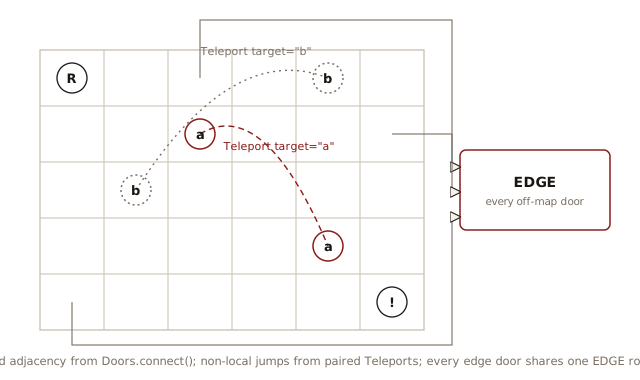
Doors.connect() links each room to its neighbors
on the grid. Teleports add links that cross the grid. Two rooms
whose Teleport items share a target letter lead to
each other.
# robot_explorer/world.py
from typing import Final
from items import Item, Robot, Urge, Wall

type Coord = tuple[int, int]  # (row, col)
type RoomMap = dict[Coord, Room]

class Room:
    def __init__(self, occupant: Item) -> None:
        self.occupant = occupant
        self.doors = Doors()

    def enter(self, robot: Robot) -> Room:
        return self.occupant.interact(robot, self)

    def __repr__(self) -> str:
        return f"Room({self.occupant})"

class Doors:
    def __init__(self) -> None:
        self.neighbors: dict[Urge, Room] = {}

    def connect(self, row: int, col: int,
                rooms: RoomMap) -> None:
        for urge, coord in {
            Urge.NORTH: (row - 1, col),
            Urge.SOUTH: (row + 1, col),
            Urge.EAST: (row, col + 1),
            Urge.WEST: (row, col - 1),
        }.items():
            if coord in rooms:
                self.neighbors[urge] = rooms[coord]

    def open(self, urge: Urge) -> Room:
        return self.neighbors.get(urge, EDGE)

# The void outside the maze, created once both classes
# exist; its own doors stay unset
EDGE: Final[Room] = Room(Wall())
The Coord here is
(row, col), the opposite order from the rats
example’s (column, row), because
GameBuilder walks the maze text line by line.
One move is one chain. Robot.move() calls
doors.open(urge), which returns the neighboring
room, EDGE when no door leads that way. That room’s
enter() passes the robot to its occupant’s
interact(), and the room interact()
returns becomes robot.room. The
interact() methods implement every rule of the
game.
Building the Maze in Stages
GameBuilder assembles
the maze in three stages: a room for every character, then the
connections between rooms, then the teleport pairs. Stages 2 and
3 each need every room that Stage 1 builds, so the three stages
run as three separate passes, each labeled by a comment. Factory counts
GameBuilder among the cases where Builder
remains useful in Python, because construction here takes three
ordered stages rather than a single call.
# robot_explorer/game.py
from itertools import groupby
from items import Empty, Robot, Teleport, Urge, item_factory
from world import Room, RoomMap

type Moves = str

class GameBuilder:
    def __init__(self, maze: str) -> None:
        self.rooms: RoomMap = {}
        teleports: list[tuple[Teleport, Room]] = []
        # Stage 1: a Room for every character
        for row, line in enumerate(maze.splitlines()):
            for col, char in enumerate(line):
                occupant = item_factory(char)
                if isinstance(occupant, Robot):
                    room = Room(Empty())
                    self.robot = occupant
                    self.robot.room = room
                else:
                    room = Room(occupant)
                self.rooms[row, col] = room
                if isinstance(occupant, Teleport):
                    teleports.append((occupant, room))
        # Stage 2: connect each room to its neighbors
        for (row, col), room in self.rooms.items():
            room.doors.connect(row, col, self.rooms)
        # Stage 3: pair teleports sharing a target letter
        teleports.sort(key=lambda entry: entry[0].target)
        for letter, group in groupby(
            teleports, key=lambda entry: entry[0].target
        ):
            pair = list(group)
            assert len(pair) == 2, letter
            (t1, room1), (t2, room2) = pair
            t1.target_room = room2
            t2.target_room = room1

    def show_maze(self) -> str:
        rows: list[str] = []
        current = -1
        for (row, _), room in self.rooms.items():
            if row != current:
                rows.append("")
                current = row
            if room is self.robot.room:
                rows[-1] += str(self.robot)
            else:
                rows[-1] += str(room.occupant)
        return "\n".join(rows)

    def run(self, moves: Moves) -> None:
        for char in moves:
            self.robot.move(Urge(char))
Stage 1 stores each teleport beside its room, as a
(Teleport, Room) tuple, so the
Teleport type that isinstance()
establishes stays in the list’s type.
In Stage 3, sorting by target
letter puts each pair of partners side by side.
groupby(), with the same key, then walks the sorted
list in one pass, yielding each run of matching letters, and
pair = list(group) collects each run.
assert len(pair) == 2, letter checks a rule the
maze layout must obey. Every target letter marks exactly two
rooms. A typo that gives a letter one room, or three, fails here
at build time, naming the offending letter. If you remove the
check, the build still stops, at the unpacking
(t1, room1), (t2, room2) = pair. The
ValueError that unpacking raises says how many
values it expected and leaves you to find the letter.
The list’s type tells the type checker that t1
and t2 are Teleports, so the code
assigns target_room with no runtime check.
Stage 1 does test types, with
isinstance(occupant, Robot) and
isinstance(occupant, Teleport). Those tests are not
the type switch that polymorphism removes.
GameBuilder must tell the kinds of item apart,
once. The movement code that runs afterward calls
interact() on whatever item a room holds.
The Robot branch builds
Room(Empty()) rather than
Room(occupant). The robot is the one item that
moves, so its room gets an Empty occupant and
behaves like any other empty room once the robot moves away.
show_maze() draws the R by checking
which room the robot is in rather than reading an occupant.
The demo, the tests, and the view all import the maze as one
string, MAZE:
# robot_explorer/robot_maze.py
from typing import Final

MAZE: Final[str] = """
###############################
#R#.____#____.#_______#_______#
#_###_#_###_#_#_#_#####_#####_#
#___#_#___#_#_#_#.#__b__#___#_#
###_#_###_#_#_###_#_#####_#_#_#
#.#_#_#.__#_#__.#_#__b__#_#___#
#_#_#_#_###_###_#_#####_#_#####
#_#_#_#__.#_#_#_____#___#_____#
#_#_#_###_#_#_#_#####_#######_#
#.#___#___#_#___#____.#_____#_#
#_#####_###_#_###_#####_#_###_#
#___#a__#.__#.__#__.#___#_#___#
#_#_#_###_#####_###_###_###_#_#
#_#.#_#___#!______#_____#___#_#
#_#_#_###_#############_#_###_#
#_#_#__a#_______________#___#_#
#_#####_###_###########_###_#_#
#_____#.__#_#___#_____#_#___#_#
#_#_#####_###_#_#_###_###_###_#
#.#___________#___#____.__#___#
###############################
""".strip()
Choosing the Path
The robot can now move, and run() replays a
string of
n/s/e/w
characters. Each character is the value of one Urge
member, so Urge(char) turns a character into a
direction, and urge.value turns a direction back
into its character. So far a person writes that string, as test_robot.py does in the
next section with game.run("e"). For the whole
maze, solve() computes the string by searching the
room graph, so game.run(solve(game)) walks the
route the search found.
solve() is a breadth-first search over
Room objects. It expands the room reached in the
fewest moves first, so the first route it finds to the
! is a shortest one. It makes the same
doors.open(urge) calls Robot.move()
makes, so it works in rooms and the moves between them rather
than in grid coordinates.
landing() decides whether a door is passable by
testing the occupant’s type with isinstance(). That
test reproduces what Room.enter() gets from
interact().
# robot_explorer/solver.py
from collections import deque
from game import GameBuilder, Moves
from items import EndGame, Teleport, Urge, Wall
from world import Room

def landing(room: Room, urge: Urge) -> Room | None:
    # Where a door leads, or None when it is blocked
    beyond = room.doors.open(urge)
    if isinstance(beyond.occupant, Wall):
        return None
    if isinstance(beyond.occupant, Teleport):
        return beyond.occupant.target_room
    return beyond

def solve(game: GameBuilder) -> Moves:
    start = game.robot.room
    queue: deque[tuple[Room, Moves]] = deque([(start, "")])
    seen: set[Room] = {start}
    while queue:
        room, path = queue.popleft()
        if isinstance(room.occupant, EndGame):
            return path
        for urge in Urge:
            beyond = landing(room, urge)
            if beyond is None or beyond in seen:
                continue
            seen.add(beyond)
            queue.append((beyond, path + urge.value))
    raise ValueError("No path to the EndGame room")
seen holds
Room objects. Room inherits
__eq__() and __hash__() from
object, so it compares and hashes by identity. A
graph search needs identity, because two rooms holding the same
kind of item are still two different places.
solve() adds a room to seen when
the room enters the queue, rather than when it leaves, so each
room enters the queue once.
Searching leaves the maze as it was. solve()
reads doors and occupants without calling enter(),
so every . stays in place and the robot stays where
it started. solve() cannot call
interact() to learn where a door leads, because
interact() changes the model. Food
replaces itself, and EndGame sets
finished. So landing() repeats the
rules as a type switch, the construct that polymorphism replaces
in the movement code. A new kind of item that blocks the robot
or moves it needs a branch in landing() as well as
its own interact().
# robot_explorer/robot_demo.py
from game import GameBuilder
from robot_maze import MAZE
from solver import solve

game = GameBuilder(MAZE)
moves = solve(game)
print(len(moves), "moves")
#: 198 moves
game.run(moves)
if game.robot.finished:
    print("Game over!")
#: Game over!
print(game.show_maze())
#: ###############################
#: #_#.____#_____#_______#_______#
#: #_###_#_###_#_#_#_#####_#####_#
#: #___#_#___#_#_#_#.#__b__#___#_#
#: ###_#_###_#_#_###_#_#####_#_#_#
#: #.#_#_#___#_#___#_#__b__#_#___#
#: #_#_#_#_###_###_#_#####_#_#####
#: #_#_#_#___#_#_#_____#___#_____#
#: #_#_#_###_#_#_#_#####_#######_#
#: #.#___#___#_#___#_____#_____#_#
#: #_#####_###_#_###_#####_#_###_#
#: #___#a__#___#___#___#___#_#___#
#: #_#_#_###_#####_###_###_###_#_#
#: #_#.#_#___#R______#_____#___#_#
#: #_#_#_###_#############_#_###_#
#: #_#_#__a#_______________#___#_#
#: #_#####_###_###########_###_#_#
#: #_____#___#_#___#_____#_#___#_#
#: #_#_#####_###_#_#_###_###_###_#
#: #.#___________#___#_______#___#
#: ###############################
The robot eats the food along its path, jumps through both
teleports (a, then b), and reaches the
! that ends the game. The teleports are not
shortcuts but the only way through. If landing()
returns None for them, as it does for a
Wall, solve() raises a
ValueError, because every route to the
! passes through a teleport.
Testing the Walk
A test checks the model without opening a window.
# robot_explorer/test_robot.py
from game import GameBuilder
from items import EndGame
from robot_maze import MAZE
from solver import solve

def test_search_walks_the_robot_to_the_end() -> None:
    game = GameBuilder(MAZE)
    game.run(solve(game))
    # Finished on the "!"
    assert isinstance(game.robot.room.occupant, EndGame)
    assert game.robot.finished  # And the model recorded it

def test_walls_block_and_food_is_eaten() -> None:
    game = GameBuilder("R.#")
    assert game.show_maze() == "R.#"
    start = game.robot.room
    game.run("e")  # East: eat the food and move in
    assert game.robot.room is not start
    blocked = game.robot.room
    game.run("e")  # East again: a wall, so stay put
    assert game.robot.room is blocked
    game.run("w")  # Back west: the food cell is empty
    assert game.show_maze() == "R_#"
Watching the Robot
The same model drives a graphical
view. The view is the one module that imports
tkinter. The imports point one way, from maze_view.py into the
model’s modules.
# robot_explorer/maze_view.py
import tkinter as tk
from typing import Final
from game import GameBuilder
from items import Urge
from robot_maze import MAZE
from solver import solve

CELL: Final[int] = 20
FILL: Final[dict[str, str]] = {
    "#": "dimgray", "!": "tomato", ".": "khaki",
    "_": "white", "R": "royalblue"}

def show(maze: str = MAZE,
         step_ms: int = 80) -> None:
    game = GameBuilder(maze)
    moves = solve(game)
    rows = maze.splitlines()
    width = max(len(row) for row in rows)
    root = tk.Tk()
    root.title("Robot in a Maze")
    canvas = tk.Canvas(root, highlightthickness=0,
                       width=width * CELL,
                       height=len(rows) * CELL)
    canvas.pack()

    def draw() -> None:
        canvas.delete("all")
        for (row, col), room in game.rooms.items():
            symbol = ("R" if room is game.robot.room
                      else str(room.occupant))
            canvas.create_rectangle(
                col * CELL, row * CELL,
                (col + 1) * CELL, (row + 1) * CELL,
                fill=FILL.get(symbol, "palegreen"),
                outline="gray")

    route = iter(moves)

    def step() -> None:
        draw()
        move = next(route, None)
        if move is not None:
            game.robot.move(Urge(move))
            root.after(step_ms, step)

    step()
    root.mainloop()

if __name__ == "__main__":
    show()
Four ideas from earlier chapters make up the design. Polymorphism replaces a type switch, a factory builds objects from data, a Builder assembles them in ordered stages, and a Null Object removes the check for a missing door. None of them needs concurrency.
Two resources go further: a survey of algorithms to create mazes, and Craig Reynolds on steering behavior for autonomous moving objects, the starting point for a robot that steers continuously instead of planning a grid path before it moves.
Order from Noise
The two simulations so far confirm designs. The rats cover
every reachable cell, and because claim() is
atomic, each cell gets one rat. The robot reaches the
! because each occupant’s interact()
sends it where landing() predicted. Both times you
know the outcome in advance and run the program to confirm it.
The third example gives you only half the outcome.
amplitude() determines the shape the sand traces.
The curves are the formula’s zero set. No line of the code
computes how two thousand independent random walks reach that
shape and stay there. That is simulation’s other purpose, to
discover behavior instead of confirming it.
In 1787 Ernst Chladni sprinkled sand across a metal plate and drew a violin bow along its edge. The bow made the plate ring. A ringing plate moves unevenly. Standing waves divide it into regions that swing up and down. The nodal lines between them stay still. The vibration bounces sand out of the moving regions. When a grain comes to rest on a nodal line, it stays there. Within seconds the random motion sweeps the sand into sharp, symmetric curves. Bowing a different spot rings the plate in a different mode and draws a different figure.
The Model
amplitude() returns how strongly a square plate
ringing in mode (m, n) vibrates at the point
(x, y). Physics supplies the formula, an
approximation for a plate with free edges. Treat it as given.
Only its shape matters here. The vibration is zero along curves,
and those curves are the nodal lines.
# chladni_plate/standing_wave.py
import math

type Mode = tuple[int, int]  # Vibration pattern (m, n)

def amplitude(x: float, y: float, mode: Mode) -> float:
    m, n = mode
    return abs(
        math.cos(m * math.pi * x)
        * math.cos(n * math.pi * y)
        - math.cos(n * math.pi * x)
        * math.cos(m * math.pi * y))
A Grain is a position. step()
contains all of the simulation’s logic. Every grain takes one
random step, and the plate’s vibration at that grain’s location
scales the step. Each grain stores its own position and moves
independently of every other grain.
# chladni_plate/chladni.py
import random
from dataclasses import dataclass
from standing_wave import Mode, amplitude

def bounce(v: float) -> float:
    if v < 0.0:
        return -v
    if v > 1.0:
        return 2.0 - v
    return v

@dataclass
class Grain:
    x: float
    y: float

class Plate:
    def __init__(self, grains: int, mode: Mode,
                 seed: int | None = None) -> None:
        self.rng = random.Random(seed)
        self.mode = mode
        self.grains = [
            Grain(self.rng.random(), self.rng.random())
            for _ in range(grains)]

    def step(self, kick: float = 0.05) -> None:
        for g in self.grains:
            a = amplitude(g.x, g.y, self.mode)
            g.x = bounce(
                g.x + self.rng.uniform(-kick, kick) * a)
            g.y = bounce(
                g.y + self.rng.uniform(-kick, kick) * a)

    def agitation(self) -> float:
        return sum(
            amplitude(g.x, g.y, self.mode)
            for g in self.grains) / len(self.grains)

    def render(self, width: int = 57,
               height: int = 30) -> str:
        counts: list[list[int]] = [
            [0] * width for _ in range(height)]
        for g in self.grains:
            col = min(int(g.x * width), width - 1)
            row = min(int(g.y * height), height - 1)
            counts[row][col] += 1
        shades = " .:*#"
        return "\n".join(
            "".join(shades[min(c, len(shades) - 1)]
                    for c in row).rstrip()
            for row in counts)
bounce() reflects a kicked grain off the edge,
keeping it on the plate. agitation() measures the
mean vibration strength at the grains’ positions. Grains
scattered at random sample the field’s average, so agitation
starts high. A grain resting on a nodal line contributes zero.
One number says how settled the sand is. render()
draws grain density as characters, as
Blackboard.render() does, so the model shows its
state without a window.
# chladni_plate/chladni_demo.py
from chladni import Plate

plate = Plate(grains=2000, mode=(2, 3), seed=42)
steps = 0
for target in (0, 100, 400, 1200):
    for _ in range(target - steps):
        plate.step()
    steps = target
    print(f"steps {target:4}: "
          f"agitation {plate.agitation():.3f}")
#: steps    0: agitation 0.585
#: steps  100: agitation 0.073
#: steps  400: agitation 0.005
#: steps 1200: agitation 0.000
print(plate.render())
#: .:.                   #                      #
#:  *##                  .#                     #
#:    .##                 ##                    #
#:      :##                ##                    #
#:        ###               ####                 #*
#:          ###                ######             ##########
#:            ##*                    ########
#:              ##:                         ###
#:                ##                          ##
#:                  ##                         #
#:                    ##                       ##
#:                      ##                      #
#: #######               .##                    #:
#:       ##*               ###                   #
#:         ##                ###                 ##
#:          ##                 ###                ##
#:           #                   ##*               ###
#:           .#                    ##:               #######
#:            #                      ##
#:            ##                       ##
#:             #                         ##
#:             ##                          ##
#:              :##                         *##
#:                .#######                    *##
#: #########*            *#####:                *##
#:          *#                 ###.               ###
#:           #                    ##                ###
#:            #                    ##                 ###
#:            #                     ##                  ##.
#:            #                      #                   .##
What the Numbers Show
Agitation collapses toward zero, and the picture shows why.
The grains have gathered on the nodal lines of mode
(2, 3). Random kicks alone carry them there. In a
loud region the kicks stay large, so a grain keeps moving until
a random step puts it near a nodal line, where the kicks shrink
toward zero. Noise can carry a grain into a quiet place. It
cannot carry the grain back out. The randomness produces the
order instead of opposing it.
Testing a Random Process
A test cannot predict where a
particular grain ends up after hundreds of random kicks. It
checks the aggregate. Seeding random.Random makes
any failure reproducible.
# chladni_plate/test_chladni.py
from chladni import Plate

def test_noise_settles_grains_onto_nodal_lines() -> None:
    plate = Plate(grains=500, mode=(2, 3), seed=1)
    before = plate.agitation()
    for _ in range(400):
        plate.step()
    assert plate.agitation() < before / 10

def test_kicks_keep_grains_on_the_plate() -> None:
    plate = Plate(grains=200, mode=(3, 5), seed=2)
    for _ in range(300):
        plate.step(kick=0.2)
    assert all(0.0 <= g.x <= 1.0 and 0.0 <= g.y <= 1.0
               for g in plate.grains)
Watching It Happen
The tkinter view
shows what the text version cannot: the collapse as it happens,
and a new figure forming after the mode changes. Each grain
keeps one color from a small palette, so you can watch
individual grains mix while the collective figure forms. Every
200 frames the view switches the plate to a new mode. The old
figure now lies on loud regions of the new field. The grains
scatter, mix, and gather into a different figure. The field, not
the grains, determines the figure.
# chladni_plate/chladni_view.py
import itertools
import tkinter as tk
from typing import Final
from chladni import Plate
from standing_wave import Mode

SIZE: Final[int] = 560
DOT: Final[int] = 3
COLORS: Final[list[str]] = [
    "gold", "coral", "palegreen", "skyblue", "plum"]
MODES: Final[list[Mode]] = [(1, 2), (2, 3), (3, 4), (3, 5)]

def show(grains: int = 1200, step_ms: int = 30,
         frames_per_mode: int = 200) -> None:
    modes = itertools.cycle(MODES)
    plate = Plate(grains, next(modes))
    root = tk.Tk()
    root.title(f"Chladni Plate {plate.mode}")
    canvas = tk.Canvas(root, width=SIZE, height=SIZE,
                       background="black",
                       highlightthickness=0)
    canvas.pack()
    palette = itertools.cycle(COLORS)
    dots = [
        canvas.create_oval(0, 0, DOT, DOT, outline="",
                           fill=next(palette))
        for _ in plate.grains]
    frames = itertools.count(1)

    def frame() -> None:
        if next(frames) % frames_per_mode == 0:
            plate.mode = next(modes)
            root.title(f"Chladni Plate {plate.mode}")
        for _ in range(3):
            plate.step()
        for dot, g in zip(dots, plate.grains):
            canvas.moveto(dot, g.x * SIZE - DOT / 2,
                          g.y * SIZE - DOT / 2)
        root.after(step_ms, frame)

    frame()
    root.mainloop()

if __name__ == "__main__":
    show()
itertools.cycle()
constructs an infinite iterator from any nonempty finite
iterable. It yields the source’s elements in sequence and starts
over when it reaches the end. After (3, 5),
modes returns to (1, 2), so the view
keeps changing modes for as long as it runs.
itertools.count(1) numbers the frames, the same
endless counter that numbered the rats.
The Less the Agents Know
A simulation is a set of objects that act on their own and interact through shared state. The grains are the limiting case of that definition. The shared state is the plate, and a grain’s whole interaction with it is one read of the field at its position. Yet the aggregate shows structure that no agent encodes. This is emergence: global order arising from local rules that say nothing about it. The less each agent’s rule uses, the more the run can tell you, because the outcome comes from the interactions rather than from the instructions.
The Chladni model has one limit. If you run it longer,
agitation keeps falling. A grain moves roughly five orders of
magnitude less per step at 20,000 steps than at 100. The nodal
lines keep thinning as long as step() keeps
running, so in any one run the step count, not the plate, sets
their width. Real sand on a real bowed plate settles into a
moving equilibrium instead of freezing.
standing_wave.py holds the
physics. chladni.py holds the rule
that moves the grains. Exercise 7 asks you to tell the physics
from the rule that models it. If you swap
amplitude()’s formula for a membrane’s formula,
every figure changes while chladni.py and the view
stay as they are.
When behavior emerges, reading the code is not enough. Run it.
Exercises
Try each exercise before opening its solution.
- Test a
Ratwith a fake blackboard. BecauseRatdepends only on theBoardProtocol, you can drive it with a stand-in. Write a fake whoseclaim()returns a scripted sequence of results and whosespawn()records the coordinates it receives instead of starting a rat, run one rat withasyncio.run(rat.run()), and assert which cell the rat kept for itself and which cells it spawned. The fake stands in for the realBlackboard,Maze, and task scheduling. - Report the cells no rat reaches. After
explore()finishes, compareblackboard.visitedagainst every open cell of theMazeand print the open cells that no rat claimed. Build a maze for which that set is not empty, and explain what makes a cell unreachable. - Break the atomicity of
claim(). Makeclaim()anasync def, which forces matching changes in theBoardprotocol,Rat.run()’s comprehension, andexplore(). Putawait asyncio.sleep(0)between the membership test andself.visited.add(...). Then count how many calls returnTrueand compare that count withlen(blackboard.visited), using a maze that contains a loop.amaze.txtis a perfect maze, so a single rat reaches each unclaimed cell. In that maze the counts always agree.test_rats_and_mazes.pystill passes, becausevisitedis a set. The guarantee that broke is “one rat per cell”, not “every cell visited”. What happens to the two rats that both claimed one cell, and why does the originalclaim(), with noawaitinside it, need no lock? - Add a new kind of
Itemto the robot maze. Define aCoinsubclass ofItemwith the symbol$. Itsinteract()removes the coin from its room, asFood’sinteract()does for the food, and adds one to a coin count carried by theRobot. Place a few$characters in the maze and report how many the robot collects.item_factory(),Room, andGameBuilderstay as they are. Explain why the factory finds your new item on its own, and what the factory does if you deriveCoinfromFoodinstead. - Send the robot to something other than the
!.solve()stops at whatever room holds anEndGame, the one goal it can express. Replace thatisinstance()test with aCallable[[Room], bool]parameter, so the caller says what counts as arriving, and leave the rest of the search as it is, beyond lettingsolve()returnNonewhen the search runs out of rooms. Then use the new parameter to feed the robot: search for the nearest room holding aFood, walk there, and repeat until noFoodremains, then search for the!and walk the route the search finds. Report how many pieces of food the robot ate and how many moves the whole tour took. The run answers two questions for you. Why must the search run again after every meal instead of once at the start? And why does asking for the nearest food each time not produce the shortest tour that eats everything? - Freeze the plate. Run the Chladni view with
MODESstarting at(2, 2). Work out whatamplitude()returns wheneverm == n, and explain why the view shows neither chaos nor a figure. Then explain why the main diagonal shows up in every figure this plate makes. Swappingxandyin the two terms ofamplitude()is the clue. - Change the physics. Replace the body of
amplitude()withabs(math.sin(m * math.pi * x) * math.sin(n * math.pi * y)), the standing waves of a membrane clamped at its edges, like a drumhead. Predict the figures before you run the view. Why are the nodal lines now straight? - Tune the noise. Rerun
chladni_demo.pypassingkick=0.005and thenkick=0.5toplate.step(), printing agitation at the same checkpoints. One setting produces order too slowly. The other drives agitation down as convincingly as the default kick, yet no figure appears. Explain both failures, and why an intermediate kick avoids them.