Observer

Something changes, and something else is interested in that change. The Observer pattern connects the two.
Observer decouples code that changes state from code that reacts to that state change. An observer attaches to a subject. When the subject changes state, it notifies the observer. The subject’s one use for an observer is to call it, and the subject decides which arguments every call receives. This is designing the communication rather than the parts.
Use Observer if a group of objects must update themselves based on a state change. Event handling typically uses Observer. A widget (like a button) keeps a list of handlers and calls each one when its event (a button press) arrives.
In its common form, where observers attach and detach at runtime, Observer is the most dynamic of the callback patterns. Setting the Responders at Construction shows a form that keeps the decoupling and connects the observers once, when you create the subject.
The classic example is Smalltalk’s Model-View-Controller (MVC), or the nearly equivalent Document-View architecture, which combines the controller with the view. In both, Observer connects the state change to its views. One subject keeps a list of views and accepts any view that has the update method it calls. This way, a document can have more than one way to view it, such as a plot and a table. With Observer, a change in the subject’s data notifies each interested view, so that every view refreshes.
The Classic Observer
The classic design comes from GoF Design Patterns:
- The object that changes is the subject.
- Each observer implements an interface with one method.
The GoF design has three parts: an
Observer interface every observer implements, a
Subject base class that keeps the observer list,
and Subject.notify() that broadcasts to every
observer:
# classic_observer.py
from typing import Protocol

class Observer[T](Protocol):
    def update(
        self, subject: Subject[T], arg: T
    ) -> None: ...

class Subject[T]:
    def __init__(self) -> None:
        self._observers: list[Observer[T]] = []

    def attach(self, observer: Observer[T]) -> None:
        self._observers.append(observer)

    def detach(self, observer: Observer[T]) -> None:
        self._observers.remove(observer)

    def notify(self, arg: T) -> None:
        for observer in list(self._observers):
observer.update(self, arg)Thermometer’s
celsius setter stores the new reading and calls
notify(). Because a setter runs on every assignment
to its attribute, every assignment to celsius
notifies the observers:
# classic_thermometer.py
from classic_observer import Subject

class Thermometer(Subject[float]):
    def __init__(self, celsius: float) -> None:
        super().__init__()
        self._celsius = celsius

    @property
    def celsius(self) -> float:
        return self._celsius

    @celsius.setter
    def celsius(self, value: float) -> None:
        self._celsius = value
        self.notify(value)
Because Subject
creates the observer list in its constructor,
Thermometer’s constructor must call super().__init__().
Without that call, a Thermometer has no
_observers attribute.
The Display observer prints each new
reading:
# classic_thermometer_demo.py
from classic_observer import Subject
from classic_thermometer import Thermometer

class Display:
    def update(
        self, subject: Subject[float], arg: float
    ) -> None:
        print(f"display: {arg}C")

t = Thermometer(20.0)
t.attach(Display())
t.celsius = 25
#: display: 25CThermometer’s list accepts any
Observer[float], meaning any object with a matching
update() method, so a Plot or a
Table that redraws attaches as easily as
Display does.
Push or Pull
Passing arg is the
push model. The subject (Thermometer)
supplies what changed (the temperature), so an observer works
from the value it receives. The pull model sends
subject in place of the value. Each observer reads
what it needs by calling back into the subject, here
subject.celsius. With pull, each observer decides
what it needs.
Reading from the subject makes each observer depend on the
subject’s interface. To read celsius, an observer
depends on Thermometer, the class that defines
celsius. The type checker enforces that dependency.
Subject[float] has no celsius, so the
observer must declare its subject parameter as a
Thermometer. That narrower update() no
longer matches Observer[float], whose
update() accepts any Subject[float],
so the type checker rejects t.attach(Display()). To
use pull, you must add either a runtime
isinstance() check or a second type parameter on
the protocol.
GoF also leaves open a second
choice, independent of push or pull: which code calls
notify(). In Thermometer, the
celsius setter calls it, so each assignment
notifies the observers immediately. Three assignments in a row
produce three notifications. The alternative leaves the call to
the client, the code that changes the subject. The client makes
all its changes and then calls notify() once, so
the observers receive one notification for the whole batch. That
alternative requires every client to make the call. Until it
does, the observers hold stale data.
Why notify()
Copies the List
Inside notify(), copying _observers
via list(self._observers) appears redundant. It is
not.
An observer may react to a
notification by detaching. If the for loop in
notify() reads self._observers instead
of a copy, a detach() shifts the remaining
observers down one index, and the loop skips the observer after
the one that detached, without raising an exception.
With the copy, detach() changes
self._observers while the loop reads the copied
list. A notify() call therefore calls every
observer in _observers at the moment the call
begins. If detach() removes an observer from
_observers partway through a notify()
call, the copy still holds that observer, so the observer
receives the call’s notification. An observer attached during
the call joins _observers after
notify() has copied the list, so its first
notification comes from the next notify() call. Disconnecting During
a Notification runs a responder that disconnects itself,
once with the copy and once without it, and shows which
responder the loop skips without the copy.
Easier Names
The traditional names are easy to confuse. Both
java.util.Observable and the reactive libraries
call the subject an Observable.
Observer and Observable share a stem
and name opposite roles, so in every listing you must work out
which role each name denotes.
GoF’s method names are a second
obstacle. When the subject changes, it calls its
notify(), and notify() calls
update() on each observer. Those two names describe
one change from its two ends. notify() is the
subject sending a change, and update() is an
observer receiving that change. The two words look unrelated, so
you must remember that update() is the receiving
end of notify(). The word “update” also fits the
subject better than the observer. Thermometer’s
setter updates the reading, while Display.update()
only prints it. The rest of this chapter uses names you can tell
apart at a glance:
| GoF Design Patterns | This chapter |
|---|---|
| subject | Broadcaster |
| observer | responder == any callable |
attach() / detach() |
connect() / disconnect() |
notify() |
announce() |
update() |
calling the responder |
In the last row, a call takes the place of a method name. A
responder is a callable, so the receiving end is the call.
Broadcasting a change takes one method name,
announce(), where GoF uses two.
The table translates this
chapter’s names into the ones the literature uses. GoF calls the
pattern Observer, and Java and the reactive libraries
use the older nouns. Java and JavaScript call a responder a
listener, as in ActionListener and
addEventListener().
The essential part of Observer is the response: something changes, and code elsewhere runs because of that change. The words “observer” and “listener” name a role that waits and watches, and neither word says what happens when the change arrives. “Responder” names the action. That word poses the question every Observer design must answer: what does this code do when something changes? A responder can disconnect itself mid-notification, raise an exception, wait on a slow network call, or write back to its broadcaster. Each of those behaviors changes how you write the broadcaster.
The Pythonic Observer
A responder is any callable that takes a notification and
returns None. A broadcaster keeps a list of those
callables and announces a change to every responder:
# broadcaster.py
from collections.abc import Callable

type Responder[T] = Callable[[T], None]

class Broadcaster[T]:
    def __init__(self) -> None:
        self._responders: list[Responder[T]] = []

    def connect(self, responder: Responder[T]) -> None:
        self._responders.append(responder)

    def disconnect(self, responder: Responder[T]) -> None:
        self._responders.remove(responder)

    def announce(self, data: T) -> None:
        for responder in list(self._responders):
            responder(data)
Broadcaster is classic_observer.py’s
Subject with its three methods renamed. The call
inside announce()’s for loop changes
as well. Broadcaster.announce() calls
responder(data) where Subject.notify()
calls observer.update(self, arg), so a responder is
any callable, a function included, rather than an object with an
update() method.
announce() passes the data alone, so
Broadcaster uses the push model. An announcement
carries one argument. When a change has two parts to report,
such as an attribute’s name and its new value, the broadcaster
packs them in a tuple and each responder unpacks it. A responder
that cares only that a change occurred ignores the argument it
receives.
A responder returns
None, as the Responder
type alias declares. At runtime,
announce() discards a responder’s return value,
since it calls each responder as a statement. The alias turns
that silent discard into a type error. The type checker rejects
a responder that returns a value, because the author of that
responder likely expected someone to use the value. The
alternative alias Callable[[T], object] accepts any
callable that takes a T, since every return type,
None included, is assignable to
object. That alternative also accepts a responder
that returns a value by mistake. announce() quietly
drops the value. The strict Responder, which
returns None, lets the type checker report that
mistake.
Notification runs one way, from broadcaster to responders.
GoF Design Patterns states the premise of broadcast
communication: a notification goes to every connected responder.
Each one decides whether to handle it. If responders return
values, one announcement collects an unknown number of them. The
broadcaster then needs a rule for combining those values.
Returning None makes that rule unnecessary.
A design that needs an answer uses a different pattern. Chain of Responsibility tries its handlers in turn and returns the result from the first one that succeeds.
The new Thermometer changes only its base class
and the call in its celsius setter,
announce() in place of notify():
# thermometer.py
from broadcaster import Broadcaster

class Thermometer(Broadcaster[float]):
    def __init__(self, celsius: float) -> None:
        super().__init__()
        self._celsius = celsius

    @property
    def celsius(self) -> float:
        return self._celsius

    @celsius.setter
    def celsius(self, value: float) -> None:
        self._celsius = value
        self.announce(value)
The setter first stores the new reading, which is the state
change. Then it calls announce(), which is what the
thermometer chooses to do about that change. In this case, the
setter announces every assignment. Deciding What Matters shows a
setter that announces a reading only when it differs enough from
the previous reading.
The constructor’s self._celsius = celsius
bypasses the setter. The first reading is the thermometer’s
starting state, not a change to it. A responder connects after
the constructor returns, so the list of responders is empty
while the constructor runs. A responder that needs the current
reading when it connects reads celsius.
Thermometer’s
constructor stores its one argument in a field, which is what a
dataclass-generated __init__() does. A
class that inherits from another can be a
dataclass, but a
dataclass-generated __init__() does
not call the base class’s __init__(). A
@dataclass Thermometer has no list of
responders. A __post_init__() that calls
super().__init__() fixes that, but at greater
length and complexity than the __init__() it
replaces. Decorated
Responders gets a generated __init__() and the
list another way.
Thermometer inherits Broadcaster
because that is the shortest way to get connect()
and announce(), not because the pattern requires a
base class. A Thermometer can use composition,
holding a Broadcaster as an attribute
(self.temperature_changed = Broadcaster[float]()).
Code then connects a responder through that attribute
(t.temperature_changed.connect(display)). An object
can hold several Broadcaster attributes, so it can
publish more than one kind of change. Notifying Without a Base
Class drops the base class and the properties together.
Event-heavy programs have mature libraries (signal/slot
systems), but in most cases the Observer pattern is
only a list of responders.
Connected callables react to every celsius
assignment:
# thermometer_demo.py
from thermometer import Thermometer

def display(celsius: float) -> None:
    print(f"display: {celsius}C")

def alarm(celsius: float) -> None:
    print(f"alarm: {celsius > 100}")

t = Thermometer(20.0)
t.connect(display)
t.connect(alarm)
t.celsius = 25
#: display: 25C
#: alarm: False
t.celsius = 150
#: display: 150C
#: alarm: True
The responders here are functions, but a lambda or a bound
method works too. Thermometer is a
Broadcaster[float], so the type of each responder
in its list is Responder[float], a
Callable[[float], None].
This figure shows one notification:
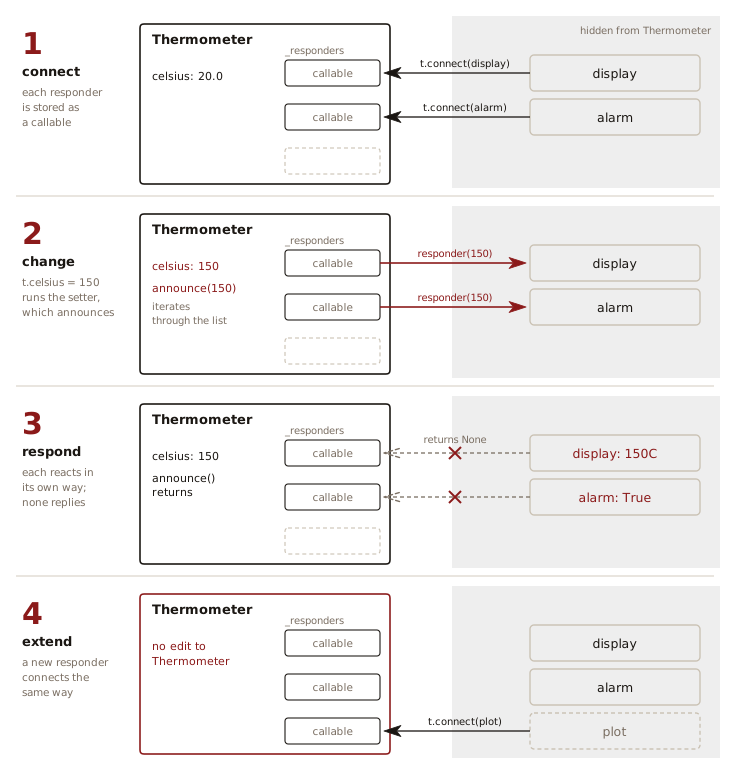
The shaded side holds the responders as the program wrote
them. Thermometer keeps each one as a callable in
its list. Two kinds of arrow cross the boundary, in opposite
directions: connect() carries a responder into the
list, and announce() calls each stored responder in
turn. Each call returns None, so
Thermometer goes on to the next responder as soon
as the call returns. A new responder such as plot
connects with t.connect(plot), as
display and alarm do.
Testing the Broadcaster
The test file confirms that:
- Every responder receives the announced value in connection order.
- Announcing to an empty list succeeds.
- Delivery stops after
disconnect(). - Two references to one list’s
append()compare equal and are distinct objects. - A callable connected twice receives each announcement twice,
and one
disconnect()removes one of the two. - A
disconnect()matching no connection raises aValueError. Thermometer’s setter stores each reading and announces it.- A responder receives only the changes made after it connects.
# test_broadcaster.py
import pytest
from broadcaster import Broadcaster
from thermometer import Thermometer

def test_announce_calls_every_responder() -> None:
    received: list[tuple[str, object]] = []
    broadcaster = Broadcaster[int]()
    broadcaster.connect(
        lambda d: received.append(("a", d)))
    broadcaster.connect(
        lambda d: received.append(("b", d)))
    broadcaster.announce(42)
    assert received == [("a", 42), ("b", 42)]

def test_no_responders_is_a_noop() -> None:
    # Must not raise anything
    Broadcaster[str]().announce("anything")

def test_disconnect_stops_delivery() -> None:
    received: list[object] = []
    broadcaster = Broadcaster[object]()
    broadcaster.connect(received.append)
    broadcaster.announce(1)
    broadcaster.disconnect(received.append)
    broadcaster.announce(2)
    assert received == [1]

def test_bound_methods_compare_equal() -> None:
    received: list[object] = []
    assert received.append == received.append
    assert received.append is not received.append

def test_connecting_twice_notifies_twice() -> None:
    received: list[object] = []
    broadcaster = Broadcaster[object]()
    broadcaster.connect(received.append)
    broadcaster.connect(received.append)
    broadcaster.announce(1)
    assert received == [1, 1]
    broadcaster.disconnect(received.append)  # One of two
    broadcaster.announce(2)
    assert received == [1, 1, 2]

def test_disconnect_without_connect_raises() -> None:
    broadcaster = Broadcaster[object]()
    with pytest.raises(ValueError):
        broadcaster.disconnect(print)

def test_thermometer_announces_each_assignment() -> None:
    readings: list[float] = []
    t = Thermometer(20.0)
    t.connect(readings.append)
    t.celsius = 25.0
    t.celsius = 150.0
    assert readings == [25.0, 150.0]
    assert t.celsius == 150.0

def test_late_responder_misses_earlier_changes() -> None:
    readings: list[float] = []
    t = Thermometer(0.0)
    t.celsius = 10.0  # No responder yet
    t.connect(readings.append)
    t.celsius = 20.0
    assert readings == [20.0]
The tests connect a list’s append to the
broadcaster, so the list records every announced value.
disconnect() matches
by equality, and a lambda equals only itself. A second lambda
with the same text is a different object, so
disconnect() raises a ValueError. To
disconnect a lambda, bind it to a name and pass that name to
both connect() and disconnect().
A bound method is different.
test_disconnect_stops_delivery() disconnects
received.append without storing it first. Each
reference to received.append builds a new
bound-method object, so
received.append is received.append is
False. Two bound methods compare equal when they
wrap the same instance and the same function.
disconnect() relies on equality. The bound method
it receives equals the one connect() stored, so
disconnect() finds that entry and removes it.
test_bound_methods_compare_equal() checks both
facts about bound methods.
test_connecting_twice_notifies_twice() and
test_disconnect_without_connect_raises() follow
from the list methods that connect()
and disconnect() call: append() stores
a callable a second time, and remove() takes out
the first equal entry and raises a ValueError when
none matches.
Disconnecting During a Notification
The copy in announce() keeps the loop from
skipping a responder when another responder disconnects itself
mid-notification:
# self_removing_responder.py
from typing import override
from broadcaster import Broadcaster

class Skipping(Broadcaster[object]):
    @override
    def announce(self, data: object) -> None:
        for responder in self._responders:  # No copy
            responder(data)

def trace(broadcaster: Broadcaster[object]) -> list[str]:
    seen: list[str] = []

    def once(data: object) -> None:
        seen.append(f"once: {data}")
        # Disconnects mid-notification
        broadcaster.disconnect(once)

    def always(data: object) -> None:
        seen.append(f"always: {data}")

    broadcaster.connect(once)
    broadcaster.connect(always)
    broadcaster.announce(1)
    broadcaster.announce(2)
    return seen

print(trace(Broadcaster[object]()))
#: ['once: 1', 'always: 1', 'always: 2']
print(trace(Skipping()))
#: ['once: 1', 'always: 2']
The disconnect() call inside once
removes once from the broadcaster’s list, while
announce()’s loop goes on reading the copy, so
always still receives the first notification.
Skipping overrides
announce() with a loop that reads
_responders, the list that
disconnect() changes. once is at index
0 and always at index 1. Removing once
moves always to index 0, which the loop has
visited, so the loop looks for index 1 and finds the list ended
there. The second marker shows always missing the
first change, with no exception to report the skipped
responder.
Raising an Exception
If a responder raises an exception, the exception stops the
announce() loop. The responders after the failing
one miss that announcement. The exception propagates to the code
that assigned to celsius. You must decide whether
announce() should catch, collect, and continue (see
exercise 3).
Alternatively, the responder can catch its own exception and
return
the error as a value. In this approach,
announce() collects the returned errors for the
caller. Every responder runs, and every failure arrives as a
value. However, the Responder type becomes a
callable that returns a success or an error, so a method such as
readings.append(), which returns None,
needs a wrapper (see exercise 5).
Lapsed Listeners
Connections are strong references.
A bound method holds the object it came from, so connecting
plot.redraw keeps that plot in memory
for as long as the broadcaster holds the connection. When the
program finishes with plot, it drops its other
references to plot. A plot.redraw that
is still connected keeps plot in memory. Every
announcement still calls redraw(). A responder the
program stops using but leaves connected is a lapsed
listener. Lapsed listeners that accumulate over a long run
are a memory leak.
Long-lived broadcasters need
either a disconnect() call for every responder the
program stops using, or weak
references, which let Python collect the object a responder
calls. A weak responder holds its object through a weak
reference. On each announcement the responder passes the
announcement to the object while the object is alive, and
disconnects itself after Python collects the object:
# weak_responder.py
import gc
from weakref import WeakMethod
from broadcaster import Broadcaster

class Plot:
    def redraw(self, celsius: float) -> None:
        print(f"plot: {celsius}C")

broadcaster = Broadcaster[float]()
plot = Plot()
ref = WeakMethod(plot.redraw)

def weak(celsius: float) -> None:
    live = ref()
    if live is None:
        print("weak: plot gone, disconnecting")
        broadcaster.disconnect(weak)
    else:
        live(celsius)

broadcaster.connect(weak)
broadcaster.announce(25.0)
#: plot: 25.0C

del plot  # The only strong reference
gc.collect()
broadcaster.announce(30.0)
#: weak: plot gone, disconnecting
A Broadcaster holds a strong reference to every
object you connect(), so weak_responder.py puts the
weak reference inside the responder. A different broadcaster can
store weak references for every responder. With
Broadcaster, a responder that needs a weak
reference creates and holds that reference.
An ordinary
weakref.ref(plot.redraw) is dead from the moment
you make it. Its argument, plot.redraw, builds a
new bound-method object, and the weak reference becomes the
single reference to that object. A weak reference lets Python
collect its target, so Python collects the bound method as soon
as weakref.ref() returns, and that leaves the weak
reference dead. WeakMethod stores the instance and
the function separately, both weakly, and rebuilds the bound
method each time you call ref().
During announce(25.0), live is a
strong reference, so the Plot object stays alive
while live(celsius) runs redraw().
When weak returns, Python discards the local
live, and the responder again holds the
Plot object through the weak reference alone.
After del plot,
CPython’s reference counting collects the Plot
object at once. An implementation with a tracing
collector, such as PyPy, collects the object when its
collector runs. The gc.collect() call runs that
collector before announce(30.0). In a program that
leaves the timing to the collector, weak keeps
calling redraw() until the collector runs.
The copy that announce() iterates over makes a
mid-notification disconnect safe, as it does for
once in self_removing_responder.py.
For most programs, strong connections are fine. A broadcaster
that lives no longer than its responders releases them when
Python collects it. A disconnect() call covers a
responder that leaves early. Use a weak responder only when a
long-lived broadcaster holds short-lived responders that the
program drops while they are still connected.
Re-entrant Notification
A responder that writes back to
the broadcaster re-enters announce() from inside
announce(). Two-way bindings are the usual source.
The view edits the model, the model notifies the view, the view
edits the model, and the cycle continues until Python raises a
RecursionError:
# reentrant_announce.py
from exceptions import expected
from thermometer import Thermometer

t = Thermometer(20.0)
t.connect(lambda c: setattr(t, "celsius", c))
with expected(RecursionError):
    t.celsius = 25.0
#: [RecursionError] maximum recursion depth exceeded
A guard breaks the cycle.
TwoWay is a two-way binding whose setter returns
early when the new value equals the stored one:
# reentrant_announce_fixed.py
from broadcaster import Broadcaster

class TwoWay(Broadcaster[int]):
    def __init__(self) -> None:
        super().__init__()
        self._value = 0

    @property
    def value(self) -> int:
        return self._value

    @value.setter
    def value(self, new: int) -> None:
        if new == self._value:
            print(f"unchanged: {new}")
            return  # Breaks the re-entry
        self._value = new
        self.announce(new)

model = TwoWay()

def echo(v: int) -> None:
    print(f"echo: {v}")
    model.value = v

model.connect(echo)
model.value = 1
#: echo: 1
#: unchanged: 1
announce() runs once, for the original
assignment.
The alternative is a re-entry flag, set before
announce() and cleared after, with the setter
returning early while the flag reads True. The flag
breaks the cycle without comparing values, so a second write of
the same reading still reaches the responders. That behavior
suits a responder that counts readings rather than
modifications.
Setting the Responders at Construction
A program can choose its responders at any of four points:
- Source time. The
broadcaster’s code calls each responder by name, as a setter
that calls
display.update()and thenalarm.update(). The broadcaster names every responder, and Observer replaces those names with a list of callables. - Load time. Each
responder registers itself with a decorator as Python imports
its module. Django’s
@receiverdecorator andatexit.register()work this way. Registration runs at runtime, but the set is normally complete once the imports finish (see exercise 11). - Runtime. Responders connect and disconnect
at any moment, as with
Broadcaster. - Construction time. The broadcaster receives its responders when you create it, and the set stays the same for as long as the broadcaster lives.
Broadcaster’s
connect() and disconnect() make it
dynamic. Its list of responders can change at any moment,
including in the middle of an announce(). Three
earlier sections each handle a consequence of that dynamism: the
copy in announce() guards against a
disconnect() call during the loop, a lambda needs a
name to reach both connect() and
disconnect(), and a lapsed listener is a connection
that outlives the program’s use of its responder.
Decoupling and dynamism are separate properties. A decoupled broadcaster knows its responders only as callables. A dynamic broadcaster lets the set of responders change after the broadcaster exists. A broadcaster that receives its responders at construction is decoupled but not dynamic:
# bound_broadcaster.py
from broadcaster import Responder
from record import record

@record
class BoundBroadcaster[T]:
    responders: tuple[Responder[T], ...]

    def announce(self, data: T) -> None:
        for responder in self.responders:
            responder(data)

log: list[float] = []
broadcaster = BoundBroadcaster[float]((
    log.append,
    lambda c: print(f"alarm: {c > 100}"),
))
broadcaster.announce(25.0)
#: alarm: False
broadcaster.announce(150.0)
#: alarm: True
print(log)
#: [25.0, 150.0]
The @record freezes
the field, and a tuple keeps the items it holds at creation, so
the set of responders stays the same. announce()
loops over the tuple directly, since the tuple holds the same
responders for the whole loop. The broadcaster still holds
strong references to its responders, so each responder stays
alive as long as the broadcaster does.
Notifying Without a Base Class
Thermometer writes a
getter and a setter for each attribute it publishes, and
inherits connect() and announce() from
Broadcaster. We can simplify both using
__setattr__(). Python calls it for every attribute
assignment, so one __setattr__() covers every
attribute of the class:
# weather_station.py
from broadcaster import Responder

type Change = tuple[str, object]

class WeatherStation:
    def __init__(
        self, celsius: float, humidity: float
    ) -> None:
        self.celsius = celsius
        self.humidity = humidity

    @property
    def _responders(self) -> list[Responder[Change]]:
        return self.__dict__.setdefault("_responders", [])

    def connect(self, responder: Responder[Change]) -> None:
        self._responders.append(responder)

    def __setattr__(
        self, name: str, value: object
    ) -> None:
        responders = list(self._responders)
        super().__setattr__(name, value)
        for responder in responders:
            responder((name, value))

station = WeatherStation(20.0, 0.4)
changes: list[Change] = []
station.connect(changes.append)
station.celsius = 25.0
station.humidity = 0.5
print(changes)
#: [('celsius', 25.0), ('humidity', 0.5)]
Python routes every attribute assignment through
__setattr__(), including assignments within the
constructor. __setattr__() begins by reading
self._responders. An ordinary
self._responders = [] in the constructor therefore
runs that read before the list exists, and the read raises an
AttributeError. To prevent this, the
_responders property creates the list upon first
read, using setdefault() on the instance
__dict__. A property takes precedence over an
instance attribute of the same name, so every later read also
goes through the getter and finds the existing list.
The constructor’s two assignments go through
__setattr__(). Each notifies an empty list, since
callers can connect responders only after the constructor
returns.
In __setattr__(),
super().__setattr__() does the storing, because an
ordinary assignment inside __setattr__() calls
__setattr__().
A single __setattr__() gives up three things
that Thermometer’s per-attribute properties
keep:
WeatherStation’s responders receive a pair. Each is aResponder[Change], called asresponder((name, value)), and filters by name to act on one attribute.Thermometerpublishes one attribute and is aBroadcaster[float], so each responder takes thefloatreading as its one argument. When a responder sorts its own notifications, the responder, not the broadcaster, decides which changes it acts on. Deciding What Matters returns to that choice.- Every assignment reaches the
responders, including the internal ones. Assigning a cached
result or a hit counter notifies the responders, as assigning a
published attribute does. A class that keeps an assignment quiet
writes the value through
self.__dict__, as the_respondersproperty does. __setattr__()accepts any name, so the type checker stops checking assignments. The type checker acceptsstation.celcius = 25.0, a misspelling ofcelsius, and the assignment quietly creates a new attribute. The same misspelling on aThermometerproduces anunresolved-attributeerror.Thermometerinheritsobject’s__setattr__(), so the type checker verifies each assignment against the attributes the class declares.
Decorated Responders
Using decorators, we can connect each responder to its
broadcaster on the line above the responder’s
def:
# broadcasting_thermometer.py
from broadcasting import Broadcasting

class Thermometer(Broadcasting[float]):
    celsius: float

thermometer = Thermometer(100)

@thermometer.respond
def display(celsius: float) -> None:
    print(f"display: {celsius}C")

@thermometer.respond
def alarm(celsius: float) -> None:
    print(f"alarm: {celsius > 100}")

thermometer.celsius = 90
#: display: 90C
#: alarm: False
thermometer.celsius = 150
#: display: 150C
#: alarm: True
thermometer.disconnect(alarm)
thermometer.celsius = 200
#: display: 200C
The respond() decorator method appends its
function to thermometer’s list of responders and
returns the function unchanged, so display stays
callable by name. Broadcaster.connect() returns
None, so as a decorator it binds the function’s
name to None (see exercise 11).
The two listings that follow build the
__init__(), the announcing properties, and the list
of responders that every subclass shares, so a subclass such as
Thermometer consists of its field declarations. The
first piece builds the property that publishes a field:
# published.py
from typing import Any

def published(name: str) -> property:
    def read(self: Any) -> Any:
        return self.__dict__[name]

    def write(self: Any, value: Any) -> None:
        self.__dict__[name] = value  # [1]
        self.announce(value)  # [2]

    return property(read, write)  # [3]
property is the
class behind @property.
Called as a function ([3]), it returns a property
object. Installed as a class attribute, the property intercepts
every read and write of that attribute on an instance, routing a
read through read() and a write through
write(). The two function names are arbitrary.
The @property form needs a getter and a setter
written in the class body for each attribute.
published() writes the pair once, as nested
functions, and builds the property for any field name.
write() stores a new value ([1])
and then calls announce() with it
([2]), so every assignment to the field notifies
the responders.
announce() comes from outside this file. It is a
method of Broadcasting, the base of every class
that will own the property, so when write() runs,
Python finds announce() on the instance.
published() reaches announce()
through self, whose annotation is Any,
so the type checker accepts the call. value is
Any too, since published() receives
the field’s name and not its type. The type checker types each
field from the subclass’s annotation, not from this
property.
Broadcasting installs that property on each
subclass and holds the responders:
# broadcasting.py
from dataclasses import dataclass, fields
from typing import dataclass_transform
from broadcaster import Responder
from published import published

@dataclass_transform(eq_default=False)
class Broadcasting[T]:
    def __init_subclass__(cls, **kwargs: object) -> None:
        super().__init_subclass__(**kwargs)
        built = dataclass(eq=False)(cls)  # [1]
        for field in fields(built):  # [2]
            prop = published(field.name)  # [3]
            setattr(cls, field.name, prop)  # [4]

    @property
    def _responders(self) -> list[Responder[T]]:
        return self.__dict__.setdefault("_responders", [])

    def respond(
        self, responder: Responder[T]
    ) -> Responder[T]:
        self._responders.append(responder)
        return responder

    def disconnect(self, responder: Responder[T]) -> None:
        self._responders.remove(responder)

    def announce(self, data: T) -> None:
        for responder in list(self._responders):
            responder(data)
__init_subclass__() runs once, at the moment
Python creates the subclass. After the body of
class Thermometer(Broadcasting[float]): runs,
Python builds the class object and then calls __init_subclass__()
on its base, passing the new class as cls.
__init_subclass__() is implicitly a class method.
At this point Thermometer has its annotation, no
__init__(), and no class attribute named
celsius.
super().__init_subclass__(**kwargs)
lets each base above Broadcasting run its own
__init_subclass__(). One of those bases is
Generic, which class Broadcasting[T]
adds, and its __init_subclass__() records that
Thermometer takes no type parameter. If you leave
the call out, the runtime accepts
Thermometer[int].
[1] calls
dataclass(eq=False), which returns a decorator, and
applies that decorator to cls. The decorator reads
the bare
annotations (e.g. celsius: float) and writes an
__init__() and a __repr__() onto the
class. That __init__() has one parameter per field,
so Thermometer’s __init__() is
__init__(self, celsius: float), and its body
assigns self.celsius = celsius.
eq=False keeps identity equality and also leaves
the instances hashable. dataclass() modifies the
class in place and returns it, and [1] binds that
result to built.
[2] calls
fields() to get the dataclass fields, one
Field per annotation, each carrying its name.
[2] passes built rather than
cls to satisfy the type checker. The checker still
types cls as the class the class
statement declared, and rejects fields(cls).
[3] builds the
property for the field’s name, and [4] installs it
on the class under that name, so
Thermometer.celsius is now a property. Python looks
up a data
descriptor on the class before it looks in the instance
__dict__, so every thermometer.celsius
read or write reaches the property, which reads or writes the
__dict__ entry of the same name behind it.
The __init__() generated at [1]
takes any default the field declares as its parameter default,
so replacing the class attribute at [4] leaves
construction as it was. Now the subclass behaves like thermometer.py’s
constructor and property pair, with one difference. The
generated __init__() assigns through the property,
so construction calls announce(), which finds the
list of responders still empty.
@dataclass_transform
on the base class is the type checker’s side of
[1]. It declares every subclass dataclass-like, so
the checker synthesizes the same
__init__(self, celsius: float) that
dataclass() builds at runtime. The checker accepts
Thermometer(100) because 100 fits that
parameter. eq_default=False makes the checker’s
claim match the runtime eq=False.
Broadcasting has one type parameter, so a
subclass publishes values of one type. A class that declares
celsius and humidity sends both
readings to the same responders with no name attached. A class
with several published attributes uses
WeatherStation’s name-and-value pair (exercise 12),
or gives each attribute its own responders with the descriptor
in exercise 10.
Observer and I/O
All the examples so far assume that every responder finishes
immediately. Each displays, appends, or writes back, then
returns. announce() calls the responders one at a
time, in connection order. When one responder calls a network
service or writes to a database, every responder connected after
it waits for that call to finish, and the setter that announced
the change waits for all of them.
An asynchronous broadcaster
removes the wait between responders. Its responders are
coroutines, and its announce() awaits them together
with asyncio.gather(). One state change therefore
notifies all responders at once. Each responder finishes when
its own awaits complete. gather() waits for all of
them, so announce() returns only after every
responder finishes.
Concurrency
covers the mechanics this section uses: async def,
await, gather(), and
run().
# async_broadcaster.py
import asyncio
from collections.abc import Awaitable, Callable

type AsyncResponder[T] = Callable[[T], Awaitable[None]]

class AsyncBroadcaster[T]:
    def __init__(self) -> None:
        self._responders: list[AsyncResponder[T]] = []

    def connect(
        self, responder: AsyncResponder[T]
    ) -> None:
        self._responders.append(responder)

    def disconnect(
        self, responder: AsyncResponder[T]
    ) -> None:
        self._responders.remove(responder)

    async def announce(self, data: T) -> None:
        # Fan out to every responder, then wait for all
        await asyncio.gather(
            *(responder(data)
              for responder in self._responders))
gather() takes one awaitable per argument rather
than an iterable of them, so announce() calls the
responders in a generator expression and unpacks
that generator with *, turning each coroutine into
its own argument.
The AsyncResponder
type alias makes the type checker reject a
synchronous function as a responder. A responder must return an
awaitable, produced by calling an async
function.
Because announce()
awaits, it must also be a coroutine, and its caller must
await it in turn. A property setter cannot await
the asynchronous announce(). The assignment
t.celsius = value calls the setter and discards its
return value, so with an async def setter the
assignment discards the coroutine before it starts. An ordinary
def setter cannot await, since an
await inside an ordinary def is a
SyntaxError. The asynchronous
Thermometer therefore replaces the setter with a
coroutine method, set_celsius(), and a caller
writes await t.set_celsius(value):
# async_thermometer.py
from async_broadcaster import AsyncBroadcaster

class Thermometer(AsyncBroadcaster[float]):
    def __init__(self, celsius: float) -> None:
        super().__init__()
        self._celsius = celsius

    async def set_celsius(self, value: float) -> None:
        # A property setter cannot be awaited
        self._celsius = value
        await self.announce(value)
The responders become coroutines:
# async_thermometer_demo.py
import asyncio
from async_thermometer import Thermometer

async def alarm(celsius: float) -> None:
    if celsius > 100:
        await asyncio.sleep(0.05)  # Slow network alert
        print(f"alarm sent: {celsius}C")

async def log_reading(celsius: float) -> None:
    await asyncio.sleep(0.01)  # Faster local write
    print(f"logged: {celsius}C")

async def main() -> None:
    t = Thermometer(15.0)
    t.connect(alarm)
    t.connect(log_reading)
    await t.set_celsius(20)  # Below the alarm threshold
    print("announced 20")
    await t.set_celsius(150)  # Triggers the alarm too
    print("announced 150")

asyncio.run(main())
#: logged: 20C
#: announced 20
#: logged: 150C
#: alarm sent: 150C
#: announced 150
Although alarm connects before
log_reading, at 150 degrees the log prints first.
Concurrency means each responder finishes as soon as its own
wait ends, so the faster responder prints first. Each
announced line prints after every line its change
produced, because set_celsius() returns when
gather() has waited for both responders.
Disconnecting During an Async Notification
The async announce() loops over
self._responders where the synchronous one loops
over a list() copy. The * unpacks the
generator into a tuple of coroutines before
gather() runs, so a disconnect() call
during the fan-out leaves that tuple as it was:
# async_self_removing_responder.py
import asyncio
from async_broadcaster import AsyncBroadcaster

broadcaster = AsyncBroadcaster[object]()
seen: list[str] = []

async def once(data: object) -> None:
    seen.append(f"once: {data}")
    # Disconnects mid-notification
    broadcaster.disconnect(once)

async def always(data: object) -> None:
    seen.append(f"always: {data}")

async def main() -> None:
    broadcaster.connect(once)
    broadcaster.connect(always)
    await broadcaster.announce(1)
    await broadcaster.announce(2)

asyncio.run(main())
print(seen)
#: ['once: 1', 'always: 1', 'always: 2']
A Failing Responder Orphans the Rest
A failing asynchronous responder behaves differently from a
failing synchronous one. gather() re-raises the
first exception to its caller right away. The unfinished
responders keep running with nobody awaiting them:
# gather_orphan.py
import asyncio
from async_broadcaster import AsyncBroadcaster
from exceptions import aexpect

async def failing(data: int) -> None:
    raise ValueError(f"bad: {data}")

async def slow(data: int) -> None:
    await asyncio.sleep(0.05)
    print(f"slow finished: {data}")

async def main() -> None:
    broadcaster = AsyncBroadcaster[int]()
    broadcaster.connect(failing)
    broadcaster.connect(slow)
    await aexpect(ValueError, broadcaster.announce, 1)
    await asyncio.sleep(0.25)  # Let the orphan finish

asyncio.run(main())
#: [ValueError] bad: 1
#: slow finished: 1
announce() raises
ValueError from gather() the moment
failing() raises it. slow is still
sleeping at that point, so this announce() ends
while a responder still runs, unlike the one in async_thermometer_demo.py.
The event loop keeps running slow’s task, but the
gather() call has returned, so no
await remains to collect the task’s result.
main() sleeps for 0.25 seconds afterward, long
enough for slow to finish, but a real caller rarely
adds that wait. The program moves on before the orphan finishes.
gather() marks any exception the orphan raises as
retrieved, so that exception disappears silently.
gather(*coros, return_exceptions=True) returns
the failures as data, the async form of exercise 3’s
catch-collect-continue. A TaskGroup
is the usual choice for concurrent awaits, but not here. A
TaskGroup cancels a failing task’s siblings, so a
single broken responder cancels the others mid-notification.
A Visual Example
This example separates the model
from the view. The model, grid_observer.py, is a
grid of colored boxes and the rule that decides what changes for
a selection event. The model manipulates Grid
values. grid_view.py displays them
separately, using tkinter from the standard
library.
Clicking a box advances it to the next color, along with the
boxes above, below, left, and right of it. One click changes up
to five boxes, which makes the window a puzzle: try to turn
every box palegreen. Only palegreen
works. On the 8x8 grid that grid_view.py opens, no
sequence of clicks turns every box skyblue or
khaki. The colors a grid can reach depend on its
size. A 3x3 grid reaches all three colors (see exercise 9).
The Model
The model reaches the view that displays it only through
announce():
# grid_observer.py
from enum import StrEnum
from broadcaster import Broadcaster

class Color(StrEnum):
    SKYBLUE = "skyblue"
    PALEGREEN = "palegreen"
    KHAKI = "khaki"

    @classmethod
    def at(cls, n: int) -> Color:
        members = list(cls)
        return members[n % len(members)]

    def next(self) -> Color:
        return Color.at(list(Color).index(self) + 1)

type Coord = tuple[int, int]  # (column, row)
type Grid = dict[Coord, Color]

def new_grid(size: int) -> Grid:
    return {(x, y): Color.at(x + y)
            for x in range(size) for y in range(size)}

def recolored(grid: Grid, selected: Coord) -> Grid:
    x, y = selected
    cross = [(x, y), (x - 1, y), (x + 1, y),
             (x, y - 1), (x, y + 1)]
    return grid | {cell: grid[cell].next()
                   for cell in cross if cell in grid}

class GridModel(Broadcaster[Grid]):
    def __init__(self, size: int) -> None:
        super().__init__()
        self.size = size
        self.grid = new_grid(size)

    def select(self, cell: Coord) -> None:
        self.grid = recolored(self.grid, cell)
        self.announce(self.grid)
Color is a StrEnum,
an Enum
whose members are also strings. Color.KHAKI
compares equal to "khaki" and works anywhere a
str does, so the view passes a Color
to tkinter as a color name.
list(Color) is the cycle of colors, because
iterating over an enum produces its members in definition order.
at() is a classmethod because it works on the whole
set rather than a single member. (A class attribute holding the
list becomes another member, because an ordinary assignment in
an Enum body creates one.)
new_grid() builds a square grid,
size cells on a side, banded into three colors. A
cell’s color is Color.at(x + y), so the cells along
a diagonal, where x + y is constant, share one
color.
recolored() computes the grid that results from
selecting a cell. cross holds the selected cell and
the four cells that share an edge with it. A cell on the border
has fewer neighbors, so some of the coordinates in its
cross lie outside the grid. Because a
Grid’s keys are coordinates,
cell in grid is True only for a
coordinate inside the grid. The comprehension’s if
clause applies that test and skips any outside coordinates, so
recolored() gets the grid’s bounds from its keys.
The dictionary
merge builds the new grid. Every key on the right is also in
grid, so the new grid has the same keys as
grid. The new grid is a copy of grid
that differs in the cells of the cross.
Testing the Model
The model is testable without a GUI:
new_grid()builds a grid of the requested size, starting fromskyblueat(0, 0). Cells with the samex + yshare a color.Color.next()steps to the next color, and on the last color it returns the first.recolored()changes the cross, leaves every other cell as it was, and returns a new grid.- A selection in a corner changes the corner and its two
neighbors.
recolored()drops the two cross coordinates outside the grid, so the result is still a 3x3 grid. - Responders receive the new grid after a selection.
# test_grid_observer.py
from grid_observer import (Color, Grid, GridModel,
                          new_grid, recolored)

def test_new_grid_size_and_banding() -> None:
    grid = new_grid(3)
    assert len(grid) == 9
    assert grid[(0, 0)] == Color.SKYBLUE
    # Same (x + y) color band
    assert grid[(0, 1)] == grid[(1, 0)]

def test_next_steps_and_wraps() -> None:
    assert Color.SKYBLUE.next() == Color.PALEGREEN
    assert Color.KHAKI.next() == Color.SKYBLUE

def test_recolored_changes_the_cross() -> None:
    grid = new_grid(3)
    out = recolored(grid, (1, 1))
    cross = {(1, 1), (0, 1), (2, 1), (1, 0), (1, 2)}
    assert all(out[c] == grid[c].next() for c in cross)
    assert all(out[c] == grid[c]
               for c in grid if c not in cross)
    assert out is not grid
    assert grid == new_grid(3)

def test_corner_selection_stays_on_the_grid() -> None:
    grid = new_grid(3)
    out = recolored(grid, (0, 0))
    changed = {c for c in grid if out[c] != grid[c]}
    assert changed == {(0, 0), (1, 0), (0, 1)}
    assert out.keys() == grid.keys()

def test_responders_receive_the_new_grid() -> None:
    model = GridModel(3)
    before = model.grid[(1, 1)]
    seen: list[Grid] = []
    model.connect(seen.append)
    model.select((1, 1))
    assert len(seen) == 1
    assert seen[-1] is model.grid
    assert model.grid[(1, 1)] != before
The View
The view draws the grid on the screen. Run
tip grid_view to play. Because grid_view.py opens a
window, the example harness skips it (see
tools/data/norun.txt).
# grid_view.py
import tkinter as tk
from grid_observer import Grid, GridModel

def show(model: GridModel, cell_px: int = 60) -> None:
    root = tk.Tk()
    root.title("ColorBoxes")
    canvas = tk.Canvas(root, highlightthickness=0,
                       width=model.size * cell_px,
                       height=model.size * cell_px)
    canvas.pack()

    def draw(grid: Grid) -> None:
        canvas.delete("all")  # Clear old rectangles
        for (x, y), color in grid.items():
            canvas.create_rectangle(
                x * cell_px, y * cell_px,
                (x + 1) * cell_px, (y + 1) * cell_px,
                fill=color, outline="white")

    model.connect(draw)  # Repaint on every model change
    canvas.bind("<Button-1>",
                lambda e: model.select(
                    (e.x // cell_px, e.y // cell_px)))
    draw(model.grid)
    root.mainloop()

if __name__ == "__main__":
    show(GridModel(8))
show() defines draw() in its body,
so draw() is a closure that
reads canvas and cell_px.
draw(grid: Grid) -> None is the shape
connect() requires of a responder, and the view
connects draw() to the model, so every change
repaints. When the window opens, show() calls
draw(model.grid) once to paint the starting
grid.
Without
canvas.delete("all"), each notification adds
another size * size rectangles on top of the
previous ones. The window looks the same, but the canvas’s list
of items grows with every notification, the same quiet
accumulation as a lapsed
listener.
canvas.bind()
registers the lambda as the responder for
"<Button-1>", the left mouse button. When you
press the left button over the canvas, tkinter
calls the responder with an event e.
e.x and e.y give the click’s position
in pixels, measured from the canvas’s top-left corner. Floor
division by cell_px converts that position to a
cell. With 60-pixel cells, a click at e.x == 130 is
in column 130 // 60, which is 2. A
click on the canvas becomes a select() on the
model, and the resulting notification repaints the view. The
responder calls the model, and draw() does the
painting.
Because the view handles the mouse as well as the screen, the
view also does the controller’s job. select() takes
a cell rather than a mouse event, so a keypress, a touch, or a
test call drives the model through the same
select() call a click makes.
The model calls a view through the view’s responder alone, so
you can connect a second view to the same model and keep both
views in step (see exercise 8). The view alone uses the model’s
names. grid_view.py imports
GridModel, reads size and
grid, and calls select().
Document-View and MVC
Document-View combines the controller with the view. We’ll
look at two approaches that differ in where the input handling
lives. With Document-View, View has a
key() method as a controller, while MVC gives
key() to a Controller class.
Document-View and MVC share two models. The first is a counter:
# counter_model.py
from broadcaster import Broadcaster

class Counter(Broadcaster[int]):
    def __init__(self) -> None:
        super().__init__()
        self._count = 0

    @property
    def count(self) -> int:
        return self._count

    def increment(self) -> None:
        self._count += 1
        self.announce(self._count)

    def decrement(self) -> None:
        self._count -= 1
        self.announce(self._count)
The second records every key pressed, and announces the history as a string:
# history_model.py
from broadcaster import Broadcaster

class History(Broadcaster[str]):
    def __init__(self) -> None:
        super().__init__()
        self._history: list[str] = []

    @property
    def history(self) -> str:
        return "".join(self._history)

    def add(self, char: str) -> None:
        self._history.append(char)
        self.announce(self.history)
Each model announces its own kind
of data, an int from Counter and a
str from History, so a responder
connects to one model or the other.
In Document-View, a single class interprets input and displays results:
# document_view.py
from counter_model import Counter
from history_model import History
from record import record

@record
class View:
    counter: Counter
    history: History

    def __post_init__(self) -> None:
        self.counter.connect(self.display_count)
        self.history.connect(self.display_history)

    def display_count(self, count: int) -> None:
        print(f"count: {count}")

    def display_history(self, keys: str) -> None:
        print(f"keys: {keys}")

    def key(self, char: str) -> None:  # The controller
        self.history.add(char)
        match char:
            case "+":
                self.counter.increment()
            case "-":
                self.counter.decrement()
            case _:
                pass

view = View(Counter(), History())
for char in "++-x":
    view.key(char)
#: keys: +
#: count: 1
#: keys: ++
#: count: 2
#: keys: ++-
#: count: 1
#: keys: ++-x
key() records the character in the history model
and sends a request to the counter model, and each model pushes
its new state to its display method. The wildcard case leaves
the counter alone, which is why "++-x" displays
four histories and three counts.
Because key() writes to both models,
View holds a field for each. View is
also the one class that displays, so each model’s display method
sits in View beside key().
MVC uses separate classes for the views and the controller:
# model_view_controller.py
from counter_model import Counter
from history_model import History
from record import record

@record
class CountView:
    model: Counter

    def __post_init__(self) -> None:
        self.model.connect(self.display)

    def display(self, count: int) -> None:
        print(f"count: {count}")

@record
class HistoryView:
    model: History

    def __post_init__(self) -> None:
        self.model.connect(self.display)

    def display(self, keys: str) -> None:
        print(f"keys: {keys}")

@record
class Controller:  # Interprets but doesn't display
    counter: Counter
    history: History
    up: str = "+"
    down: str = "-"

    def key(self, char: str) -> None:
        self.history.add(char)
        match char:
            case self.up:
                self.counter.increment()
            case self.down:
                self.counter.decrement()
            case _:
                pass

counter = Counter()
history = History()
count_view = CountView(counter)
history_view = HistoryView(history)
controller = Controller(counter, history)
for char in "++-x":
    controller.key(char)
#: keys: +
#: count: 1
#: keys: ++
#: count: 2
#: keys: ++-
#: count: 1
#: keys: ++-x
vim = Controller(counter, history, up="k", down="j")
for char in "kkj":
    vim.key(char)
#: keys: ++-xk
#: count: 2
#: keys: ++-xkk
#: count: 3
#: keys: ++-xkkj
#: count: 2
In MVC, the views and the controller communicate through the
models. Controller.key() adds the key to the
history and calls increment() or
decrement(), each model announces its new state,
and the view connected to that model displays it. No view holds
a reference to the controller, and the controller holds no view.
The controller holds both models because it writes to both,
while each view holds the one model it displays. Each model
announces to the responders it holds.
That one-way flow is the benefit. Because each view receives
announcements from its model alone, replacing the controller
leaves the views working as before. The views built earlier go
on displaying, since the announcements they receive come from
the models, whichever controller sent the request.
vim’s first key displays ++-xk,
because the keys live in the History model, not in
the controller that recorded them.
key() compares the
character with self.up and self.down
through value
patterns, since self.up is a dotted name.
The controller alone defines what the keys mean. A new key
scheme is two constructor arguments. A new kind of key, say one
that resets the count, is an edit to
Controller.
Adding a view leaves the controllers unchanged. A second view
connects to a model and both views display (see exercise 13). A
third model is a new view class, one more field in the
controller, and the key() code that writes to the
new model, with CountView and
HistoryView untouched.
The decoupling also simplifies
testing. A Controller needs a Counter
and a History, so a test builds both, calls
key(), and reads counter.count and
history.history, with no view and no output to
capture.
In Document-View, one class contains both the controller and
the view, interpreting the keys and displaying every model the
keys touch. View.key() and the display methods
share an instance, so a new kind of key means editing
View or subclassing it. Either way, you change the
class that holds the display code.
Split the controller out when input handling varies on its own, when the same displays must work with more than one input scheme, or when interpreting input needs tests that run apart from the display code.
Deciding What Matters
High cohesion
means one job per class. Thermometer has three
jobs: it measures, it decides which changes to announce, and it
notifies the responders. Measuring is the thermometer’s actual
job. Observer adds deciding and notification.
Three designs in this chapter separate the notification code from the measuring code:
BroadcasterandAsyncBroadcasterhold the responder list and the notification loop, andThermometerinherits them.BoundBroadcasterholds a tuple of responders and the same loop.weather_station.pyholds its own responder list and calls its responders from__setattr__(), so one method covers every attribute.broadcasting.pyholds the list and the loop likeBroadcaster, and its generated properties callannounce()as well, so theThermometerbody is a single annotation.
In each design, the responders receive announcements from the
object whose state changes. But each design keeps the loop that
calls them in one place, apart from the code that measures: in
Broadcaster, in __setattr__(), or in
Broadcasting.
The second job Observer adds is deciding which
changes to announce. With push, the sending side makes that
decision: the object whose state changes, or the client that
changes it. The announcement carries the value, so the
thermometer also decides what each responder receives.
Thermometer’s setter announces every assignment,
which assumes that every change matters to everyone. When the
client calls announce() in place of the setter (Push or Pull), several changes can
coalesce into one announcement. Then every client that changes
the thermometer must call announce(), and the
responders hold stale data until the client does.
With pull, a broadcast sends the thermometer. Each responder reads the attributes it needs from the thermometer and depends on the thermometer’s interface. Pull leaves the decision of which changes to announce with the thermometer. A responder’s choice covers what it reads and which announcements prompt it to act.
weather_station.py pushes
a name-and-value pair for every assignment and lets each
responder choose the changes it handles. celsius
and humidity share one channel, so every responder
receives both kinds of change, along with the attribute
name.
Observer decouples the thermometer from its
responders and leaves the responders coupled to the thermometer.
The thermometer treats every responder as a callable, so
connecting a new responder leaves the thermometer’s code as it
was. The responders still depend on which changes the
thermometer announces, since a responder acts on what it
receives. A threshold in the thermometer makes that dependence
visible. Here, the thermometer announces a reading only when it
differs from the reading before it by at least
_delta:
# threshold_thermometer.py
from broadcaster import Broadcaster

class ThresholdThermometer(Broadcaster[float]):
    def __init__(
        self, celsius: float, delta: float
    ) -> None:
        super().__init__()
        self._celsius = celsius
        self._delta = delta

    @property
    def celsius(self) -> float:
        return self._celsius

    @celsius.setter
    def celsius(self, value: float) -> None:
        change = abs(value - self._celsius)
        self._celsius = value
        if change >= self._delta:
            self.announce(value)

def display(celsius: float) -> None:
    print(f"display: {celsius}C")

log: list[float] = []
t = ThresholdThermometer(20.0, 0.5)
t.connect(log.append)
t.connect(display)
for reading in [20.2, 20.9, 21.0, 22.0]:
    t.celsius = reading
#: display: 20.9C
#: display: 22.0C
print(log)
#: [20.9, 22.0]
_delta is the thermometer’s field, but the half
degree is a judgment about what display needs. For
log, which exists to record every reading, the same
half degree is wrong. log misses two of the four
readings. ThresholdThermometer applies
_delta to every responder alike. Its code hides the
link between the threshold and display.
The alternative moves the comparison out of the thermometer
and into display, the responder that the threshold
serves. The setter announces every assignment, log
appends every reading, and display stores the last
value it drew and skips a reading close to it. The tolerance
belongs to display. Every responder that filters by
size writes the same comparison.
That repetition is acceptable when responders filter by how
much a value changed, since each responder’s threshold is its
own. It is a poor fit when they filter by which kind of change
arrived. In weather_station.py every
attribute’s changes arrive on one channel, so each responder
that acts on one attribute filters by name, and all of them
write the same filter.
Function Objects removes the repeated name filter with a dictionary of handler lists keyed by event type. A handler is that chapter’s name for a responder. An announcement carries its type, and each responder connects to the type it handles. Instead of deciding which responders need an announcement, the broadcaster then labels each announcement with its event type, a fact its own code supplies.
Exercises
Try each exercise before opening its solution.
- Create a minimal Observer design of your own,
without looking at
broadcaster.py: the smallestBroadcasterthat lets you connect callables, then notifies them. Demonstrate it by connecting several responders and causing one change that updates them all. - Rewrite the classic listings to use the pull model:
Display.update()readssubject.celsiusinstead ofarg. ADisplaythat narrows itssubjectparameter toThermometerno longer satisfiesObserver[float], so make it type-check two ways: once with a runtimeisinstance()check insideupdate(), and once with anObserver[S, T]protocol whose first parameter is the subject type, whichSubjectsupplies asSelf. Say what each version adds. - Make
Broadcaster.announce()survive a responder that raises an exception: every other responder still receives the announcement, andannounce()re-raises the failures afterward, together, as anExceptionGroup(which you build yourself here:raise ExceptionGroup("message", failures)). Write a test in which the first responder raises an exception and the second still records its notification. - Redo exercise 3 for
async_broadcaster.py. Makeannounce()usegather(*coros, return_exceptions=True), separate the returned exceptions from the successes, and raise them together as an exception group. Write a test in which the first responder raises an exception and the second still records its notification. - Redo exercise 3 with each failure returned as a value
instead of raised as an exception. Each responder returns a
Resultfromutils/result.py, andannounce()returns theErrvalues it collects. Write an adapter that lets you connect a responder returningNone, such asreceived.append. Write a test in which the first responder fails and the second still records its notification. - Turn
grid_observer.pyinto a simple game: you own the contiguous patch of same-colored squares containing the top-left corner, and selecting any square recolors your patch to that square’s color, absorbing neighbors that now match. Write the neighbor test yourself, and count diagonal squares as neighbors. Track the moves it takes to make the whole field one color. For competition, alternate turns between players. - Change the rule for a selection in
grid_observer.py: makerecolored()advance every box in the selected box’s row and column. Rungrid_view.pywithout editing it, and explain why the view shows the new rule. - Add a second view to
grid_observer.py’sGridModel. Write one view that prints a letter per cell and another that prints how many cells each color holds, connect both to the same model, and show that oneselect()updates the pair. Keep both views textual so the example runs without a window, and leave the model asgrid_observer.pyhas it. - Work out which colors the whole grid can reach from
new_grid(size)undergrid_observer.py’s rule. Selecting a cell advances up to five cells by one, modulo three, and selections commute, so this is a linear system over the integers mod 3. The unknowns are how many times you select each cell. Write Gaussian elimination mod 3 to decide whether the system has a solution, and print the reachable colors for every size from 3 through 8. The 8x8 grid reachespalegreenalone, and one smaller size reaches nothing. - Write a
Notifyingdescriptor that replaces the@propertyandannounce()pair, so one class declares several independently watched attributes:celsius = Notifying[float]()besidehumidity = Notifying[float](). Each attribute keeps its own responders. Connecting needs the descriptor, not the value it stores, so__get__()returns the descriptor for an access through the class, andThermometer.celsius.connect(t, readings.append)reaches it. Show that an assignment to one attribute calls that attribute’s responders alone. - Write a load-time version of
Broadcaster: a module-level list of responders and a@respondsdecorator that appends a function to it and returns the function unchanged. Each responder then registers when Python runs itsdefstatement, and for a module-level function Python runs that statement while it imports the module. Give aThermometeracelsiussetter that announces to that list, and create two thermometers. Say which of the problems in this chapter’s runtime sections the load-time form keeps, which it removes, and which new problems it brings thatBroadcasteravoids. - Give
Broadcastingthe name-and-value pair ofweather_station.py:published()’s setter announces the field’s name paired with the new value, so each responder receives atuple[str, T]. Declare a subclass withcelsiusandhumidityfields, and attach one responder that reportscelsiusreadings and letshumiditypass. Show that an assignment to either field reaches that responder, so filtering by name is the responder’s job, as it is forWeatherStation. - Connect a second view to
model_view_controller.py’sCounter: one that prints a bar of asterisks as long as the count, beside theCountViewthat prints the number. Drive both with aControllerwhose keys arekandj, and show that one key updates the pair. Then say what each class knows about the others, and which of them a third view would require you to change.