Comprehensions

A loop says how to build a collection, one step at a time. A comprehension says what the collection is, and Python builds it.
Comprehensions build one collection from another in a single expression. The idea originated in mathematical set-builder notation, and functional programming languages adopted it. Haskell had list comprehensions, and Python borrowed them.
Comprehensions require a mental shift. With a loop you describe how to build the result: make an empty list, walk the input, test each item, and append the ones you want. A comprehension reads like the definition of the result rather than a recipe for it. It is also shorter. One line replaces several lines of loop bookkeeping.
List Comprehensions
A list comprehension consists of:
- An input iterable
- A variable representing members of the input iterable
- An optional filter expression
- An output expression that builds one element of the output list from each member that passes the filter
The first examples take their input from a list that mixes integers and strings:
# a_list.py
a_list = [1, "4", 9, "a", 0, 4]
The list comprehension selects integers from the list and squares them:
# list_comprehension.py
from a_list import a_list

squared_ints = [
    e ** 2 for e in a_list if isinstance(e, int)]
print(squared_ints)
#: [1, 81, 0, 16]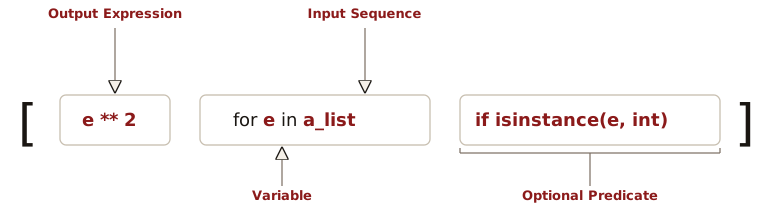
- The
forclause walks through each membereof the input iterablea_list. - The filter checks whether the member is an integer.
- If the member is an integer, the output expression squares it and the comprehension appends the square to the output list.
The map()
and filter() Equivalent
The built-in functions map() and
filter(), each given a lambda, produce
the same list that list_comprehension.py
builds. filter() applies a predicate to an iterable
and retains the members that pass it. It produces a lazy
iterator, which list() expands into a
list. map() applies a function to each
member, here squaring each integer that filter()
keeps:
# filter_then_map.py
from a_list import a_list

ints = list(filter(lambda e: isinstance(e, int), a_list))
print(ints)
#: [1, 9, 0, 4]
print(list(map(lambda e: e ** 2, ints)))  # type: ignore
#: [1, 81, 0, 16]
Nesting the filter() call inside the
map() call does both steps in one expression:
# map_and_filter.py
from a_list import a_list

print(list(map(lambda e: e ** 2,  # type: ignore
               filter(lambda e: isinstance(e, int),
                      a_list))))
#: [1, 81, 0, 16]
The map()/filter() form calls a
lambda on every element and is harder to read. The
comprehension inlines the test and the expression, and its
brackets show at a glance that it produces a list.
map() and filter() are a better choice
when the function they apply already has a name:
map(str.strip, lines) rather than
[line.strip() for line in lines]. So the
lambda makes map_and_filter.py worse,
not map(). Functional
Foundations compares what the two forms return.
A lambda predicate
leaves the element type of filter()’s result at
int | str, so ty rejects
e ** 2. Pyright infers the mixed list literal as
list[Unknown] and accepts any operation on its
elements. The comprehension’s if isinstance(e, int)
narrows the element type to int, so ty
accepts e ** 2 in list_comprehension.py.
filter() narrows when its predicate is a named
function annotated to return TypeIs[int]
or TypeGuard[int] rather than
bool:
# filter_typeis.py
from typing import TypeIs
from a_list import a_list

def is_int(e: object) -> TypeIs[int]:
    return isinstance(e, int)

print(list(map(lambda e: e ** 2, filter(is_int, a_list))))
#: [1, 81, 0, 16]
The TypeIs[int] return type of
is_int() declares that every element passing it is
an int. The lambda inside
map() therefore receives an int.
filter(None, items) is the other narrowing form.
It drops the falsy values, so the type checker removes
None from the element type.
Scope and the Walrus Operator
A comprehension has a scope of its own:
# comprehension_scope.py
e = "outer"
squares = [e ** 2 for e in range(4)]
print(squares, e)
#: [0, 1, 4, 9] outer
A comprehension’s loop variable belongs to the comprehension.
The e inside the brackets is a different name from
the e outside them, so the outer e
keeps its value. A for loop behaves the opposite
way. Its loop variable remains bound in the enclosing scope
after the loop ends.
Before Python 3.12, CPython gave a comprehension its scope by compiling it into a hidden function and calling that function each time the comprehension ran. Since 3.12, PEP 709 inlines list, set, and dict comprehensions into the surrounding code, which removes the call and makes them faster while keeping the loop variable private.
The scope works like a function
scope, which limits a comprehension in a class body. Python
skips the class body when it looks up a name from a scope nested
inside the class, so a comprehension there cannot read the
class’s other attributes. With base = 3 in the
class body, [n * base for n in range(3)] raises a
NameError. The outermost iterable is the one part
Python evaluates in the enclosing scope, so
[n for n in range(base)] works.
Inside a comprehension, the walrus operator binds its name in the enclosing scope:
# walrus_running_sum.py
total = 0
running = [(total := total + n) for n in range(5)]
print(running, total)
#: [0, 1, 3, 6, 10] 10
Because total := total + n assigns in the
enclosing scope, total holds the running sum after
the comprehension finishes. That leak is deliberate. It lets a
comprehension accumulate a value without a separate loop.
The walrus has three restrictions
inside a comprehension. Each of these uses is a
SyntaxError: a walrus that rebinds the
comprehension’s own loop variable, a walrus inside the iterable
expression that follows in, and a walrus in a
comprehension inside a class body.
The running sum is a rare use of the walrus. The common one computes a value once and uses it twice, once to filter and once to produce the output:
# walrus_filter.py
def cube_if_even(n: int) -> int | None:
    return n ** 3 if n % 2 == 0 else None

data = range(6)
cubes = [
    y for x in data if (y := cube_if_even(x)) is not None
]
print(cubes)
#: [0, 8, 64]
Without the walrus, the filter and the output each need their
own call: cube_if_even(x) is not None in the filter
and cube_if_even(x) in the output.
cube_if_even() then runs twice for every member
that passes (see exercise 9).
Set Comprehensions
A set comprehension has the same four parts as a list
comprehension, inside {} instead of
[]. Braces build a set when the comprehension
produces one value per member, and a dict when it produces a
key: value pair. The colon decides which.
{} is an empty dict, so an empty set needs
set().
# set_comprehension.py
names = ["Bob", "JOHN", "alice", "bob", "ALICE", "J", "Bob"]

unique = {name.capitalize()
          for name in names if len(name) > 1}

print(sorted(unique))  # Sorted for stable display
#: ['Alice', 'Bob', 'John']

same = set([name.capitalize()
            for name in names if len(name) > 1])

print(unique == same)
#: True
same and unique are equal, but
same first builds a full list, spending time and
memory on an intermediate object. The set comprehension adds
each name straight to the set.
Dictionary Comprehensions
A dictionary comprehension builds a dict. Each
member produces a key and a value, with an optional filter.
# dict_comprehension.py
names = ["Arthur", "Lancelot", "Bedevere", "Ni", "Robin"]

lengths = {name.upper(): len(name)
           for name in names if len(name) > 3}
print(lengths)
#: {'ARTHUR': 6, 'LANCELOT': 8, 'BEDEVERE': 8, 'ROBIN': 5}
A common variant swaps a dictionary’s keys and values to invert a lookup:
# invert_dict.py
seat_of = {"Arthur": 1, "Galahad": 2, "Robin": 1}

name_at = {seat: name for name, seat in seat_of.items()}
print(name_at)
#: {1: 'Robin', 2: 'Galahad'}
Inverting assumes the values are unique. Arthur
and Robin both sit at seat 1.
Robin, entered later, overwrites
Arthur at key 1, because a dictionary
keeps the last value it receives for a duplicate key.
To keep both names, group instead of inverting. Grouping
appends to lists that earlier elements created. A comprehension
writes each entry fresh, so grouping takes a for
loop. The loop walks seat_of.items() and appends
each name to a defaultdict(list)
keyed by seat, producing
{1: ['Arthur', 'Robin'], 2: ['Galahad']}.
Nested Comprehensions
An identity matrix of size n is an
n by n square matrix with ones on the
main diagonal and zeros elsewhere. Python represents such a
matrix as a list of lists, where each sub-list is a row.
# identity_matrix.py
from typing import Final

SIZE: Final[int] = 6

matrix = [[1 if col == row else 0 for col in range(SIZE)]
          for row in range(SIZE)]

for row in matrix:
    print(row)
#: [1, 0, 0, 0, 0, 0]
#: [0, 1, 0, 0, 0, 0]
#: [0, 0, 1, 0, 0, 0]
#: [0, 0, 0, 1, 0, 0]
#: [0, 0, 0, 0, 1, 0]
#: [0, 0, 0, 0, 0, 1]
Read a nested comprehension from the outside in, not left to
right. The outer comprehension supplies row. For
each row, the inner comprehension runs the full
col loop and produces one sub-list. The inner
for col sits to the left of the outer
for row but runs inside it. The output expression
sits first but runs last, once per innermost iteration.
Because the inner comprehension runs once per
row, each row is a new list.
[[0] * SIZE] * SIZE looks like a shorter start on
the same matrix. Multiplying the outer list, however, repeats
one row object SIZE times, so setting one
diagonal element sets it in every row.
1 if col == row else 0 is a
conditional expression, not a filter. It sits in the output
position, before the for, and decides what each
element is. Every col still produces one. An
if after the for decides whether the
comprehension produces an element, as in
[e ** 2 for e in a_list if isinstance(e, int)].
Each position accepts one of the two forms, so
[x for x in xs if a else b] is a
SyntaxError. When you need both a conditional
expression and a filter, write each in its own position:
[x if a else b for x in xs if c].
Nesting one comprehension inside another builds a list of
lists. Writing two for clauses in one comprehension
flattens, producing a single list. Unlike the clauses of a
nested comprehension, these clauses read left to right, in the
order the equivalent nested loops appear:
# flatten.py
rows = [[1, 2], [3, 4], [5]]
print([x for row in rows for x in row])
#: [1, 2, 3, 4, 5]
If you get that order backward, Python evaluates
for x in row before for row in rows
binds row:
# flatten_wrong_order.py
rows = [[1, 2], [3, 4], [5]]
try:
    print([x for x in row for row in rows])  # type: ignore
except NameError as e:
    print(e)
#: name 'row' is not defined

row = [7, 8]
print([x for x in row for row in rows])
#: [7, 7, 7, 8, 8, 8]
The NameError depends
on the enclosing scope having no row. An earlier
statement can bind one, as row = [7, 8] does here.
The first clause then iterates over that stale row.
The comprehension silently produces a wrong list. Each
x from the stale row repeats once per
element of rows, because the
for row in rows clause runs inside
for x in row.
Supplying the Input Iterable
Everything to the right of in is an ordinary
iterable expression, so anything that produces one works
there.
zip() walks several
iterables together, taking one element from each:
# zip_pairs.py
names = ["a", "b", "c", "d"]
values = [1, 2, 3]
print([f"{n}={v}" for n, v in zip(names, values)])
#: ['a=1', 'b=2', 'c=3']
zip() stops at the
end of the shorter iterable. Pass strict=True to
make a length mismatch raise a ValueError instead
of silently truncating. map() called with several
iterables passes one element from each to its function and stops
at the shortest in the same way. Since Python 3.14,
map() accepts strict=True too. A
truncated result looks complete, so pass
strict=True to either function whenever the inputs
must have equal lengths.
The for clause’s target can unpack a nested
tuple. Here zip() pairs each
(name, function) tuple with a value, and the target
(name, f), v takes both apart:
# zip_unpack.py
operations = [
    ("doubled", lambda v: v * 2),
    ("squared", lambda v: v ** 2),
]
values = [10, 3]
print([
    f"{name}({v}) = {f(v)}"
    for (name, f), v in zip(operations, values)
])
#: ['doubled(10) = 20', 'squared(3) = 9']
Path.walk() produces
a (dirpath, dirnames, filenames) tuple for each
directory in a tree, and a second for clause walks
the names in filenames:
# path_walk_comprehension.py
import tempfile
from pathlib import Path

# Build a small tree to walk: two .py files and one to skip
with tempfile.TemporaryDirectory() as tmp:
    root = Path(tmp)
    (root / "pkg").mkdir()
    for name in ("main.py", "pkg/util.py", "pkg/notes.txt"):
        (root / name).write_text("")
    py_paths = [
        (dirpath / filename).relative_to(root).as_posix()
        for dirpath, _, filenames in root.walk()
        for filename in filenames
        if filename.endswith(".py")
    ]

for path in sorted(py_paths):  # Sorted for stable output
    print(path)
#: main.py
#: pkg/util.py
tempfile.TemporaryDirectory()
is a context
manager that creates a scratch directory and deletes it, and
everything in it, when the with block exits. The
scratch directory gives the example a throwaway file tree to
walk and leaves the file system as the example found it.
The filter tests filename.endswith(".py") on the
bare filename rather than building a Path and
reading its .suffix. Testing the bare filename
leaves Path construction to the output expression,
which runs only for the files that pass.
A with block, unlike a function body, runs in
the enclosing scope. py_paths stays bound after the
block ends, so the for path in sorted(py_paths):
line below the block reads it.
The comprehension finishes
building py_paths, as strings, while the directory
still exists. The for loop runs after the context
manager deletes the directory, and it reads the strings in
py_paths, which outlive the directory. If you turn
the comprehension’s brackets into parentheses, the program exits
normally with empty output. The Gap Between
Creation and Consumption explains why.
root.rglob("*.py") finds the same two files in
one call. Try rglob() first. A glob pattern says
what you want. Use walk() when the filter needs
more than a glob pattern can express, such as a file’s size or
contents rather than its name. Use it too when the comprehension
needs the directory structure rather than a flat list of its
files.
Breaking Up a Complex Comprehension
A comprehension is the right choice when you can read it in
one pass. It can nest more for and if
clauses, or sit inside another call, but each addition makes the
expression harder to read.
dense_comprehension.py and
comprehension_steps.py
share one inventory, a list of (name, qty, price)
tuples for each warehouse:
# warehouses.py
warehouses = {
    "East": [
        ("wrench", 12, 4.50),
        ("drill", 0, 9.00),
        ("hammer", 5, 2.25),
    ],
    "West": [
        ("wrench", 3, 4.75),
        ("sander", 8, 15.00),
    ],
}
One comprehension builds a report from that inventory:
# dense_comprehension.py
from warehouses import warehouses

report = [
    f"{wh}: {name} (${price:.2f})"
    for wh, name, price in sorted(
        [(wh, name, price)
         for wh, items in warehouses.items()
         for name, qty, price in items
         if qty > 0 and price < 10],
        key=lambda t: t[2])
]
for line in report:
    print(line)
#: East: hammer ($2.25)
#: East: wrench ($4.50)
#: West: wrench ($4.75)
Reading the report comprehension means answering
several questions at once: which items qualify, how the
warehouses flatten together, how sorted() orders
the qualifying items, and how each line renders. That one
expression does four jobs. Giving each stage a name gives each
question its own statement:
# comprehension_steps.py
from warehouses import warehouses

in_stock = [
    (wh, name, price)
    for wh, items in warehouses.items()
    for name, qty, price in items
    if qty > 0 and price < 10
]
in_stock.sort(key=lambda t: t[2])

report = [
    f"{wh}: {name} (${price:.2f})"
    for wh, name, price in in_stock
]

for line in report:
    print(line)
#: East: hammer ($2.25)
#: East: wrench ($4.50)
#: West: wrench ($4.75)
in_stock answers “which items qualify, flattened
across warehouses.” sort() answers “in what order.”
report answers “how each line renders.” Each name
documents a stage of the pipeline, so a reader can follow the
transformation one step at a time instead of parsing every step
at once. Use this split whenever a comprehension needs a comment
to explain what it does.
Comprehensions Build, Loops Execute
A comprehension’s output
expression can be any expression, including a call with a side
effect, such as print(). A comprehension can run
code for its side effect and discard the list it builds:
# comprehension_side_effects.py
wasted = [print(n) for n in [1, 2, 3]]
#: 1
#: 2
#: 3
print(wasted)
#: [None, None, None]
print() returns None, so
wasted ends up holding three Nones,
one for each call. Worse, a reader scanning [...]
expects a list that later code reads. This comprehension is a
loop written with the wrong punctuation.
# for_loop_side_effects.py
for n in [1, 2, 3]:
    print(n)
#: 1
#: 2
#: 3
The for loop prints the same values and builds
no list, so its form matches what it does. Use a comprehension
when code assigns or uses its result, and a for
loop when you want the side effect alone.
Generator Expressions
A comprehension evaluates eagerly, so it immediately builds the entire result in memory. For a large data set, that wastes time and space, especially if you consume the result only once. A generator expression uses the same syntax with parentheses instead of brackets, and produces its values one at a time, on demand:
# generator_expression.py
from itertools import islice

squares = (n ** 2 for n in range(1_000_000))
print(next(squares))
#: 0
print(next(squares))
#: 1
print(list(islice(squares, 3)))
#: [4, 9, 16]
The generator computes a square each time you pull a value. In all, the generator computes five of its million squares.
Python has no tuple comprehension. The parentheses make a
generator expression. When you need a tuple, pass the generator
expression to tuple().
A generator expression can also feed set() and
dict():
# set_dict_from_genexp.py
words = ["pol", "parrot", "fjord", "ex"]

lengths = set(len(w) for w in words)
print(sorted(lengths))
#: [2, 3, 5, 6]

initials = dict((w, w[0]) for w in words)
print(initials)
#: {'pol': 'p', 'parrot': 'p', 'fjord': 'f', 'ex': 'e'}
A set or dict must hold every element, so
set(...) or dict(...) consumes the
whole generator immediately. Comprehensions build the same
results without creating a generator, and are a better choice:
{len(w) for w in words} for the set and
{w: w[0] for w in words} for the dict.
Use a generator expression when
the consumer takes values one at a time, such as
sum(), any(), all(),
min(), or max():
# genexp_consumers.py
nums = range(1_000_000)

print(sum(n * n for n in nums))
#: 333332833333500000
print(any(n == 12_345 for n in nums))
#: True
print(max(len(str(n)) for n in nums))
#: 6
Because each consumer takes the values as the generator
produces them, memory holds one value at a time.
any() also stops when it finds a match.
str.join() is the exception. It needs two passes,
one to size the result and one to fill it, so it converts its
argument to a list first. With str.join(), a
generator expression and a list comprehension therefore both end
up as a full list.
A generator expression that is a
function’s sole argument shares the call’s parentheses. With a
second argument, the generator expression needs a pair of its
own. sum(n * n for n in nums, 0) is a
SyntaxError, and
sum((n * n for n in nums), 0) is the fix.
A Generator Expression Runs Once
genexp_consumers.py
iterates over nums three times because a
range is re-iterable. Each for over it
starts again at zero. A generator expression is not
re-iterable:
# spent_generator.py
nums = (n for n in range(10))
print(sum(n * n for n in nums))
#: 285
print(any(n == 5 for n in nums))
#: False
print(list(nums))
#: []
A generator expression keeps its place between calls. Once
its body has finished, every further next() raises
StopIteration, which sum(),
any(), and list() each read as the end
(Iterators
has the protocol).
In spent_generator.py,
sum() drains nums, so
any() finds it empty and reports False
instead of True. The wrong False
arrives silently, because an empty generator is a valid
input.
When you must traverse the values twice, either materialize
them with list() or write the generator expression
again. Writing it again works when the source is re-iterable, as
a range is.
The Gap Between Creation and Consumption
Creating a generator expression evaluates its outermost iterable immediately and runs the rest of the expression only when a consumer pulls values:
# genexp_timing.py
def source() -> list[int]:
    print("source() called")
    return [1, 2, 3]

factor = 2
gen = (n * factor for n in source())
#: source() called
print("generator created")
#: generator created
factor = 10
print(list(gen))
#: [10, 20, 30]
Because the output expression runs later, it reads
factor when list() pulls the values
rather than at creation. list(gen) returns
[10, 20, 30] instead of [2, 4, 6]. A
list comprehension evaluates its output expression for every
element before the next statement runs, so it reads
factor at creation.
The gap between creation and
consumption is also why path_walk_comprehension.py
uses brackets. With parentheses, Python still evaluates the
outermost iterable, root.walk(), at creation. The
walking and the filtering run later, when a consumer pulls
values. That consumer is sorted(), which runs after
the with block exits and the context manager
deletes the directory. Path.walk() then gets an
OSError when it scans the deleted directory. Its
default, on_error=None, discards the error, so
sorted() returns an empty list.
A lambda created in a comprehension reads
its variables late by the same mechanism. Its body runs when
something calls it, not when the comprehension creates it.
Iterators explores generators further, and Generators covers the values they receive as well as the ones they produce.
Unpacking in Comprehensions
flatten.py flattens nested
lists with two for clauses. Python 3.15 (PEP 798) adds a way
to flatten with one for clause. Displays have
accepted unpacking since PEP 448:
[*a, *b] and {**d1, **d2} (Containers). PEP 798
extends that unpacking to the comprehension form. The unpacking
operator * may appear in the output expression of a
comprehension or generator expression, and ** may
appear in the output expression of a dict comprehension. Each
operator splices its iterable or mapping into the result. The
new form replaces many uses of two-for
comprehensions, itertools.chain(), and
itertools.chain.from_iterable():
# unpacking_comprehensions.py
rows = [[1, 2], [3, 4], [5]]
dicts = [{"a": 1}, {"b": 2}, {"a": 3}]

print([*row for row in rows])
#: [1, 2, 3, 4, 5]

print({**d for d in dicts})
#: {'a': 3, 'b': 2}

print([*row for row in [[1, [2, 3]], [4]]])
#: [1, [2, 3], 4]
print({*s for s in [{1, 2}, {3}]})
#: {1, 2, 3}
[*row for row in rows] reads
as “splice each row in.” It produces the same flat
list as the two-for
[x for row in rows for x in row], with one
for clause instead of two. It is a shallow flatten,
splicing each row one level deep, so the nested
[2, 3] above stays a single element of the
result.
** does the same for dictionaries, merging each
mapping into the result, where a later key’s value replaces an
earlier one. In {**d for d in dicts}, the third
mapping’s "a": 3 replaces the first mapping’s
"a": 1.
With braces, * builds a set and **
builds a dict. In an ordinary brace comprehension, the colon
decides between the two. Neither unpacking comprehension has a
colon, so the operator decides.
In parentheses, (*row for row in rows) is a
generator expression that produces the same spliced values one
at a time. The asynchronous generator expression
(*a async for a in agen()) works the same way. Concurrency
introduces async syntax.
Choosing a Form
The four forms are one expression
with different delimiters, so learning the list form teaches all
four. Brackets build a list. Braces build a set, or a dict when
a colon separates a key from a value or ** splices
in a mapping. Parentheses build a generator, for a consumer that
takes values one at a time. When you want the side effect rather
than the collection, write a for loop.
The delimiters also decide when the loop runs. The list, set, and dict forms run to completion before the next statement, so a comprehension computes every element where you wrote it. A generator expression defers its loop to whoever consumes it, and computes only the values the consumer pulls.
Exercises
Try each exercise before opening its solution.
- Using
a_listfroma_list.py([1, "4", 9, "a", 0, 4]), write a list comprehension that finds the string elements made only of digits (e.isdigit()), converts each tointwithint(e), and squares it. The filter must reject"a"beforeint()receives it.isdigit()is astrmethod, anda_listalso holds integers, so the filter must testisinstance(e, str)before calling it. - In
identity_matrix.py, change the comprehension to put2on the diagonal instead of1, without adding a second pass over the result. - In
dict_comprehension.py, add"Galahad"tonames, then predict which entries the comprehension produces before running it, given thelen(name) > 3filter. - In
set_comprehension.py, drop theif len(name) > 1filter, and predict how many entriesuniqueholds before running it. Explain why"J"does not collide with"JOHN". comprehension_side_effects.pybuilds a list ofNones. Write a version that keeps the printing but produces a list the caller can use, then say whether a comprehension or aforloop is the right shape for it.- In
unpacking_comprehensions.py, add a fourth entry{"a": 5, "c": 9}todictsand predict what{**d for d in dicts}produces before running it, paying attention to which value wins for the key"a". - In
spent_generator.py, move theany()line above thesum()line. Predict all three printed values before running it, remembering thatany()stops when it finds a match. - In
genexp_timing.py, turn the generator expression into a list comprehension and name the resultbuilt. Predict the three printed lines, and their order, before running it. Explain which value offactorthe result uses. - In
walrus_filter.py, makecube_if_even()append each argument it receives to a list, then add a second comprehension that produces the same cubes without the walrus. Predict how many calls each comprehension makes overrange(6), and which arguments the second one passes twice.