State Machines

A State Machine transitions through a known set of states, and behaves differently depending on the state it’s in. The current state together with an input decides the next state. A State Machine names the states and defines their transitions.
Recall State: a surrogate forwards calls to one of several implementations, and the client programmer chooses an implementation. State Machine adds transitions, which choose the next implementation from the current state and an input. The system behaves differently as it moves from state to state.
You call run() on a state to perform its
behavior. next() takes an input and returns the
machine’s next state.
We look at two designs. In the first, each State
object decides its own next state. In the second, a single table
holds all transitions.
Each State Decides
A State is a record holding an action performed
by that state, and the function that chooses the next
State:
# state.py
from collections.abc import Callable
from record import record

@record
class State[I]:
    message: str
    next: Callable[[I], State[I]]
    action: Callable[[], None] = lambda: None

    def run(self) -> None:
        print(self.message)
        self.action()
next and
action are functions stored in fields, not methods,
so neither receives self.
state.next(input_) passes the input alone. The name
is input_, with a trailing underscore, because a
bare input shadows the builtin
input(). The state plus input decides the next
state.
State is generic in I, the type of
input the machine reads, so one engine serves machines with
different input types, and each machine’s transition functions
declare the input type they accept.
This is a Moore machine,
where what a state does depends on the state alone.
run() calls self.action() with no
arguments. action defaults to
lambda: None, an empty action. A state that does
more than print its message supplies an action as
the third constructor argument.
self.action() has the form of a method call. In
a method call, Python passes self automatically as
the first argument. However, Python supplies self
only when the lookup finds the function on the class. Here,
next and action are references to
external (non-method) functions. self.action()
therefore looks up and calls the stored function with no
arguments.
The annotation on next names
State[I] inside the State class body,
which works because Python evaluates
annotations lazily.
As an example, consider a mousetrap that can move through several states while trapping a mouse. The possible moves a mouse can make are the inputs to the state machine:
# mouse.py
from enum import StrEnum

class Mouse(StrEnum):
    APPEARS = "mouse appears"
    RUNS_AWAY = "mouse runs away"
    ENTERS = "mouse enters trap"
    ESCAPES = "mouse escapes"
    TRAPPED = "mouse trapped"
    REMOVED = "mouse removed"
We use an enumeration
to define a restricted set of objects. Because
Mouse is a StrEnum,
each member is a str, and print()
shows a member as its value, e.g. mouse appears
rather than Mouse.APPEARS.
A sequence of nine moves covers every transition that changes the trap’s state:
# mouse_moves.py
from typing import Final
from mouse import Mouse

MOVES: Final[list[Mouse]] = [
    Mouse.APPEARS, Mouse.RUNS_AWAY, Mouse.APPEARS,
    Mouse.ENTERS, Mouse.ESCAPES, Mouse.APPEARS,
    Mouse.ENTERS, Mouse.TRAPPED, Mouse.REMOVED,
]
Mousetrap States
The trap has four states. Every state needs a transition
function that takes a Mouse input and produces the
trap’s next state:
# trap_states.py
from enum import Enum
from mouse import Mouse
from state import State

def waiting(input_: Mouse) -> TrapState:
    match input_:
        case Mouse.APPEARS:
            return TrapState.LURING
        case _:
            return TrapState.WAITING

def luring(input_: Mouse) -> TrapState:
    match input_:
        case Mouse.RUNS_AWAY:
            return TrapState.WAITING
        case Mouse.ENTERS:
            return TrapState.TRAPPING
        case _:
            return TrapState.LURING

def trapping(input_: Mouse) -> TrapState:
    match input_:
        case Mouse.ESCAPES:
            return TrapState.WAITING
        case Mouse.TRAPPED:
            return TrapState.HOLDING
        case _:
            return TrapState.TRAPPING

def holding(input_: Mouse) -> TrapState:
    match input_:
        case Mouse.REMOVED:
            return TrapState.WAITING
        case _:
            return TrapState.HOLDING
The four functions use TrapState before the file
defines it. A function body runs at the call, and Python
evaluates an annotation lazily, so by the first call the whole
module has loaded and TrapState exists.
The file continues with chime(), the one
non-empty action, which HOLDING
performs. TrapState is an enum because the states
form a closed set:
# trap_states.py (continued)
def chime() -> None:
    print("*ding*")

class TrapState(State[Mouse], Enum):
    WAITING = ("Broadcasting cheese smell", waiting)
    LURING = ("Presenting Cheese, door open", luring)
    TRAPPING = ("Closing door", trapping)
    HOLDING = ("Mouse caught", holding, chime)

    def __str__(self) -> str:
        return self.name.capitalize()
TrapState mixes
State[Mouse] into Enum. Each
member’s definition assigns it a tuple, and Enum
passes the tuple to State’s constructor, so
TrapState.WAITING is both a TrapState
member and a State, with message and
next as attributes.
The StateMachine
holds the current state and advances it on each input. The
State pattern combined with automated transitions is
State Machine:
# state_machine.py
from collections.abc import Iterable
from state import State

class StateMachine[I]:
    def __init__(self, initial_state: State[I]) -> None:
        self.current_state = initial_state
        self.current_state.run()
    def step(self, input_: I) -> None:
        state = self.current_state
        self.current_state = state.next(input_)
        print(state, input_, "->", self.current_state)
        self.current_state.run()

def run_all[I](machine: StateMachine[I],
               inputs: Iterable[I]) -> None:
    for input_ in inputs:
        machine.step(input_)
run() is an entry action: each transition
arrives in a state and calls that state’s run().
The constructor calls the initial state’s run(),
because constructing the machine enters that state.
The type checker infers I from the initial
state, so StateMachine(TrapState.WAITING) is a
StateMachine[Mouse] whose step()
accepts only a Mouse.
run()’s behavior depends on the current state.
step() defines the flow, while each
State’s fields supply the varying behavior.
The demo runs one trap through every move in
MOVES, then feeds a fresh trap an input that
matches only waiting()’s case _:
# trap_states_demo.py
from mouse import Mouse
from mouse_moves import MOVES
from state_machine import StateMachine, run_all
from trap_states import TrapState

run_all(StateMachine(TrapState.WAITING), MOVES)
#: Broadcasting cheese smell
#: Waiting mouse appears -> Luring
#: Presenting Cheese, door open
#: Luring mouse runs away -> Waiting
#: Broadcasting cheese smell
#: Waiting mouse appears -> Luring
#: Presenting Cheese, door open
#: Luring mouse enters trap -> Trapping
#: Closing door
#: Trapping mouse escapes -> Waiting
#: Broadcasting cheese smell
#: Waiting mouse appears -> Luring
#: Presenting Cheese, door open
#: Luring mouse enters trap -> Trapping
#: Closing door
#: Trapping mouse trapped -> Holding
#: Mouse caught
#: *ding*
#: Holding mouse removed -> Waiting
#: Broadcasting cheese smell

# ESCAPES has no case in waiting(), so case _
# fires and the machine stays at Waiting:
trap = StateMachine(TrapState.WAITING)
#: Broadcasting cheese smell
trap.step(Mouse.ESCAPES)
#: Waiting mouse escapes -> Waiting
#: Broadcasting cheese smell
Each StateMachine(TrapState.WAITING) call prints
Broadcasting cheese smell before any input arrives,
because the constructor runs the initial state.
The tests check two facts: the nine moves bring the trap back
to Waiting, as the trace shows, and every state
answers every move with a state:
# test_trap_states.py
from mouse import Mouse
from mouse_moves import MOVES
from state_machine import StateMachine, run_all
from trap_states import TrapState

def test_nine_moves_return_to_waiting() -> None:
    trap = StateMachine(TrapState.WAITING)
    run_all(trap, MOVES)
    assert trap.current_state is TrapState.WAITING

def test_every_state_answers_every_move() -> None:
    for state in TrapState:
        for move in Mouse:
            assert state.next(move) in TrapState
The second test iterates over the enum, so the test covers a
new member of TrapState as soon as it exists.
Table-Driven State Machine
The first design, Each State
Decides, keeps each state’s transitions with that state, in
its next function. A fully table-driven design
represents the entire machine as a single transition table.
Every transition, with its condition and its action, is then in
one place, so you can build and maintain the table from a
state-transition diagram. The example is a vending machine,
built in two steps: a general-purpose engine, then the vending
machine’s table.
For a given current state and input, a rule records three things: whether a condition must pass, what action runs during the transition, and what state comes next:
Rule(state, InputType, next_state, action, condition)A condition is any callable returning a bool,
and an action is any callable. The rules are a list, which the
engine groups into a dict.
The action on a rule takes the
input, so what the machine does depends on the state and the
input together. That is a Mealy machine, the other
classical state machine. The first design’s action
acts per state and runs the same way whichever input led into
that state, while a rule’s action acts per
transition and reads the input that fired it.
The mousetrap’s inputs are Mouse members, each
naming one event. The vending machine’s inputs carry values:
what a coin is worth, which row or column the user pressed. Each
kind of input has a class of its own. The table looks up a rule
by the input’s class, not by its value.
The Engine
For the current state and the type of the incoming input, the
engine tries the candidate rules in order. It takes the first
rule whose condition passes (or is None), runs that
rule’s action, and moves to the next state:
# table_machine.py
from collections.abc import Callable, Sequence
from enum import Enum
from typing import Any
from record import record

@record
class Rule[I]:
    state: Enum
    input_type: type[I]
    next_state: Enum
    action: Callable[[I], None] | None = None
    condition: Callable[[I], bool] | None = None

type Table = dict[tuple[Enum, type], list[Rule[Any]]]

class NoTransition(RuntimeError):
    "No rule matched this state and input."

class StateMachine:
    def __init__(self, initial: Enum,
                 rules: Sequence[Rule[Any]]) -> None:
        self.state = initial
        self.table: Table = {}
        for rule in rules:
            key = (rule.state, rule.input_type)
            self.table.setdefault(key, []).append(rule)

    def handle(self, input_: object) -> None:
        for rule in self.table.get(
                (self.state, type(input_)), []):
            condition = rule.condition
            if condition is None or condition(input_):
                if rule.action is not None:
                    rule.action(input_)
                self.state = rule.next_state
                return
        raise NoTransition(
            f"no rule from {self.state} "
            f"on {type(input_).__name__}")
A Rule reads as a sentence: from
state, on an input of input_type, go
to next_state, running action if the
rule has one, provided condition passes if the rule
has one. A state is an Enum member, so a misspelled
state is a type error.
Rule is generic in I, the input
class, and input_type is type[I], so a
rule’s action and condition must
accept the class its input_type names. The input
class appears twice, as the input_type field and as
the type argument I, because the two do different
jobs. I exists for the type checker and is erased
before the program runs, so a Rule[Money] object
carries only what its fields hold. The input_type
field holds the class, and StateMachine’s
constructor uses it as half of each table key.
The constructor groups the rules by
(state, input_type) into a dictionary, so
handle() finds the candidates for the current state
and the input’s class in one lookup.
One table holds Rule[Money] beside
Rule[Row], so the engine holds the rules as
Rule[Any]. Rule is invariant
in I, since I sits in both
type[I] and Callable[[I], ...], so
Any is the one type argument that admits every
entry. The engine calls each condition and action with the input
that arrived. The checker matches each input class to its
methods at the Rule(...) call.
Several rules can share one (state, input_type)
key. Their conditions tell them apart. In this Chain
of Responsibility shape, a single input can lead to
different states, depending on which condition passes. A rule
whose condition is None matches every time, so it
belongs last in its group.
When every condition in a group returns False,
handle() raises the same NoTransition
it raises for a missing key.
A Vending Machine
A single table now defines the machine. The conditions and actions are ordinary methods, stored in the table. The machine collects money, takes a selection as a row and then a column, then either dispenses the item, reports it sold out, or clears a selection that costs more than the money inserted.
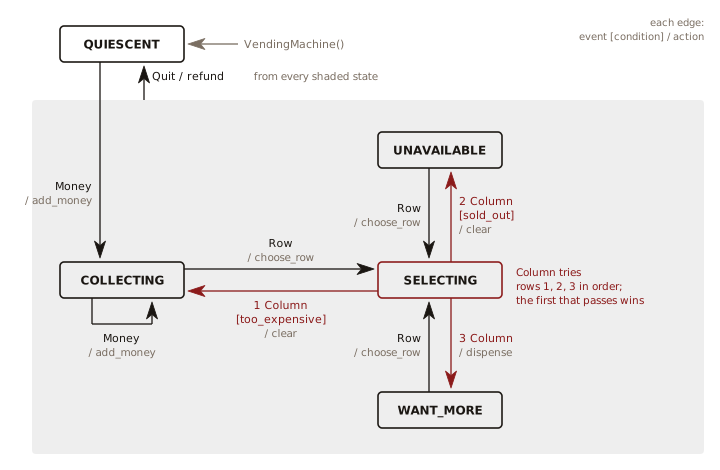
Money moves the machine from
QUIESCENT to COLLECTING, and more
Money keeps it there. A Row moves it
to SELECTING. A Column moves it to one
of three states, decided by price and stock. Quit
refunds from any of the other states back to
QUIESCENT.
The vending machine’s states are
bare auto() members, so the demo prints a state by
its name:
# vending_machine.py
from dataclasses import dataclass
from enum import Enum, auto
from record import record
from table_machine import Rule, StateMachine

class State(Enum):
    QUIESCENT = auto()
    COLLECTING = auto()
    SELECTING = auto()
    UNAVAILABLE = auto()
    WANT_MORE = auto()
Each kind of input has its own class. A Slot
holds one item’s price and quantity:
# vending_machine.py (continued)
@record
class Money:
    name: str
    value: int

    def __str__(self) -> str:
        return self.name

class Quit:
    def __str__(self) -> str:
        return "Quit"

class Row(Enum):
    A = 0
    B = 1
    C = 2
    D = 3

    def __str__(self) -> str:
        return self.name

class Column(Enum):
    C0 = 0
    C1 = 1
    C2 = 2
    C3 = 3

    def __str__(self) -> str:
        return f"col {self.value}"

@dataclass
class Slot:
    price: int
    quantity: int
Row and Column are
Enums, so a selection outside the grid fails where
you name it, Row.E as a type error and
Column(4) as a ValueError, rather than
as an index error inside _slot(). Slot
stays a mutable @dataclass, because
dispense() decrements its quantity in
place.
The engine looks up rules by the
exact type(input_), so finding them takes one
dictionary lookup rather than an isinstance() test
against each rule. The lookup is by class identity. An instance
of a subclass of Money has a different
type(), so it finds the rules filed under that
subclass, if any, and passes over the rules filed under
Money (see exercise 9).
Other chapters key a dictionary by class. The event bus stores its handlers under the event class, and Multiple Dispatching and Pattern Refactoring reuse this engine’s lookup.
VendingMachine holds the table, its conditions,
and its actions:
# vending_machine.py (continued)
class VendingMachine(StateMachine):
    def __init__(self) -> None:
        self.amount = 0  # Money inserted, in cents
        self.row = Row.A  # The selected row
        # Last action, for the caller to show
        self.message = ""
        # A 4x4 grid; column c costs (c + 1) * 25 cents:
        self.slots = [[Slot((c + 1) * 25, 5)
                       for c in range(4)]
                      for _ in range(4)]
        # One sold-out slot
        self.slots[3][0] = Slot(25, 0)
        paid = [s for s in State
                if s is not State.QUIESCENT]
        rules = [
            Rule(State.QUIESCENT, Money, State.COLLECTING,
                 self.add_money),
            Rule(State.COLLECTING, Money, State.COLLECTING,
                 self.add_money),
            Rule(State.SELECTING, Column, State.COLLECTING,
                 self.clear, self.too_expensive),
            Rule(State.SELECTING, Column, State.UNAVAILABLE,
                 self.clear, self.sold_out),
            Rule(State.SELECTING, Column, State.WANT_MORE,
                 self.dispense),
            *[Rule(s, Quit, State.QUIESCENT, self.refund)
              for s in paid],
            *[Rule(s, Row, State.SELECTING, self.choose_row)
              for s in paid if s is not State.SELECTING],
        ]
        super().__init__(State.QUIESCENT, rules)

    def _slot(self, col: Column) -> Slot:
        return self.slots[self.row.value][col.value]

    # Conditions:
    def too_expensive(self, col: Column) -> bool:
        return self._slot(col).price > self.amount

    def sold_out(self, col: Column) -> bool:
        return self._slot(col).quantity == 0

    def add_money(self, money: Money) -> None:
        self.amount += money.value
        self.message = f"Total = {self.amount}"

    def choose_row(self, row: Row) -> None:
        self.row = row
        prices = [slot.price
                  for slot in self.slots[row.value]]
        self.message = f"{min(prices)}c to {max(prices)}c"

    def clear(self, col: Column) -> None:
        slot = self._slot(col)
        self.message = (f"Cleared: {slot.price}c, "
                        f"{slot.quantity} left")

    def dispense(self, col: Column) -> None:
        slot = self._slot(col)
        slot.quantity -= 1
        self.amount -= slot.price
        self.message = (
            f"Dispensing; remaining {self.amount}")

    def refund(self, input_: object) -> None:
        self.message = f"Returning {self.amount}"
        self.amount = 0
The rules go in __init__() rather than in the
class body, because each rule holds a bound method.
self.add_money holds a reference to this machine,
so each VendingMachine’s rules call methods that
read and write its own amount and
slots.
Quit refunds from every paid state, and a
Row selects from every paid state but
SELECTING, which is waiting for a
Column. Those seven rules come from two
comprehensions over paid rather than seven lines
that differ in one member.
The engine passes the input to both the condition and the
action, so refund() takes an argument it ignores.
Each method declares the specific input type it handles, and
those types differ from rule to rule. Rule[I] ties
the input type to the methods on the same rule. Naming
Column makes I Column, so
the checker requires clear() and
too_expensive() to accept a Column. If
you pair Column with choose_row(),
written for a Row, ty reports
invalid-argument-type on that rule.
refund() accepts object, so it pairs
with any input type.
The listing binds the list to
rules, with no annotation, before the call, and
that binding leaves each Rule(...) to infer its
I from its own arguments. If you write the list
inline as the argument, the parameter’s
Sequence[Rule[Any]] becomes its expected type. That
Any reaches into every Rule(...) and
makes its I Any, so the checker
accepts any method on any rule. The
Column/choose_row() mismatch above
then passes the checker. At runtime choose_row()
stores a Column in self.row, and
_slot() then uses that column’s value
as the row index.
Adding a state or an input is now
a local change: a State member or an input class,
its rules in the list, and a method or two. Two language
features do the work of a switch, reflection, or a
Condition/Transition class hierarchy.
The dict does the dispatch, and a bound method
stored in a rule is the condition or the action.
The demo feeds a VendingMachine a list of
inputs:
# vending_demo.py
from vending_machine import (Column, Money, Quit, Row,
                             VendingMachine)

inputs = [
    Money("quarter", 25), Money("quarter", 25),
    Money("dollar", 100),
    # Buy A, col 1
    Row.A, Column(1),
    # Buy it again
    Row.A, Column(1),
    # Too expensive
    Row.C, Column(2),
    # Sold out
    Row.D, Column(0),
    Quit(),  # Refund and reset
    Money("dime", 10),
    Row.D, Column(0),
]
machine = VendingMachine()
for input_ in inputs:
    before = machine.state
    machine.handle(input_)
    print(f"{before.name} {input_} -> "
          f"{machine.state.name}: {machine.message}")
#: QUIESCENT quarter -> COLLECTING: Total = 25
#: COLLECTING quarter -> COLLECTING: Total = 50
#: COLLECTING dollar -> COLLECTING: Total = 150
#: COLLECTING A -> SELECTING: 25c to 100c
#: SELECTING col 1 -> WANT_MORE: Dispensing; remaining 100
#: WANT_MORE A -> SELECTING: 25c to 100c
#: SELECTING col 1 -> WANT_MORE: Dispensing; remaining 50
#: WANT_MORE C -> SELECTING: 25c to 100c
#: SELECTING col 2 -> COLLECTING: Cleared: 75c, 5 left
#: COLLECTING D -> SELECTING: 25c to 100c
#: SELECTING col 0 -> UNAVAILABLE: Cleared: 25c, 0 left
#: UNAVAILABLE Quit -> QUIESCENT: Returning 50
#: QUIESCENT dime -> COLLECTING: Total = 10
#: COLLECTING D -> SELECTING: 25c to 100c
#: SELECTING col 0 -> COLLECTING: Cleared: 25c, 0 left
The first two Cleared lines end in different
states, COLLECTING for too expensive and
UNAVAILABLE for sold out. The state after the arrow
shows which condition passed; the message alone leaves you to
infer it from the left count.
The last input picks the sold-out slot again with a dime
inserted, so both conditions are true.
too_expensive() comes first in the
(State.SELECTING, Column) list, so the engine takes
that rule and reports COLLECTING, as though more
money would sell a sold-out item. If you swap the rule order,
the same input reports UNAVAILABLE. By the engine’s
ordering rule, the first rule whose
condition passes wins, even when a later rule, here the
sold_out() rule, also passes.
Testing the Vending Machine
Because the machine is deterministic, a test can drive it through a sequence of inputs and check which state it reaches. The tests cover:
- A successful purchase
- The too-expensive conditional branch
- The sold-out conditional branch
- A refund
- The error when no transition matches
# test_vending.py
import pytest
from table_machine import NoTransition
from vending_machine import (Column, Money, Quit, Row,
                             State, VendingMachine)

def feed(vm: VendingMachine, *inputs: object) -> None:
    for input_ in inputs:
        vm.handle(input_)

def test_buy_dispenses_and_spends() -> None:
    vm = VendingMachine()
    assert vm.slots[0][1].price == 50
    feed(vm, Money("quarter", 25), Money("quarter", 25),
         Row.A, Column(1))
    assert vm.state is State.WANT_MORE
    assert vm.amount == 0  # 50 in, 50 spent
    # One dispensed from five
    assert vm.slots[0][1].quantity == 4
    assert vm.message == "Dispensing; remaining 0"

def test_too_expensive_clears_back_to_collecting() -> None:
    vm = VendingMachine()
    assert vm.slots[0][1].price == 50
    # 25c in
    feed(vm, Money("quarter", 25), Row.A, Column(1))
    assert vm.state is State.COLLECTING
    assert vm.amount == 25  # Money kept
    assert vm.slots[0][1].quantity == 5  # Nothing dispensed

def test_sold_out_clears_to_unavailable() -> None:
    vm = VendingMachine()
    # [3][0] is sold out
    feed(vm, Money("quarter", 25), Row.D, Column(0))
    assert vm.state is State.UNAVAILABLE
    assert vm.amount == 25  # Money kept
    assert vm.slots[3][0].quantity == 0  # Nothing dispensed

def test_quit_refunds_and_resets() -> None:
    vm = VendingMachine()
    feed(vm, Money("dollar", 100), Quit())
    assert vm.state is State.QUIESCENT
    assert vm.amount == 0

def test_no_transition_raises() -> None:
    vm = VendingMachine()
    assert vm.state is State.QUIESCENT
    with pytest.raises(NoTransition):
        vm.handle(Quit())
Which Design Should You Use?
The first design, Each State
Decides, suits a machine whose states have only a few
transitions. Reading trap_states.py’s
LURING and luring() tells you what
that state does and which states can follow it. Adding a state
is one row, one function, and a case in each
existing function that leads to it. The design reads best when
the transitions are obvious from the state’s own name.
A state’s row holds its action, so the action appears once,
however many transitions lead into that state.
chime() sounds whenever the trap reaches
HOLDING, and HOLDING’s row alone names
it. That is the Moore shape: the action belongs to the
state.
The second design, the Table-Driven State
Machine, suits a machine you build from a diagram,
whose inputs carry data, or whose transitions need conditions.
Every transition is a rule in one table, in the same order as
the diagram. Adding a state or an input is a State
member or an input class, its rules in the list, and a method or
two.
In the first design a member is also a State
record with an action field. In the table-driven
design a member is a bare name with no fields, so every action
is the action field of a rule. When an action must
run on every entry into a state, it is the action
of every rule whose next_state is that state.
refund() runs on every transition into
QUIESCENT, so one comprehension writes it into all
four Quit rules. That is the Mealy shape: the
action belongs to the transition. A state’s action
depends on the state alone, while a rule’s action reads the
input that caused the transition: add_money() reads
the coin’s value.
In both designs the states are Enum members
because a state machine works with a closed set of states.
Iterating over the enum reaches every member of that set. test_trap_states.py checks
each state against each move, and VendingMachine
builds its Quit and Row rules from a
comprehension over State.
An Enum member is one object that every machine
using it shares, so every machine sees a value stored on a
member (see exercise 2). Data that belongs to one machine lives
on the machine, as VendingMachine’s
amount and row do.
The deciding question is which is easier to maintain: one state’s transitions, gathered in that state’s function, or the whole machine’s transitions, gathered in one table. A machine with a few states works in either. A machine designed as a diagram belongs in the table.
Mature libraries such as transitions and
python-statemachine offer guards, callbacks, and
hierarchical states. Choose one of the designs here when you
don’t want that dependency, or want the mechanism visible in
your own code. Choose a library if the machine needs more than a
page of code.
Exercises
Try each exercise before opening its solution.
- Using State,
make a class called
UnpredictablePersonthat changes the kind of response to itshello()method depending on its currentMood. Add another kind ofMoodcalledProzac. - Turn exercise 1’s
UnpredictablePersoninto a state machine in the shape oftrap_states.py: aMoodenum of rows, each carrying its greeting and its transition function, with the inputs as aStrEnumandstate_machine.py’s engine running it. Say what a mood gains and loses as an enum member rather than a class. - Create a State Machine system in which the current
state and the input together determine the next state. Make the
states an
Enumof rows, as intrap_states.py, where each row’s transition function consults that state’s owndict, mapping a word to the name of the next state. Feed the machine a sequence of single words, such as a text file with one word per line. - Modify the previous exercise so that you can configure the state machine by editing a single transition table.
- Write a
mouse_move_generator(), a generator that yields validMousemoves in sequence, where each possible move depends on the previous one (it is another state machine). Have it accept anintfor the number of moves to produce, then stop. Say where this machine’s state lives, and how that differs from wheretrap_states.pykeeps its state. - Apply the table-driven
StateMachinefromtable_machine.pyto a washing-machine problem. Give one(state, input)pair two rules told apart by a condition, such as a load too heavy for the fast spin. Then pressStartin the middle of a cycle, an input for which that state has no rule, and decide what the caller does with theNoTransition: ignore the press or stop the machine. Say which policy suits a washing machine, and why. - Create an elevator state machine using
table_machine.py. Give the “doors closing” state two rules for the same input, one with a door-obstruction condition. - Create a heating/air-conditioning system using
table_machine.py. A singleTemperatureReadinginput must be able to lead to heating, cooling, or idle, decided entirely by conditions on one(state, input)key. - Build a two-state machine that collects
Money, modeled on the machine invending_machine.py. Add aNickelclass deriving fromMoneyand feed one in without touching the table. Explain the exception, then make it work two ways: by adding a rule, and by makingNickelan instance ofMoneyrather than a subclass. Say which you would keep.