Concurrency

The network, the disk, and the user all take their time, and a core sits idle while the program waits. Concurrency puts other work into that wait, on the same core or on another.
Performance makes one stream of instructions faster. Concurrency runs independent tasks “at the same time” instead of making them wait in line. Performance is about the math, while concurrency is about the machine. Both try to speed progress.
The meaning of “at the same time” depends on context. Early machines had a single CPU, and early operating systems (OS) were little more than program loaders. The first step beyond that was time-sharing. The CPU runs one program for a slice of time, then the OS stops it and switches to a different program for another time slice. Later came a finer-grained unit of scheduling that lives inside a program: the thread of execution. A modern OS schedules threads, not whole programs. Each task (unit of work) gets its own thread. The OS performs context switching from one thread to the next. The OS controls everything: allocating threads, deciding how long a time slice is, switching contexts, and deciding which thread is ready to run next.
Each process (allocated to a program when you start it) gets one thread and its own heap. The program can request more threads from the OS, but all threads within a process share the same heap, so each thread must leave intact the parts of the heap other threads use. Every thread has its own stack.
When a program requests an additional thread from the OS, that thread gets its own function-call stack, separate from the original process stack. Every function call pushes arguments and the return address onto the stack. When the function ends, its stack frame pops off and execution jumps back to the return address. (The function typically returns its value in a CPU register.) Thus each thread must own its call stack.
The heap and the stack grow in opposite ways. The heap reserves no space in advance. It starts essentially empty and grows only as the program asks for more, one allocation at a time. A stack is the reverse. Creating the thread sets its maximum size, and that size holds for the life of the thread. The amount used out of that constant allotment varies at runtime. If a chain of function calls needs more room than the maximum, the stack overflows instead of growing to fit. Code reaches a heap allocation only through a reference, so an allocation that needs more room can move to a larger block, and the reference points at the new location. The code running on a stack addresses it directly, so the stack must stay where it is.
A context switch must preserve the state of the current thread before switching to a different thread. It stores the CPU register set, which includes:
- The program counter (the next instruction to execute)
- The stack pointer
- Other registers and flags the program uses
Every thread has its own stack, so the context switch leaves that stack in place. All threads in that process share a single heap.
Context switching between threads is as efficient as possible, but it has overhead. That overhead recurs because the OS must time slice frequently to distribute computing resources evenly across threads. Typically a thread runs only a few milliseconds at a time.
Using more than one thread within a program solves an immediate problem. When a thread gets stuck (blocked) waiting for I/O (e.g. disk, network, waiting on a lock), it hands its CPU back to the operating system. While that thread waits, the OS can run other threads, producing faster overall progress.
Another benefit of threads emerged when more CPUs became available on a single machine. Threads already distributed computing resources, so more CPUs simply meant more resources to distribute (of course, it wasn’t quite that easy). Adapting the threading mechanism let threads also perform ad-hoc parallelism. Multiple CPUs could run multiple parts of a program simultaneously.
Although threads serve these purposes, the OS is always at a disadvantage. It doesn’t know details of the program it’s running, and therefore cannot optimize that program. For example, a context switch saves every register, because the OS cannot tell which ones hold data the program still needs. Knowing that, the OS could switch contexts faster. For the same reason, each thread reserves a stack large enough to serve virtually any program, although some tasks need a small fraction of that. Engineers learned tricks to make programs run faster despite these disadvantages, but these tricks made the resulting programs harder to create and maintain.
Asynchrony, implemented with coroutines, moves the context switch out of the OS and into the program. Engineers no longer need tricks to work around the threading system. The programming language decides, based on its knowledge of the program, the smallest amount of data to include in the context switch. The programmer minimizes context switches by choosing where the code yields control. Moving that control into the program simplifies both writing the program and reasoning about it.
Moving the context switch into the program was the first big shift. The second changed who schedules parallel work. Mapping every parallel task onto its own OS thread worked, but it left every scheduling decision to the OS and needed extra machinery (thread pools, pinning, tuning) to perform well. Languages and runtimes responded by doing the scheduling themselves. Go and Java multiplex lightweight tasks onto a pool of OS threads, while Python gives each parallel worker its own interpreter, in a separate process or, since 3.12, inside the current process.
I/O-Bound vs CPU-Bound
A task is I/O-bound when it waits on something outside the process: a network reply, a disk read, a database query. Given nothing else to do, the processor sits idle through the wait. A task is CPU-bound when it spends its time computing inside the process. The processor is busy from start to finish.
That distinction determines which
tool to use. Waiting can overlap on a single thread. While one
task waits, the thread runs another. Computing cannot. One core
runs one stream of instructions at a time. I/O-bound work
overlaps within a single process, with asyncio or a
thread pool. CPU-bound work needs multiple cores. A separate
process is the traditional way to get more than one core. Free
threading and subinterpreters, both later in this chapter, each
run inside a single process.
async def,
await, and the Event Loop
Instead of using threads for I/O-bound problems, asynchrony lets you create coroutines. Each coroutine, upon encountering I/O, suspends itself and yields control … but not to the OS. Instead, control goes to the event loop, which picks the next task that is ready to run.
async defdefines a coroutine function. Calling it returns a coroutine object, a description of pending work, and leaves the function body to run later.awaitstarts that work and pauses the awaiting coroutine until the result is ready. While that coroutine waits, the event loop finds other coroutines ready to run.asyncio.gather()awaits several coroutines at once and collects their results in order.asyncio.run()starts the event loop, runs one coroutine to completion, and shuts the loop down. A program callsasyncio.run()once, as its entry point. Calling it from inside a coroutine raisesRuntimeError: asyncio.run() cannot be called from a running event loop. Inside anasync def,awaitthe coroutine instead of passing it toasyncio.run().asyncio.Runner(3.11) serves a program that needs several top-level calls on one event loop. Insidewith asyncio.Runner() as runner:, eachrunner.run()call runs one coroutine to completion on the same loop, which closes when the block exits.
# async_mechanics.py
import asyncio

async def fetch(item: str, delay: float) -> str:
    print(f"{item}: started")
    # Stand-in for a network request
    await asyncio.sleep(delay)
    print(f"{item}: resumed")
    return item.upper()

async def main() -> None:
    pending = fetch("a", 0.03)  # Nothing runs yet
    print(type(pending).__name__)
    # Run all three concurrently
    results = await asyncio.gather(
        pending, fetch("b", 0.02), fetch("c", 0.01))
    print(results)

asyncio.run(main())
#: coroutine
#: a: started
#: b: started
#: c: started
#: c: resumed
#: b: resumed
#: a: resumed
#: ['A', 'B', 'C']
The first printed line proves that
calling a coroutine function defers its body.
main()’s first line calls
fetch("a", 0.03), yet no “started” line appears,
only the type of object the call built: coroutine.
gather() schedules the work when it receives that
object. If you discard that coroutine object instead of handing
it to gather() (or create_task()), its
body never runs. Python emits a
RuntimeWarning: coroutine 'fetch' was never awaited
when the garbage collector reclaims it.
gather() wraps each
coroutine in a task, the event loop’s unit of
scheduling, and schedules the tasks in the order given.
gather() returns an awaitable, an object
that await accepts. Scheduling and running are
separate steps. The task bodies execute later, after
main() suspends at its await, which
returns control to the event loop.
Each task runs until it reaches its own await,
so the started lines print as a, b, c. At the await
each task suspends. It stops executing, saves its position in
the function, and hands control back to the event loop.
A suspended task sits idle and leaves the processor to the other tasks. Local variables keep their values until the task resumes. The event loop starts the next task, so all three are in flight during the first wait.
Suspending also registers a wake-up condition with the event
loop. asyncio.sleep() asks for a timer, but a real
network request asks the loop to watch a socket for the reply.
When the timer expires, the loop resumes that task where it
suspended, just after the await.
The three delays make the resumptions visible. Because c
sleeps shortest, its timer expires first, and the resumed lines
print as c, b, a, the reverse of the starting order.
gather() returns ['A', 'B', 'C'],
showing that the results follow the argument order, not the
finishing order. The total wait is the longest delay (0.03
seconds), not the sum of all three.
An await is legal only inside an
async def, so the demonstration needs
main().
Beware a list comprehension that awaits.
[await c for c in coroutines] becomes the
sequential version of gather(). Each
await runs its coroutine to completion before the
next one starts, so the coroutines run one after another and the
delays add. gather() is concurrent because it wraps
and schedules every coroutine as a task before it waits for any
of them.
Overlapping the Waits
Every task in async_mechanics.py spends
its time suspended at an await. The following
example compares a task that waits with one that computes,
writing the same price lookup twice. io_price()
awaits asyncio.sleep() as a stand-in for a network
call. cpu_price() counts through a million
iterations as a stand-in for heavy computing.
A Meter records the
peak number of tasks in flight at once. Meter is a
context
manager. __enter__() counts the task in flight,
and __exit__() counts it done.
__exit__() runs whether or not the body raises an
exception. A shared module defines Meter because Semaphores uses it too:
# utils/meter.py
from dataclasses import dataclass

type Peak = int

@dataclass
class Meter:
    active: int = 0
    peak: Peak = 0

    def __enter__(self) -> None:
        self.active += 1
        self.peak = max(self.peak, self.active)

    def __exit__(self, exc_type: object, exc: object,
                 tb: object) -> None:
        self.active -= 1
Each price function runs on the same five orders, with a
Meter of its own:
# peak_concurrency.py
import asyncio
from collections.abc import Awaitable, Callable
from meter import Meter, Peak
from pricing import Price

async def io_price(order: int, meter: Meter) -> Price:
    with meter:
        await asyncio.sleep(0.05)  # Off-processor work
    return order * 10

async def cpu_price(order: int, meter: Meter) -> Price:
    with meter:
        total = 0
        for _ in range(1_000_000):  # On-processor work
            total += 1
    return order * 10

# The type of an async price function:
type PriceTask = Callable[[int, Meter], Awaitable[Price]]

async def run(
    price_task: PriceTask, orders: list[int]
) -> tuple[list[Price], Peak]:
    meter = Meter()
    coroutines = [price_task(o, meter) for o in orders]
    prices = await asyncio.gather(*coroutines)
    return prices, meter.peak

async def main() -> None:
    orders = [1, 2, 3, 4, 5]
    io_prices, io_peak = await run(io_price, orders)
    cpu_prices, cpu_peak = await run(cpu_price, orders)
    print(f"io : peak={io_peak}, prices={io_prices}")
    print(f"cpu: peak={cpu_peak}, prices={cpu_prices}")

asyncio.run(main())
#: io : peak=5, prices=[10, 20, 30, 40, 50]
#: cpu: peak=1, prices=[10, 20, 30, 40, 50]
Both runs use the same asyncio.gather(), yet the
peaks differ. Each I/O task reaches its await and
suspends there. All five are in flight at once: peak 5. The CPU
tasks contain no await, so each runs to the end
before the next starts: peak 1.
The event loop overlaps waiting, not computing.
time.sleep()
Stops the Loop
asyncio.sleep() in
io_price() is not time.sleep().
Awaiting asyncio.sleep() suspends only the current
task and hands control to the event loop, which lets all five
io_price() tasks overlap. time.sleep()
is a blocking call. It stops the whole thread, so a coroutine
that calls it freezes every task in the program, not just
itself:
# blocking_the_loop.py
import asyncio
import time
from collections.abc import Awaitable, Iterable
from benchmark import report

async def yielding_wait() -> None:
    await asyncio.sleep(0.05)  # Suspends this task only

async def blocking_wait() -> None:
    time.sleep(0.05)  # Stops the event loop

async def elapsed(
    tasks: Iterable[Awaitable[None]]
) -> float:
    start = time.perf_counter()
    await asyncio.gather(*tasks)
    return time.perf_counter() - start

async def main() -> None:
    t_yield = await elapsed(
        yielding_wait() for _ in range(5))
    t_block = await elapsed(
        blocking_wait() for _ in range(5))
    report(awaited=t_yield, blocking=t_block)
    print(f"awaited sleeps overlap: {t_yield < 0.05 * 2}")
    print(
        f"blocking sleeps serialize: {t_block >= 0.05 * 5}")

asyncio.run(main())
#: awaited sleeps overlap: True
#: blocking sleeps serialize: True
Each blocking sleep stalls the loop for its full duration, so the total is at least their sum.
await time.sleep() raises a
TypeError, since the call returns None
and None is not awaitable. That
TypeError is another sign that
time.sleep() is the wrong function here.
A Real Socket
Every listing so far stands in for
network I/O with asyncio.sleep(). async def,
await, and the Event Loop claims that a real
request “asks the loop to watch a socket for the reply.” Every
example since has left that claim untested.
asyncio.start_server() and
asyncio.open_connection() are the real thing, a
listening socket and a client connecting to it, both on
localhost:
# network_io.py
import asyncio

async def handle_client(
    reader: asyncio.StreamReader,
    writer: asyncio.StreamWriter,
) -> None:
    line = await reader.readline()
    writer.write(b"echo: " + line)
    await writer.drain()
    writer.close()
    await writer.wait_closed()

async def request(port: int, message: str) -> str:
    reader, writer = await asyncio.open_connection(
        "127.0.0.1", port)
    writer.write(message.encode() + b"\n")
    await writer.drain()
    reply = await reader.readline()
    writer.close()
    await writer.wait_closed()
    return reply.decode().strip()

async def main() -> None:
    server = await asyncio.start_server(
        handle_client, "127.0.0.1", 0)
    port = server.sockets[0].getsockname()[1]
    async with server:
        replies = await asyncio.gather(
            request(port, "a"), request(port, "b"))
    print(replies)

asyncio.run(main())
#: ['echo: a', 'echo: b']
start_server() opens a listening socket on an
OS-assigned port (port 0 asks the OS to choose one)
and hands each new connection to handle_client().
Each await on a reader suspends its task the way
asyncio.sleep() does, except the wake-up condition
is now “the socket has bytes to read,” not a timer.
async with server: closes the listening socket once
both requests finish.
Escaping to a Thread
The rule inside
async def is to await instead of
blocking. If you cannot rewrite a blocking call, for example a
library function that reads a file or talks to a database, you
can put it in a thread.
await asyncio.to_thread(blocking_call) runs
blocking_call() in a worker thread, allowing the
event loop to keep running:
# to_thread.py
import asyncio
import time
from benchmark import report

async def offloaded_wait() -> None:
    # Runs in a thread
    await asyncio.to_thread(time.sleep, 0.05)

async def main() -> None:
    start = time.perf_counter()
    await asyncio.gather(
        *(offloaded_wait() for _ in range(5)))
    elapsed = time.perf_counter() - start
    report(elapsed=elapsed)
    print(f"offloaded sleeps overlap: {elapsed < 0.05 * 2}")

asyncio.run(main())
#: offloaded sleeps overlap: True
offloaded_wait() calls the same
time.sleep() that stalls blocking_the_loop.py’s
blocking_wait(), but through
asyncio.to_thread(), which hands the call to a
worker thread and awaits its completion.
time.sleep() still blocks, but it blocks a worker
thread, not the one running the event loop, so the loop stays
free to run the other four tasks while each sleep finishes.
Simulation builds a full
program on these mechanics: a pack of rats exploring a maze as
cooperating tasks. Observer
uses gather() to notify slow observers together
instead of one at a time.
Structured
Concurrency with TaskGroup
How does gather() respond to a failure? If one
of its coroutines raises an exception, gather()
re-raises that exception into the awaiting code, but the other
tasks it started keep running. Those other tasks become
unsupervised. gather() discards their results and
errors.
The next two listings run the same six fetches, which a shared module defines:
# utils/fetch_demo.py
import asyncio
from typing import Final
from record import record

@record
class Fetch:
    item: str
    delay: float
    fails: bool = False

FETCHES: Final[list[Fetch]] = [
    Fetch("a", 0.01),
    Fetch("b", 0.02),
    Fetch("c", 0.03, fails=True),
    Fetch("d", 0.03, fails=True),
    Fetch("e", 0.2),
    Fetch("f", 0.3),
]

async def sleep_until(when: float) -> None:
    loop = asyncio.get_running_loop()
    woken: asyncio.Future[None] = loop.create_future()
    timer = loop.call_at(when, woken.set_result, None)
    try:
        await woken
    finally:
        timer.cancel()

async def fetch(job: Fetch, t0: float) -> str:
    await sleep_until(t0 + job.delay)
    if job.fails:
        raise ValueError(f"fetch({job.item!r}) failed")
    print(f"{job.item}: fetched")
    return job.item.upper()
Each delay is an offset from t0, one reading of
the event loop’s clock that the caller takes before it starts
any task. c and d share one deadline
and carry fails=True, so they fail together.
e and f are still sleeping when
c and d fail, with a wide gap to their
own deadlines. The gap lets a cancellation of e and
f take effect before those deadlines on any
platform’s timer, so the trace stays deterministic.
asyncio.TaskGroup (added in 3.11) is the
structured alternative. An async with block owns
every task started inside it and exits only after every one of
them finishes or ends in cancellation:
# task_group.py
import asyncio
from fetch_demo import FETCHES, fetch

async def main() -> None:
    t0 = asyncio.get_running_loop().time()
    try:
        async with asyncio.TaskGroup() as tg:
            tasks = {
                job.item: tg.create_task(fetch(job, t0))
                for job in FETCHES
            }
    except* ValueError as group:
        for exc in group.exceptions:
            print(f"caught: {exc}")
    for item, task in tasks.items():
        if task.cancelled():
            print(f"{item}: cancelled")
        elif (exc := task.exception()) is not None:
            print(f"{item}: raised {exc!r}")
        else:
            print(f"{item}: {task.result()}")

asyncio.run(main())
#: a: fetched
#: b: fetched
#: caught: fetch('c') failed
#: caught: fetch('d') failed
#: a: A
#: b: B
#: c: raised ValueError("fetch('c') failed")
#: d: raised ValueError("fetch('d') failed")
#: e: cancelled
#: f: cancelled
tg.create_task() schedules a task immediately,
so all six are in flight together.
The tasks dict holds
the task objects so the loop after the block can read each
outcome. The TaskGroup holds its own strong
references until the block exits. Those references matter
because the event loop keeps only weak references to its tasks.
A task that loses its last strong reference can silently
disappear mid-execution. Outside a TaskGroup, keep
the returned task in a variable or a set that outlives the
task.
c and d raise exceptions at the
same 0.03-second mark. The TaskGroup responds by
cancelling e and f, which are still
suspended with far more sleep to go, so both stop before their
fetched print.
The shared deadline puts both
failures in one exception group, a container for
simultaneous failures. The loop runs every timer due at one
instant in the same turn, so c and d
both raise their exceptions before the group’s own callback runs
and starts cancelling. If fetch() called
asyncio.sleep(0.03) instead of
sleep_until(), the two calls would set their timers
a few microseconds apart, since each call reads the clock when
it runs. A loop that woke between the two timers would run
c’s failure, cancel d while
d’s timer was still pending, and deliver an
exception group holding one exception.
The block exits once every task has either finished or ended
in cancellation. As it exits, it re-raises both failures wrapped
in an exception group, since more than one task can fail at
once. The except* form catches members of a group
by type, and iterating through group.exceptions
reaches every member.
A TaskGroup wraps
what it re-raises whether one task failed or several, so the
ExceptionGroup propagates straight past a plain
except ValueError: around the
async with block.
Keeping the task objects lets you inspect each outcome after
a partial failure. a and b succeeded
before the failures, and their results stay intact.
c and d each completed with their own
exception, so task.exception() returns the
ValueError instead of raising it.
Cancelling a task raises
asyncio.CancelledError inside it, at whichever
await currently suspends it. That exception derives
from BaseException rather than
Exception so that a handler for ordinary errors
lets it pass. Inside a task, a
try/except Exception that logs and
continues lets cancellation propagate, so the task still stops
the way the group intended. The real mistake is catching too
much. A bare except: or an
except BaseException: around an await
catches the cancellation and keeps the task running, so the
TaskGroup block waits on a task it cancelled. If a
task must clean up as it stops, catch
asyncio.CancelledError by name, do the cleanup, and
re-raise it.
You can also stop a TaskGroup deliberately.
tg.cancel() (3.15) cancels every task in the group,
for the case where the answer arrives before the batch finishes
and the remaining work has lost its value.
TaskGroup is where most programs meet an
exception group, but ExceptionGroup and
except* (both added in 3.11) work in any code. You
build a group from a message and a list of exceptions, and raise
it like any other exception. This listing raises a group of four
exceptions into two except* clauses:
# except_star.py
group = ExceptionGroup("batch", [
    ValueError(1), TypeError(2),
    ValueError(3), KeyError(4)])
try:
    try:
        raise group
    except* ValueError as values:
        print(f"ValueError: {values.exceptions}")
    except* TypeError as types:
        print(f"TypeError: {types.exceptions}")
except ExceptionGroup as rest:
    print(f"{rest.message}: {rest.exceptions}")
#: ValueError: (ValueError(1), ValueError(3))
#: TypeError: (TypeError(2),)
#: batch: (KeyError(4),)
Both except* clauses run, whereas a chain of
except clauses stops at its first match. Each
clause runs once, with a new group holding every member that
matches its type, so the ValueError clause receives
ValueError(1) and ValueError(3)
together. The clauses claim members in order. If an
except* Exception comes first, it claims all four,
and the clauses below it never run. The remaining members
propagate as a new group that keeps the original message, so the
outer except ExceptionGroup catches the
KeyError alone.
except* also wraps a lone exception. A bare
ValueError raised into an
except* ValueError clause arrives as a group of
one, so an except* handler always reads its
exceptions from .exceptions, whether the
try block raised a group or a single exception.
Failures as Values with
gather()
When the others should keep running after one task fails,
gather(..., return_exceptions=True) returns each
failure as a value instead of raising it:
# gather_with_exceptions.py
import asyncio
from typing import assert_never
from fetch_demo import FETCHES, fetch

async def main() -> None:
    t0 = asyncio.get_running_loop().time()
    results = await asyncio.gather(
        *(fetch(job, t0) for job in FETCHES),
        return_exceptions=True,
    )
    for job, result in zip(FETCHES, results):
        match result:
            case BaseException():
                print(f"{job.item}: raised {result!r}")
            case str():
                print(f"{job.item}: {result}")
            case _:
                assert_never(result)

asyncio.run(main())
#: a: fetched
#: b: fetched
#: e: fetched
#: f: fetched
#: a: A
#: b: B
#: c: raised ValueError("fetch('c') failed")
#: d: raised ValueError("fetch('d') failed")
#: e: E
#: f: F
gather() leaves its siblings unsupervised, where
TaskGroup cancels them, so e and
f keep sleeping and eventually print their
fetched line. The gather() call
returns normally, so the call site reads each failure from
results.
That behavior is gather()’s alternative to
TaskGroup’s all-or-cancel contract. For a batch
where partial failure is data to examine rather than a reason to
stop, return_exceptions=True collects failures as
values instead of cancelling the tasks still in flight. A health
check across ten services needs all the answers, including the
errors, not a cancelled remainder of the batch.
TaskGroup cancels the rest of the batch on any
failure. Keeping siblings alive past a failure means catching
exceptions inside each task yourself.
Bounding a Wait
with asyncio.timeout()
Every delay in this chapter so far
has a set length or, in network_io.py, waits on a
server in the same process, so every wait so far ends on its
own. A call to a remote server can wait indefinitely.
asyncio.timeout() (3.11) bounds how long a block of
code may run. A TaskGroup nested inside its
async with block falls under the same deadline:
# async_timeout.py
import asyncio

async def wait(delay: float) -> str:
    await asyncio.sleep(delay)
    return "done"

async def main() -> None:
    try:
        async with asyncio.timeout(0.05):
            async with asyncio.TaskGroup() as tg:
                fast = tg.create_task(wait(0.01))
                slow = tg.create_task(wait(0.5))
    except TimeoutError:
        print("timed out")
    print(f"fast: {fast.result()}")
    print(f"slow cancelled: {slow.cancelled()}")

asyncio.run(main())
#: timed out
#: fast: done
#: slow cancelled: Trueasyncio.timeout()’s
deadline passes well before the slow task’s sleep ends, so the
timeout cancels the task running main(). The
resulting asyncio.CancelledError reaches the
TaskGroup, which cancels the slow task, its one
child still running, and re-raises the cancellation as it exits.
asyncio.timeout() recognizes the cancellation as
coming from its own deadline, so it converts that
CancelledError into a TimeoutError as
it exits. The caller therefore sees an ordinary exception
instead of a bare cancellation. The last two lines show which
task the deadline stopped.
asyncio.wait_for()
bounds one awaitable the same way. async_deadlock.py uses it to
end the deadlocked wait after 0.5 seconds.
asyncio.timeout() is the newer, composable form,
scoping the deadline over an entire block,
TaskGroup included, instead of one call.
A Single Thread Still Races
asyncio runs one task at a time, and that fact
tempts you to conclude that shared state is safe from races. But
“one at a time” protects the instructions between two
awaits, not a value read before an
await and written after it. Two coroutines that
read a shared value, await, then write it back can
lose an update with no thread and no GIL involved:
# async_race.py
import asyncio

counter = 0

async def increment(count: int) -> None:
    global counter
    for _ in range(count):
        value = counter  # Read
        # Release control to the event loop
        await asyncio.sleep(0)
        counter = value + 1  # Write

async def main() -> None:
    await asyncio.gather(*(increment(50) for _ in range(8)))
    print(f"counter: {counter} of {8 * 50}")

asyncio.run(main())
#: counter: 50 of 400
Every await asyncio.sleep(0) releases control to
the event loop before the write. (The sleep(0) is a
stand-in for a database query or an HTTP call.) In each round
all eight tasks read the same value before any of them writes,
so their eight writes store the same result.
The GIL Does Not Prevent
Races shows the identical failure with threads. A thread
switch is preemptive, occurring at points the interpreter picks,
while a coroutine yields only at an await you chose
to write. Yielding only at a written await makes
the race easier to find, not safer to leave without a lock. A
read-modify-write that spans an await needs
asyncio.Lock, just as the same race between threads
needs a threading.Lock.
Locks
A lock grants exclusive
access to a shared resource so one task at a time holds it.
Wrapping the read-modify-write from async_race.py in an
asyncio.Lock restores the missing updates by
serializing access to counter:
# async_locks.py
import asyncio

counter = 0
lock = asyncio.Lock()

async def increment(count: int) -> None:
    global counter
    for _ in range(count):
        async with lock:
            value = counter  # Read
            # Release control to the event loop
            await asyncio.sleep(0)
            counter = value + 1  # Write

async def main() -> None:
    await asyncio.gather(*(increment(50) for _ in range(8)))
    print(f"counter: {counter} of {8 * 50}")

asyncio.run(main())
#: counter: 400 of 400
If another task holds the lock, a
task that reaches async with lock suspends until
the lock becomes available. One task at a time runs its
read-modify-write, however often the event loop switches to
another task in between. A threading.Lock repairs
the threaded version of this race the same way.
An asyncio.Lock
orders tasks on one event loop. Its protection stops at that
loop’s thread. A worker thread reached through
asyncio.to_thread() needs a
threading.Lock.
Semaphores
A semaphore generalizes a lock from a single
lock-holder to a set number of them. Where a lock admits one
task, asyncio.Semaphore(n) admits up to
n at once and suspends the rest:
# async_semaphore.py
import asyncio
from meter import Meter

meter = Meter()
semaphore = asyncio.Semaphore(2)

async def worker() -> None:
    async with semaphore:
        with meter:
            await asyncio.sleep(0.05)

async def main() -> None:
    await asyncio.gather(*(worker() for _ in range(5)))
    print(f"peak concurrent workers: {meter.peak}")

asyncio.run(main())
#: peak concurrent workers: 2
meter is the
Meter from Overlapping the Waits, which
reports a peak of 5 for the unbounded I/O tasks there and 2
here. A threaded equivalent of this worker needs a lock around
the two updates in Meter.__enter__(), since a
preemptive switch can occur between them. Here,
__enter__() finishes both updates before the task
reaches its await, so the task keeps control
through them and needs no lock.
A semaphore initialized to one
behaves like a lock, with one difference. Releasing a
Lock that no task holds raises
RuntimeError: Lock is not acquired. An
over-released Semaphore quietly increases its
limit, so a stray release() turns a semaphore of
one into a semaphore of two.
asyncio.BoundedSemaphore checks for that mistake. A
release() beyond its starting count raises a
ValueError.
Deliberately choosing a count above one makes the semaphore a throttle on a limited resource, such as a set number of database connections.
Deadlock and Livelock
A lock fixes a race, but a program that takes two locks can
stop altogether. Shared mutable state, not threads, is the
source of deadlock and livelock. asyncio shares it
just as readily as threads do. Removing the OS thread scheduler
moves where these failures arise and leaves the failures
themselves in place. With threads, a failure can arise anywhere
the OS decides to preempt you. asyncio narrows
those places to the await points you wrote
yourself.
Deadlock
In a deadlock, two or more tasks each hold a resource the other needs, so neither can proceed. Four conditions must all hold at once:
- Exclusive access to each resource
- Holding one resource while waiting for another
- No way to force a task to give up what it holds
- A cycle of tasks each waiting on the next
If you break any one of the four,
deadlock becomes impossible. None of these conditions mentions
threads or an OS scheduler, so asyncio can also
produce deadlock. Here, two tasks acquire two
asyncio.Lock objects in opposite order:
# async_deadlock.py
import asyncio

lock_a = asyncio.Lock()
lock_b = asyncio.Lock()

async def worker(
    name: str, first: asyncio.Lock, second: asyncio.Lock
) -> None:
    async with first:
        print(f"{name}: holds its first lock")
        # Let the other task grab its lock
        await asyncio.sleep(0.01)
        async with second:
            print(f"{name}: holds both")

async def main() -> None:
    try:
        await asyncio.wait_for(
            asyncio.gather(
                worker("task 1", lock_a, lock_b),
                worker("task 2", lock_b, lock_a),
            ),
            timeout=0.5,
        )
    except TimeoutError:
        print("deadlock detected")

asyncio.run(main())
#: task 1: holds its first lock
#: task 2: holds its first lock
#: deadlock detected
The sleep(0.01) gives each task time to acquire
its first lock before either asks for its second. The deadlock
depends on that await. Tasks run one at a time and
switch only at an await, and a task that acquires a
free lock keeps running. Without the sleep, the first task takes
both locks and releases them before the second task starts, and
each task prints holds both in turn.
Once both hold their first lock,
each task’s async with second: suspends on a lock
the other task keeps holding. A real deadlock has no
timeout. Both tasks wait forever, the event loop
included, since the one task that can wake each of them is
waiting too. Here, asyncio.wait_for() bounds the
wait. When its deadline passes, it cancels the
gather() and raises a TimeoutError, so
the example reports the deadlock instead of hanging.
The fix is the same one that works for threads: have every
task acquire shared locks in the same global order. If both
tasks acquire lock_a first, the second task waits
for lock_a before taking either lock, so the first
task takes lock_b, finishes, and releases both.
Livelock
A livelock keeps every task running. The tasks keep changing state while the program stays where it started, the way two people in a hallway each step aside for the other, forever. Every task stays runnable, so a lock-acquisition timeout, which can end a deadlock, has no wait to interrupt:
# async_livelock.py
import asyncio

wants: dict[str, bool] = {"a": True, "b": True}

async def giver(me: str, other: str) -> None:
    for _ in range(3):
        if wants[other]:
            print(f"{me}: gives")
        else:
            print(f"{me}: proceeds")
            wants[me] = False
        await asyncio.sleep(0)

async def main() -> None:
    await asyncio.gather(giver("a", other="b"),
                         giver("b", other="a"))
    print(f"resolved: {not any(wants.values())}")

asyncio.run(main())
#: a: gives
#: b: gives
#: a: gives
#: b: gives
#: a: gives
#: b: gives
#: resolved: False
Two equally polite tasks stay where they started, although
the event loop keeps both tasks busy the whole time. Each round,
both tasks find the other still wanting the resource, so both
give and neither clears its entry in wants. A real
livelock repeats these rounds forever. range(3)
stops the listing after three rounds so it can report
resolved: False.
A livelock looks busy on a monitor, with CPU time spent and state visibly changing. A deadlock looks idle, with tasks suspended and waiting. In both cases, progress stops.
The usual fix for a livelock is to break the symmetry, for example letting the task with the lower ID give way while the other proceeds.
Context That Follows the Call Chain
Some values are not the subject
of the work but the circumstances of it: which request the code
is serving, which user authorized it, which trace to use for
logging. Everything deep in the call chain needs them. Nothing
in the middle uses them. Threading such a value through as a
parameter adds it to the signature of every function in the
middle, and every new caller must remember to pass it along. Testing meets
the same problem with its now and rng
parameters, and solves it by injection.
A module-level global is the obvious shortcut, and it fails
as soon as two tasks overlap. async_race.py shows why.
The last write replaces every earlier one. Each reader resumes
to find another task’s value.
A ContextVar has the
convenience of a global. It holds a value per context.
Every task starts with a copy of the context current when
create_task() runs, so one task’s
set() changes its own copy, and its siblings and
its parent keep theirs:
# context_var.py
import asyncio
from contextvars import ContextVar

request_id: ContextVar[str] = ContextVar("request_id",
                                         default="-")
current = "-"  # The same idea as a plain global

async def handle(name: str) -> None:
    global current
    current = name
    request_id.set(name)
    await asyncio.sleep(0)  # Stand-in for a database call
    print(f"context {request_id.get()}, global {current}")

async def main() -> None:
    async with asyncio.TaskGroup() as group:
        for name in ("req-1", "req-2", "req-3"):
            group.create_task(handle(name))
    print(f"after: context {request_id.get()}, "
          f"global {current}")

asyncio.run(main())
#: context req-1, global req-3
#: context req-2, global req-3
#: context req-3, global req-3
#: after: context -, global req-3
The listing puts the global and
the ContextVar side by side, so each printed line
shows both values as one task reads them. Each task reads its
own request_id. Every task reads the same
current, because by the time any of them resumes,
the global holds req-3. The last line shows what
main() reads after its tasks finish. Because
main() creates the tasks, their contexts are copies
of main()’s context, so the value a task sets stays
in its own copy.
A parameter also works here, with no global and no
ContextVar, until a logging helper four calls down
needs the value. That is the problem a ContextVar
solves.
You often set a variable for part
of a call and restore it afterward, so the token
set() returns also works as a context manager
(3.14):
# context_scope.py
import asyncio
import threading
from contextvars import ContextVar

request_id: ContextVar[str] = ContextVar("request_id",
                                         default="-")

def audit(step: str) -> str:
    main = (threading.current_thread()
            is threading.main_thread())
    where = "main thread" if main else "worker thread"
    return f"[{request_id.get()}] {step} on the {where}"

async def handle(name: str) -> None:
    with request_id.set(name):
        print(audit("start"))
        print(await asyncio.to_thread(audit, "offloaded"))
    print(audit("after the scope"))

asyncio.run(handle("req-7"))
#: [req-7] start on the main thread
#: [req-7] offloaded on the worker thread
#: [-] after the scope on the main thread
Leaving the with block calls
reset() on the token, and reset()
restores the variable’s previous value, not the default. So when
scopes nest, leaving an inner with block restores
the value the outer one set.
Before 3.14 you wrote
token = var.set(x) and a matching
var.reset(token) in a finally. The
context manager now makes that same pair of calls for you.
The offloaded line
shows why the modern answer is ContextVar rather
than threading.local. threading.local
gives each thread its own value, and a thread is the wrong unit
twice over. Thousands of tasks share one event-loop thread, so
threading.local gives them all one value. And a
threading.local value stored on the event-loop
thread is absent from a worker thread.
asyncio.to_thread() copies the current context into
the worker, so the offloaded audit() still reads
req-7. contextvars.copy_context() is
the general form, letting you capture a context and run
something else inside it later.
Parallelism
Everything so far has overlapped
waiting on one thread. Computing is the other half, and it needs
a second mechanism. A CPU-bound task cannot overlap if only a
single core is available. With several cores, it can.
ProcessPoolExecutor runs each call in one of its
worker processes. Each worker has its own interpreter and its
own Global Interpreter
Lock (GIL), the interpreter-wide lock that lets one
thread at a time run Python bytecode. Because each process holds
its own GIL, the operating system can place these processes on
different cores and run them at the same time.
The rest of the chapter runs one CPU-bound workload on
several backends, so a shared module holds it.
cpu_price() is the counting loop from peak_concurrency.py, as an
ordinary function with no Meter:
# utils/pricing.py
type Price = int

def cpu_price(order: int) -> Price:
    total = 0
    for _ in range(1_000_000):  # Processor work
        total += 1
    return order * 10
A ProcessPoolExecutor runs
cpu_price() in a pool of worker processes:
# parallel_cpu.py
from concurrent.futures import ProcessPoolExecutor
from pricing import cpu_price

if __name__ == "__main__":
    orders = [1, 2, 3, 4, 5]
    with ProcessPoolExecutor() as pool:
        prices = list(pool.map(cpu_price, orders))
    print(prices)
pool.map() sends
each order to a worker process and gathers the results in order,
printing [10, 20, 30, 40, 50], the same prices peak_concurrency.py
prints. The work now spreads across multiple interpreters, each
on its own core, instead of one interpreter on one core. With
enough cores the wall-clock time falls toward the time of a
single task.
What a Process Pool Requires
Three issues separate a process pool from the in-process
tools in this chapter, and all three appear in parallel_cpu.py:
- The
if __name__ == "__main__"guard keeps each worker from building a pool of its own. To create a worker, the operating system starts a fresh Python interpreter, and that interpreter imports this module, the program’s main module, before it runs any work. During the import the module’s name is not"__main__", so the worker skips the guarded block. If you leave out the guard, each worker re-runs the block, tries to build a pool of its own, and dies withRuntimeError: An attempt has been made to start a new process before the current process has finished its bootstrapping phase. The parent sees the worker’s death asBrokenProcessPool, with the worker’s ownRuntimeErrortraceback printed above it by the failing child process. Before 3.14 the guard was a Windows and macOS concern only, because Linux forked the parent process instead of importing anything. Since 3.14 no platform forks the parent by default. Linux now usesforkserver, which forks each worker from a server process that has imported this module. macOS and Windows usespawn, which starts each worker fresh. Every platform therefore requires the guard. - Work crosses the process
boundary by pickling. One process serializes each
argument and each return value, and the other rebuilds it.
Pickling records a function as its module and name, so the
function must be importable from the top level of a module.
Passing a
lambdatopool.map()fails with a pickling error. That boundary crossing echoes Performance’s coarse-interface rule. A million tiny results can cost more to pickle than the parallelism saves. pool.map()defers each worker’s exception. It returns a generator, and consuming a worker’s result re-raises that worker’s exception in the calling process. Thelist(...)around the call turns a failure in any worker into an exception here, at a point you can catch it. That third point holds for everyExecutor, thread and interpreter pools included.
Raw
multiprocessing
The multiprocessing
module underneath ProcessPoolExecutor exposes the
raw pieces of a separate process: a Process you
start and join(), and a Queue to carry
results back, since a process cannot return a value the way a
function call does:
# multiprocessing_raw.py
import multiprocessing as mp
from pricing import Price, cpu_price

type Priced = tuple[int, Price]  # (order, price)

def worker(order: int, results: mp.Queue[Priced]) -> None:
    results.put((order, cpu_price(order)))

if __name__ == "__main__":
    orders = [1, 2, 3, 4, 5]
    results: mp.Queue[Priced] = mp.Queue()
    workers = [
        mp.Process(target=worker, args=(order, results))
        for order in orders
    ]
    for w in workers:
        w.start()
    for w in workers:
        w.join()
    pairs = sorted(results.get() for _ in workers)
    print([price for _, price in pairs])
The listing now writes out
everything pool.map() does: starting each worker,
waiting for it to finish, and reassembling results that can
arrive in any order (sorted() restores the input
order, since each result carries its order).
Draining a queue means
reading every item out of it until it is empty. Draining after
join() works here because all five results are
small enough to fit in the pipe, so every worker finishes
writing before the parent reads. Bulky data changes that. Once
the pipe between the processes fills, each worker’s feeder
thread blocks until a reader consumes its output, so the worker
cannot exit, and join() deadlocks. Drain a queue
carrying bulky data before joining.
ProcessPoolExecutor
builds on multiprocessing. It reuses a pool of
workers instead of spawning one process per call, and returns
results in input order by itself. It also shares its
submit()/map()/Future
interface with ThreadPoolExecutor, so switching
between processes and threads is a one-line change, as The GIL and Free
Threading shows.
A pool fits work shaped like a function call: one call in,
one result out. Use multiprocessing when the job is
a different shape:
- A worker that runs continuously and communicates over its
own
Queue. - Processes that share state
through a
multiprocessing.Manager,Value, orArray.ProcessPoolExecutordoes not expose these.
Measuring the Speedup
This section’s listing tests the claim that wall-clock time falls toward a single task’s time as the work spreads across more cores. It splits a set amount of work into a growing number of tasks, keeps the pool warm across every measurement, and shows how the time changes once task count passes the number of cores:
# task_scaling.py
import os
import time
from concurrent.futures import ProcessPoolExecutor
from typing import Final

# Loop iterations, split across tasks
TOTAL: Final[int] = 20_000_000
# Largest sweep point = cores * this
CORE_MULTIPLIER: Final[int] = 2

def work_chunk(n: int) -> int:
    total = 0
    for i in range(n):
        total += i * i  # CPU-intensive
    return total

def timed_split(
    pool: ProcessPoolExecutor, total_work: int, tasks: int
) -> float:
    chunk = total_work // tasks
    start = time.perf_counter()
    list(pool.map(work_chunk, [chunk] * tasks))
    return time.perf_counter() - start

if __name__ == "__main__":
    cores = os.cpu_count() or 1
    max_tasks = cores * CORE_MULTIPLIER
    doubled = {2**i for i in range(20) if 2**i <= max_tasks}
    task_counts = sorted(doubled | {cores, max_tasks})
    print(f"cores = {cores}, total = {TOTAL}")

    with ProcessPoolExecutor() as pool:
        # Start every worker, not timed
        list(pool.map(time.sleep, [1] * cores))
        baseline = timed_split(pool, TOTAL, 1)
        print(f"  1 tasks: {baseline:6.3f}s (1.00x)")
        for tasks in task_counts[1:]:
            elapsed = timed_split(pool, TOTAL, tasks)
            print(
                f"{tasks:>3} tasks: {elapsed:6.3f}s "
                f"({baseline / elapsed:4.2f}x)"
            )
The only difference between one run and another is how finely the listing splits the total work.
The listing creates the pool once and starts its workers before any measurement starts, so no timed result includes process startup.
By default, a
ProcessPoolExecutor starts a new worker when a task
arrives and every running worker is busy. A warm-up of one quick
task would start one worker and leave the startup of the rest
inside the timed runs. Each warm-up task sleeps for a second, so
every worker is still busy when the next task arrives, and the
pool starts a worker for each of the cores
tasks.
Wall time drops sharply as the split grows toward one task per core. Past that point the curve flattens, and can turn back upward when pickling one more chunk takes longer than the finer load balancing saves.
Task counts double from 1 up to CORE_MULTIPLIER
times the core count, so the sweep covers well below, at, and
beyond the number of cores available. One run on a 32-core
machine produced this:
cores = 32, total = 20000000
  1 tasks:  0.669s (1.00x)
  2 tasks:  0.385s (1.74x)
  4 tasks:  0.192s (3.48x)
  8 tasks:  0.125s (5.34x)
 16 tasks:  0.105s (6.39x)
 32 tasks:  0.078s (8.57x)
 64 tasks:  0.084s (7.93x)
Exact timings shift with load and hardware, but the shape holds. Wall time drops sharply up to the core count, then flattens or reverses past it, as doubling from 32 to 64 tasks did here.
TOTAL and CORE_MULTIPLIER are the
two constants to adjust. Increase TOTAL for a
slower, more dramatic slope on your machine, or lower
CORE_MULTIPLIER to stop the sweep at the core count
instead of past it.
Why Speedup Isn’t Linear
task_scaling.py’s curve
keeps dropping, then flattens. That shape is Amdahl’s
Law. Every parallel job carries some part that stays
serial. Building each chunk, pickling it across the process
boundary, and reassembling the results are unavoidably serial,
whatever else runs on more cores. If that serial part is a
fraction s of the total work, the best any number of
cores can do is:
speedup(n) = 1 / (s + (1 − s) / n)As n → ∞, that ceiling approaches 1 / s. A job that spends 10 percent of its time in serial overhead speeds up at most tenfold, on 16 cores or 1,600. The ceiling applies to any system that divides work across independent workers, in Python or anywhere else, so adding cores alone is not a scaling strategy.
Splitting into more, smaller tasks yields gains up to a point, since finer chunks even out the load across workers. Past that point, though, each additional task adds its slice of the same serial overhead: one more chunk to pickle, one more result to collect. Once that added overhead outweighs the benefit of the smaller pieces, the curve flattens.
The GIL and Free Threading
Threads don’t help with the CPU-bound work in Parallelism. The standard CPython build has one GIL for the whole process, so one thread at a time runs Python bytecode, no matter how many cores sit idle.
Threads Overlap Waits, Not Computing
A thread waiting on I/O releases the GIL. That release is why a thread pool helps with I/O-bound work.
The next two examples, one for
waiting and one for computing, share a harness.
compare() runs a price function sequentially and
threaded and confirms the two agree. Then it times each variant
five times, alternating between the two so a stray background
load spike slows both, and keeps each variant’s best with
min():
# thread_compare.py
import timeit
from collections.abc import Callable
from concurrent.futures import ThreadPoolExecutor
from typing import NamedTuple
from pricing import Price

class Times(NamedTuple):
    sequential: float
    threaded: float

def compare(
    price: Callable[[int], Price], orders: list[int],
    number: int
) -> Times:
    def sequential() -> list[Price]:
        return [price(o) for o in orders]

    def threaded() -> list[Price]:
        with ThreadPoolExecutor() as pool:
            return list(pool.map(price, orders))

    assert threaded() == sequential()
    seq: list[float] = []
    thr: list[float] = []
    for _ in range(5):  # Alternate: a load spike hits both
        seq.append(timeit.timeit(sequential, number=number))
        thr.append(timeit.timeit(threaded, number=number))
    return Times(min(seq), min(thr))
Two timings of the same type come back from one call, so a
bare tuple[float, float] forces every caller to
remember which float came first. Times names
them. io_threads.py and gil_threads.py use the two
styles a NamedTuple allows, access by field name
and positional unpacking.
Here time.sleep() stands in for a blocking
network call, and five threads overlap five of those waits
despite the GIL:
# io_threads.py
import time
from benchmark import report
from pricing import Price
from thread_compare import compare

def io_price(order: int) -> Price:
    time.sleep(0.05)  # Stand-in for I/O
    return order * 10

orders = [1, 2, 3, 4, 5]
times = compare(io_price, orders, number=1)
report(sequential=times.sequential, threaded=times.threaded)
print("threads at least 3x faster on I/O: "
      f"{times.threaded * 3 < times.sequential}")
#: threads at least 3x faster on I/O: True
Each sleeping thread releases the
GIL, so the operating system runs another thread while the
sleeping one waits. asyncio gets the same overlap
from suspended tasks. blocking_the_loop.py shows
the opposite result. A blocking call freezes an event loop,
while a thread pool gives each blocking call its own thread, so
the calls wait side by side. That is why
asyncio.to_thread() hands its blocking work to this
kind of pool.
Use a thread pool for I/O when
the blocking calls already exist and rewriting them as
coroutines is not worth the effort. asyncio is a
better choice when you have thousands of waits, since tasks are
far lighter than threads.
In contrast, a thread that is computing stalls when the GIL moves to another thread:
# gil_threads.py
from benchmark import report
from pricing import cpu_price
from thread_compare import compare

orders = [1, 2, 3, 4, 5]
seq, thr = compare(cpu_price, orders, number=5)
report(sequential=seq, threaded=thr)
print(f"threads no faster: {thr > seq * 0.9}")
#: threads no faster: True
Five threads still take turns holding the one GIL, so the threaded run takes as long as the sequential one, sometimes a little more because of the added scheduling. That is why Parallelism uses processes. Each process gets its own interpreter with its own GIL.
Why Python Has a GIL
(This condenses my PyCon 2026 presentation Demystifying the GIL, which includes a short book that covers each topic in depth.)
The GIL is the consequence of three earlier decisions. Each was reasonable on its own.
In 1990, Python adopted reference counting for memory management. Every object carries a count of the references to it. When the count reaches zero, the interpreter frees the object immediately. Reference counting gave Python deterministic cleanup with no collector pauses.
Every count update, though, is a read-modify-write sequence, and the interpreter runs millions of them per second.
In 1991, the C API exposed those counts to extension authors. Easy extensions made Python a coordination language for C libraries and eventually produced the scientific Python stack. That exposure also made reference counting part of the compiled binary interface. Changing how reference counting works breaks every extension.
In 1992, threads arrived, for I/O concurrency rather than for multi-core speed. Now two threads could update the same count at once and lose one of the updates, freeing an object still in use or leaking it forever.
One interpreter-wide lock was the simplest fix that fit the three earlier decisions. It made every count update, every dict and list mutation, and every existing extension safe at once. Single-threaded code kept nearly all its speed.
Every alternative undid one of the earlier decisions. Atomic count updates slow every program to benefit a few. A 1996 patch tried fine-grained locks and ran single-threaded code about twice as slow. A tracing garbage collector breaks every extension.
In rejecting that 1996 patch,
Guido van Rossum set the requirement that held for three
decades: remove the GIL without slowing single-threaded code.
Attempts kept failing to meet it, so workarounds appeared
instead. multiprocessing arrived in 2008,
asyncio in 2014, and the per-interpreter GIL of Subinterpreters in 2023.
The GIL Does Not Prevent Races
The lock ensures that reference counts stay consistent, dictionaries keep their internal structure intact, and imports do not collide.
Your shared state gets no such protection. The statement
counter += 1 compiles to separate bytecode
instructions:
LOAD_GLOBAL     counter  # Read the current value
LOAD_SMALL_INT  1        # Push the constant 1
BINARY_OP       13 (+=)  # Compute counter + 1
STORE_GLOBAL    counter  # Write the result back
The GIL can move to another thread between instructions. When two threads both read before either writes, they compute the same result, and one increment vanishes.
The interpreter switches threads only at a function call or at the jump that closes a loop iteration, so in practice this particular sequence runs as one unit. That is scheduling luck, not safety.
Any function call between the read and the write gives the
interpreter a point to switch threads. Here the call is a
one-microsecond time.sleep(), a blocking call.
Blocking calls release the GIL:
# gil_race.py
import time
from concurrent.futures import ThreadPoolExecutor

counter = 0

def increment(count: int) -> None:
    global counter
    for _ in range(count):
        value = counter  # Read
        time.sleep(0.000_001)  # Let other threads run
        counter = value + 1  # Write back

with ThreadPoolExecutor(max_workers=8) as pool:
    list(pool.map(increment, [50] * 8))
print(f"lost updates: {counter < 8 * 50}")
#: lost updates: True
Eight threads each add 50, so counter should
reach 400. A typical run ends near 50. Because each sleep
releases the GIL between a read and its write, all eight threads
read the same value, and their eight writes store the same
result.
At full speed, with no deliberate
sleep, the GIL makes this race rare, not impossible. Threads
that share mutable state need a lock, or a queue like the one in
Coordinating Threads
with Queues. The fix mirrors the one in async_locks.py. Wrap the
read, the sleep, and the write in a
threading.Lock:
# gil_locks.py
import threading
import time
from concurrent.futures import ThreadPoolExecutor

counter = 0
lock = threading.Lock()

def increment(count: int) -> None:
    global counter
    for _ in range(count):
        with lock:
            value = counter  # Read
            time.sleep(0.000_001)  # Let others run
            counter = value + 1  # Write back

with ThreadPoolExecutor(max_workers=8) as pool:
    list(pool.map(increment, [50] * 8))
print(f"counter: {counter} of {8 * 50}")
#: counter: 400 of 400
Eight threads still take turns,
but now each one reads counter after the previous
lock holder has written it. counter reaches 400
every time, as it does for the tasks asyncio.Lock
guards in async_locks.py.
Free Threading
Since 3.13, CPython also provides
a free-threaded build, specified in PEP 703 and
installed separately (python3.15t rather than
python3.15). In 3.14, PEP 779 removed the
“experimental” label, so CPython now supports the free-threaded
build rather than previewing it. It remains optional and
installs alongside the default build.
The free-threaded build removes the GIL, so threads run
Python bytecode on separate cores at the same time. Under a
free-threaded interpreter gil_threads.py’s boolean
flips to False. Replacing its last line with
print(f"threads speedup: {seq / thr:.1f}x") reports
the size of the gain:
threads speedup: 3.8x(The speedup needs a free-threaded interpreter, and the book’s build uses the standard one, so verification skips that measurement. The number is one machine’s actual output.)
Free threading came close to the 1996 requirement by making reference counting fast without a global lock. Usually only one thread touches an object, the one that created it. Biased reference counting lets that owning thread update the count with ordinary, non-atomic arithmetic. A thread that updates another thread’s object uses an atomic operation.
Permanent objects like
None, True, and small integers become
immortal. Their counts stay constant. Immortality
arrived in 3.12 for every build but matters most in the
free-threaded one, since immortality removes the one atomic
operation every thread otherwise contests.
Mutable containers like dictionaries and lists carry individual locks, so two threads contend only when they touch the same container.
Biased counting, immortality, and per-container locks slow
single-threaded code slightly. In 3.14, the free-threading
HOWTO puts the average overhead on the
pyperformance benchmark suite at about one percent
on ARM64 macOS and about eight on x86-64 Linux. The 3.14 What’s
New page gives roughly 5-10%, depending on the platform and C
compiler.
Removing the lock also removes three decades of accidental protection for C extensions, whose authors assumed that threads run one at a time. The free-threaded build guards against an unsafe extension. Loading an extension that has not declared itself thread-safe re-enables the GIL for the whole process and emits a warning. Free threading delivers its speedup only when every extension you load declares free-threading support, so check compatibility before switching a project.
Free threading also suits a
particular program shape. Threads that mostly work on their own
data scale across cores, as thread_compare.py’s
threaded() does. The same is true of threads that
accumulate results locally and merge them once at the end,
caches read far more often than written, and pipeline stages
connected by queues. On a free-threaded interpreter, threads
alone are enough for CPU-bound work, and they share memory
without a process pool’s pickling between processes.
Fine-grained sharing scales poorly. A counter with a lock around every increment serializes the threads all over again, and every increment now also acquires and releases that lock.
Subinterpreters
Subinterpreters run on the standard build, the one with the GIL. The process pool in Parallelism gets its speedup by giving each worker its own interpreter, and thus its own GIL, but it starts an operating-system process per worker.
Since 3.12, CPython can create
additional interpreters inside the same process (PEP 684), each with
its own GIL. InterpreterPoolExecutor (added in
3.14) runs each call in one of these subinterpreters. Within a
single process, multiple interpreters run in parallel:
# subinterpreters.py
import os
import timeit
from concurrent.futures import InterpreterPoolExecutor
from benchmark import report
from pricing import Price, cpu_price

def sequential(orders: list[int]) -> list[Price]:
    return [cpu_price(o) for o in orders]

orders = [1, 2, 3, 4, 5]
t_seq = timeit.timeit(lambda: sequential(orders), number=5)

with InterpreterPoolExecutor() as pool:
    parallel = list(pool.map(cpu_price, orders))
    assert parallel == sequential(orders)
    t_sub = timeit.timeit(
        lambda: list(pool.map(cpu_price, orders)), number=5
    )

cores = os.cpu_count() or 1
target = min(1.5, cores * 0.7)  # Lower on one or two cores
report(sequential=t_seq, subinterpreters=t_sub, cores=cores)
print(f"subinterpreters run in parallel: "
      f"{t_seq > t_sub * target}")
#: subinterpreters run in parallel: True
Subinterpreters overlap computing, where a thread pool takes turns. Because each worker interpreter holds its own GIL, several of them run on separate cores at once.
The interpreters share the process’s memory, but each keeps its own isolated objects. Arguments and results cross that boundary by copying.
The pool builds on the
concurrent.interpreters module (PEP 734, added in
3.14), which gives you one interpreter at a time.
create() starts an interpreter, call()
and exec() run code in it, and close()
shuts it down:
# one_interpreter.py
from concurrent import interpreters

def grow(orders: list[int]) -> list[int]:
    orders.append(4)
    return orders

orders = [1, 2, 3]
interp = interpreters.create()
print(interp.call(grow, orders), orders)
#: [1, 2, 3, 4] [1, 2, 3]
queue = interpreters.create_queue()
interp.prepare_main(queue=queue)
interp.exec("queue.put(sum(range(10)))")
print(queue.get())
#: 45
interp.exec("queue.put('orders' in globals())")
print(queue.get())
#: False
interp.close()
call() copies
orders into the new interpreter.
grow() appends to that copy, so the original list
keeps its three items. exec() runs a string of
source code in the interpreter’s own fresh __main__
module. prepare_main() puts queue into
that module. orders stays behind in the main
interpreter. The Queue from
create_queue() carries values from one interpreter
to another.
Each interpreter is as isolated as a process pool’s worker.
It imports its own copy of every module and keeps its objects to
itself, so data crosses by copying or through a
Queue. All the interpreters live in one
operating-system process, though, so starting an interpreter
takes a fraction of the time that starting a process takes.
Most code uses InterpreterPoolExecutor instead
of the module. call() blocks the calling thread
until the result comes back, so running several interpreters in
parallel needs a thread for each one. The pool gives each of its
worker threads an interpreter, reuses those interpreters across
calls, hands back a Future for each call, and
closes every interpreter when the pool shuts down.
A subinterpreter runs on the standard build, where free threading needs a separate install. It also starts in a fraction of the time a worker process takes. Those two differences make it the first thing to try for CPU-bound work, before a process pool or a free-threaded interpreter. The one compatibility check mirrors the free-threading check. Pure Python always works, but a C extension must support per-interpreter isolation before a subinterpreter can import it.
Coordinating Threads with Queues
When threads divide work, the
danger comes from shared mutable state. The standard solution is
a thread-safe queue. Its built-in locking hands each item to a
single consumer. queue.Queue is first-in,
first-out, while queue.PriorityQueue (the threaded
form of heapq)
always produces the smallest item. A live consumer thread calls
get() and lets that blocking call do the waiting,
rather than polling whether the queue is empty:
# priority_queue.py
from concurrent.futures import ThreadPoolExecutor
from queue import PriorityQueue, ShutDown

type Job = tuple[int, str]  # (priority, description)

tasks: PriorityQueue[Job] = PriorityQueue()

def enqueue(jobs: list[Job]) -> None:
    for job in jobs:
        tasks.put(job)

def consume() -> None:
    while True:
        try:
            print(tasks.get())
        except ShutDown:
            return

with ThreadPoolExecutor(max_workers=3) as pool:
    producers = [
        pool.submit(enqueue,
                    [(3, "backup"), (1, "page oncall")]),
        pool.submit(enqueue,
                    [(2, "rotate logs"), (1, "alert")]),
    ]
    for p in producers:
        p.result()  # Surface any producer failure
    consumer = pool.submit(consume)
    tasks.shutdown()
    consumer.result()
#: (1, 'alert')
#: (1, 'page oncall')
#: (2, 'rotate logs')
#: (3, 'backup')
The pool may run the two producers on one thread or on two.
Often one thread runs both, because the first producer finishes
before the pool picks up the second. Either way, the order in
which jobs enter the queue can vary with scheduling. Waiting for
both producer futures before submitting the consumer guarantees
every job is in the queue before consume() starts,
so the drain still comes out in priority order however the pool
scheduled the producers. When two jobs share a priority, tuple
comparison falls through to the second field, the description
string.
Collecting the producer futures and calling
result() turns a producer’s
exception into one you can see.
consume() calls
get() in a loop, the way a live consumer should.
Blocked there, it leaves the processor to other threads while it
waits, and it wakes the instant put() adds an item,
with no polling in between. This listing’s queue holds every job
by the time consume() starts, so its first
get() returns immediately. The same code runs
unchanged whether the queue is empty or stocked. The Object
Pool in Context Managers uses the same
Queue as a throttle.
A consumer blocked in
get() still needs a way to stop.
tasks.shutdown() (3.13) answers that. Once the
queue runs empty, every blocked or future get()
raises queue.ShutDown instead of waiting forever.
Calling shutdown() while items remain in the queue
is safe too. Those items still come out through
get() normally. Only a get() against
an empty, shut-down queue raises ShutDown. A
put() after shutdown() raises the same
exception immediately, which tells a producer that the queue has
shut down.
Python provides three queue classes with near-identical interfaces, the first two of which appear earlier in this chapter:
queue.Queue(and its siblingPriorityQueue) coordinates threads within one interpreter, protecting its internals with locks.multiprocessing.Queue, seen inmultiprocessing_raw.py, carries items across process boundaries by pickling them.asyncio.Queuecoordinates tasks on an event loop.
asyncio.Queue has an
await queue.get() that suspends the calling task
instead of blocking the thread:
# async_queue.py
import asyncio

async def consumer(queue: asyncio.Queue[str]) -> None:
    # Suspends until an item arrives
    item = await queue.get()
    print(f"consumed {item}")

async def producer(queue: asyncio.Queue[str]) -> None:
    await asyncio.sleep(0.01)  # Stand-in for slow work
    await queue.put("data")

async def main() -> None:
    queue: asyncio.Queue[str] = asyncio.Queue()
    async with asyncio.TaskGroup() as tg:
        tg.create_task(consumer(queue))
        tg.create_task(producer(queue))

asyncio.run(main())
#: consumed data
consumer() starts first and finds the queue
empty, so get() suspends it rather than blocking
the thread underneath it. The producer’s put()
wakes the waiting consumer.
asyncio.Queue needs no locks, since the event
loop lets one task at a time touch it. That guarantee holds
within the event loop’s own thread alone. A call from another
thread bypasses that guarantee, so the class is not
thread-safe.
The similar queue interfaces hide a difference in how they
wait. queue.Queue and
multiprocessing.Queue block the calling thread
while they wait. asyncio.Queue suspends a task. As
blocking_the_loop.py
shows, a blocked thread freezes every task on an event loop,
while a suspended task lets the rest keep running. Match the
queue to the concurrency model.
Sharing an Iterator Between Threads
A queue is the push half of distributing work. A producer decides what each consumer gets. The pull half looks simpler. Every worker gets the same iterator and takes the next item when it is ready. The language permits it and leaves making it work to you. An iterator is not thread-safe:
With one thread,
Tickets hands out each number once: read, pause,
write back. Tickets.__next__() follows the same
sequence as gil_race.py. Eight threads
read the same number and all eight receive it, so a ticket meant
to go to one worker goes to several. The count of distinct
values is still 200, and that full count makes the duplication
dangerous. Every number is present, so the output looks right
until you notice the same work ran eight times.
threading.serialize_iterator()
wraps an iterator so that __next__() runs under a
lock, one thread at a time. The wrapped object is an iterator
like any other, and the workers use it unchanged. If the
iterator also defines send(), throw(),
or close(), the wrapper serializes those too.
A generator fails differently, and louder:
A generator refuses to resume while it is running, so the
second thread through gets
ValueError: generator already executing. A typical
run loses seven of the eight workers to that
ValueError while the first drains the whole
sequence. That is better than silent duplication, but only in
the way a crash is better than corruption.
outcome() uses the same harness as shared_iterator.py.
Future.exception() returns a worker’s exception
instead of raising it, the way task.exception()
does in task_group.py, so
outcome() counts the failed workers and sums the
lists the others returned.
threading.synchronized_iterator()
takes the generator function, not a generator, and returns a
function that serializes every generator it creates.
synchronized_iterator() also works as a decorator
on the def, the right form when the serializing
belongs to the function rather than to each caller.
serialize_iterator() wraps one existing iterator,
and synchronized_iterator() wraps the callable that
makes them.
Serializing solves the case where
the workers divide one stream. When each worker needs the whole
stream, itertools.tee() looks like the answer and
is not. Tee’d iterators share an internal buffer with no
locking. Advancing two of them from different threads at once
can raise a RuntimeError.
threading.concurrent_tee() is the answer:
# concurrent_tee.py
import threading
import time
from collections.abc import Iterator
from concurrent.futures import ThreadPoolExecutor
from typing import Final

READERS: Final[int] = 4

def numbers(limit: int) -> Iterator[int]:
    for n in range(limit):
        time.sleep(0.000_001)  # Let other threads run
        yield n

streams = threading.concurrent_tee(numbers(100), READERS)
with ThreadPoolExecutor(max_workers=READERS) as pool:
    print(list(pool.map(sum, streams)))
#: [4950, 4950, 4950, 4950]
Each of the four threads sees all one hundred values. The underlying generator advances once per value, not four times.
A concurrent_tee() iterator is safe to hand to
one thread. That is why the listing makes four of them. Sharing
a single one across several threads needs
serialize_iterator() on top.
serialize_iterator(),
synchronized_iterator(), and
concurrent_tee() arrived in 3.15. Before that, you
wrote the lock wrapper yourself. That wrapper is easy to get
subtly wrong. The tempting fix is a lock inside the loop:
for item in shared:       # next() runs here, unguarded
    with lock:
        process(item)
That lock guards the work and leaves the race untouched,
because the for statement calls
next(), outside the block the lock protects.
Serializing an iterator means putting the lock inside
__next__(), and that is where these three wrappers
put it.
One Task, Many Backends
Every section so far has kept
threads, processes, subinterpreters, and asyncio
apart. Blending them before you know which parts are compatible
produces races and pickling errors. Two points of convergence
exist in the standard library, though, not because the models
are secretly the same, but because two small pieces of them
genuinely are.
One
Executor Interface, Three Pools
The first point of convergence is
concurrent.futures.Executor.
ThreadPoolExecutor,
ProcessPoolExecutor, and
InterpreterPoolExecutor share more than a
resemblance. All three subclass Executor and
present its submit() and map()
interface. A function written against that base class runs
unmodified on all three:
# any_executor.py
from concurrent.futures import (
    Executor,
    InterpreterPoolExecutor,
    ProcessPoolExecutor,
    ThreadPoolExecutor,
)
from pricing import Price, cpu_price

def run_on(
    executor: Executor, orders: list[int]
) -> list[Price]:
    with executor:
        return list(executor.map(cpu_price, orders))

if __name__ == "__main__":
    orders = [1, 2, 3, 4, 5]
    backends: list[Executor] = [
        ThreadPoolExecutor(),
        ProcessPoolExecutor(),
        InterpreterPoolExecutor(),
    ]
    for b in backends:
        print(f"{type(b).__name__}: {run_on(b, orders)}")
run_on() accepts the base type
Executor, so it takes all three subtypes, whose
workers could not be more different: an OS thread, an OS
process, a subinterpreter. The listing prints one line per pool,
each naming its executor beside
[10, 20, 30, 40, 50]. Three unrelated kinds of
worker produce one set of answers.
asyncio does not fit here. An
Executor blocks a worker and hands back a result. A
coroutine holds no worker. It is a suspended function that runs
only when the event loop resumes it.
One await, Any
Backend
The second point of convergence
is await. A native coroutine, a
to_thread() call, and a
run_in_executor() call all produce an awaitable. TaskGroup
holds any of them:
# mixed_await.py
import asyncio
import time
from concurrent.futures import ProcessPoolExecutor
from pricing import Price, cpu_price

async def io_price(order: int) -> Price:
    await asyncio.sleep(0.05)  # Native coroutine
    return order * 10

def blocking_price(order: int) -> Price:
    time.sleep(0.05)  # Blocking call, needs a thread
    return order * 10

async def process_price(
    pool: ProcessPoolExecutor, order: int
) -> Price:
    loop = asyncio.get_running_loop()
    return await loop.run_in_executor(pool,
                                      cpu_price, order)

async def main(pool: ProcessPoolExecutor) -> None:
    async with asyncio.TaskGroup() as tg:
        tasks = [
            tg.create_task(io_price(1)),
            tg.create_task(
                asyncio.to_thread(blocking_price, 2)),
            tg.create_task(process_price(pool, 3)),
        ]
    print([t.result() for t in tasks])

if __name__ == "__main__":
    with ProcessPoolExecutor() as pool:
        asyncio.run(main(pool))
Three different backends run inside one
TaskGroup. process_price() hands
cpu_price() to a worker process the way parallel_cpu.py does.
Wrapping that hand-off in an async def lets
TaskGroup hold it alongside the others. All three
start together, and the block exits once all three finish, so
the printed [10, 20, 30] holds one result from each
backend. The event loop does the job it has done all chapter. It
schedules awaitables, whatever runs underneath: a coroutine, a
thread, or a process.
An Executor and
asyncio give their result-that-arrives-later the
same name, and the shared name invites one specific mistake.
pool.submit() hands back a
concurrent.futures.Future, and you wait on it by
calling result(), which blocks the calling thread.
Awaiting that Future raises
TypeError: 'Future' object can't be awaited.
asyncio has its own Future, and
Task is a subclass of it, so both are awaitable and
neither blocks anything. loop.run_in_executor()
connects the two kinds of Future. It submits to the
executor and returns an asyncio.Future that
resolves when the executor’s own future does. That conversion is
why process_price() calls
loop.run_in_executor() instead of
pool.submit().
main(pool: ProcessPoolExecutor)
receives its pool as a parameter, and
with ProcessPoolExecutor() as pool: creates the
pool outside main. Creating a
ProcessPoolExecutor sets up its queues and pipes,
each submit() that finds every worker busy spawns
another worker process, and __exit__() joins the
workers through shutdown(wait=True). That join is
an ordinary blocking call. Running it on the thread driving the
event loop freezes every task on that loop, as
time.sleep() does in blocking_the_loop.py.
Building the pool before asyncio.run() and tearing
it down after means the shutdown runs once the event loop has
stopped.
Each of these two interfaces unifies one small piece of the
backends, not the whole. Executor unifies backends
that share a blocking, submit-and-wait shape. await
unifies backends that share only a result that arrives later.
Everything else about the backends stays different.
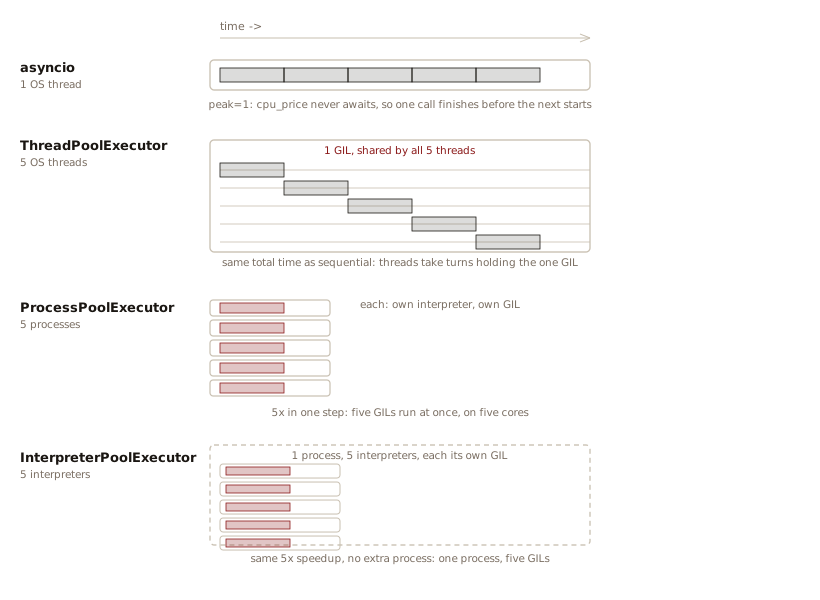
asyncio and a thread
pool run under one GIL, so their calls take turns. A process
pool and an interpreter pool give each worker its own GIL, so
five CPU-bound calls run at once. The interpreter pool keeps all
five workers in one process.
Are Threads Still Necessary?
asyncio overlaps the
waits of I/O-bound work. Processes and subinterpreters run CPU-bound work
on separate cores. With both halves covered, does new code still
need threads?
It does, but not for the reason threads were once the default choice. I/O-Bound vs CPU-Bound divides concurrent work into two kinds, and neither kind needs threads.
Under the standard build, threads remain for one job:
reaching code that doesn’t cooperate with an event loop. Most
database drivers, most GUI toolkits, and plenty of C extensions
block the calling thread and expose no async entry
point.
If Python had always supported
coroutines, you could expect every library to conform. But
rewriting all existing libraries to use asyncio
instead of threads is not realistic. asyncio.to_thread()
is the standard library solution. Thus, even a program written
as asyncio from top to bottom keeps a thread pool
underneath, because the libraries it calls still block.
Under the standard build, then, a thread no longer structures
your concurrency. asyncio does that. A thread’s
remaining job is to run a blocking call away from the event
loop’s thread, so the loop keeps running through the wait.
Free threading leaves I/O-bound work as it was and solves a narrower problem. Without the GIL, a thread can parallelize CPU-bound work from inside one process while sharing memory, with no data to pickle. Neither a GIL-bound thread nor a process pool offers that.
The GIL does not prevent races. With free threading, two threads can execute at the same instant on separate cores. Race conditions become easier to hit.
asyncio switches
only at an await, and that makes it easier to reason about
interleaving. Under free threading a thread still needs an
OS stack and an OS scheduling entity, while an
asyncio task is small enough to run in the
thousands. TaskGroup’s
structured, cancellable batches have no thread equivalent.
Python still offers no safe way to cancel a running thread. Free
threading changes a thread’s job. It leaves
asyncio’s job as it was.
Measuring the Memory
Two numbers support the claim
that a thread uses far more memory than a task. The first is the
stack each new thread reserves. The platform sets its size.
threading.stack_size() changes it for threads
created afterward. A common default across platforms is on the
order of one mebibyte.1
tracemalloc measures a task’s actual heap
footprint, since a task consists of ordinary Python objects.
Dividing the stack size by a task’s footprint gives the number
of tasks one thread’s stack can hold:
# task_vs_thread_memory.py
import asyncio
import tracemalloc
from typing import Final
from benchmark import report

TASKS: Final[int] = 5_000
# 1 MiB, a common thread stack reservation:
STACK_SIZE: Final[int] = 1024 * 1024

async def parked() -> None:
    await asyncio.sleep(999)  # Suspended, never resumes

async def bytes_per_task() -> float:
    tracemalloc.start()
    before = tracemalloc.take_snapshot()
    tasks = [asyncio.create_task(parked())
             for _ in range(TASKS)]
    # Let every task reach its own await
    await asyncio.sleep(0)
    after = tracemalloc.take_snapshot()
    grown = sum(
        stat.size_diff
        for stat in after.compare_to(before, "lineno")
        if stat.size_diff > 0
    )
    for t in tasks:
        t.cancel()
    # Without "return_exceptions=True", the first
    # CancelledError propagates and exits the function:
    await asyncio.gather(*tasks, return_exceptions=True)
    tracemalloc.stop()
    return grown / TASKS

task_cost = asyncio.run(bytes_per_task())
tasks_per_stack = STACK_SIZE / task_cost
report(bytes_per_task=task_cost,
       tasks_per_stack=tasks_per_stack)
print(f"bytes per task under 4 KiB: {task_cost < 4096}")
#: bytes per task under 4 KiB: True
print(f"holds over 200 tasks: {tasks_per_stack > 200}")
#: holds over 200 tasks: True
STACK_SIZE stipulates the stack figure as a
common one-mebibyte default instead of measuring a thread that
ran.
Before a thread runs one line of its target function, its
stack reservation can hold hundreds of suspended tasks. The
stack figure is address space set aside whether the thread
touches every byte or not. The task figure is heap measured by
tracemalloc. The comparison favors tasks over
threads by hundreds to one, against that stipulated reservation
rather than a measured thread footprint.
The exact figures move from machine to machine, so the
listing asserts the two bounds that hold anywhere and prints
what it measured under --numbers.
Measuring the Time
A thread also takes longer to create than a task:
# thread_vs_task_speed.py
import asyncio
import threading
import time
from typing import Final
from benchmark import report

COUNT: Final[int] = 3000

def noop() -> None:
    pass

async def async_noop() -> None:
    pass

def spawn_threads() -> float:
    start = time.perf_counter()
    threads = [threading.Thread(target=noop)
               for _ in range(COUNT)]
    for t in threads:
        t.start()
    for t in threads:
        t.join()
    return time.perf_counter() - start

async def spawn_async_tasks() -> float:
    start = time.perf_counter()
    await asyncio.gather(
        *(async_noop() for _ in range(COUNT)))
    return time.perf_counter() - start

t_threads = spawn_threads()
t_tasks = asyncio.run(spawn_async_tasks())
report(threads=t_threads, tasks=t_tasks)
print(f"tasks at least 5x faster to spawn: "
      f"{t_tasks * 5 < t_threads}")
#: tasks at least 5x faster to spawn: True
Starting and joining 3,000
threads does OS-level work for each one, allocating a stack,
registering with the scheduler, tearing the thread down again.
Scheduling 3,000 tasks skips all of that. gather()
builds Python objects and steps the event loop through them.
How many threads can one machine
support before Thread.start() raises
RuntimeError: can't start new thread? That number
depends on the machine, not on Python. On one well-provisioned
machine, 60,000 threads started in about four seconds with room
to spare, each blocked on a threading.Event that
nothing sets. A laptop with far less memory can fail at a
fraction of that. To find your machine’s number, start threads
that block on a threading.Event that nothing sets
and increase the count until start() raises an
exception. A task’s limit is heap memory alone, because a task
uses neither of the per-thread OS resources that limit threads:
a stack reservation and a scheduler entry.
Guidelines
- Concurrency is a performance tool. Explore Performance before deciding you require a concurrent solution.
- Don’t wrap a lone wait in
async/awaitmachinery.asynciohelps when several waits can overlap. - A comprehension that awaits is not
concurrent.
[await c for c in coroutines]runs one coroutine at a time.gather()andTaskGroupschedule every coroutine as a task before waiting on any of them. - Choose
TaskGroupwhen a failure should stop the batch,gather(return_exceptions=True)when it shouldn’t.TaskGroup’s contract is all-or-cancel.gather()can hand back errors as data alongside the successes. - A read-modify-write that
spans an
awaitstill races, with no thread in sight. Guard it withasyncio.Lock, the same fixthreading.Lockgives threads. - Never call a blocking
function inside a coroutine.
time.sleep()freezes every task on the loop, not just the calling task. Useasyncio.sleep(), or hand the blocking call toasyncio.to_thread(). - Prefer
ProcessPoolExecutorover rawmultiprocessing. A pool fits work shaped like a function call: one call in, one result out. Use rawmultiprocessingwhen the job is a different shape: a worker that runs continuously, or processes that share state through aManager. - More cores speed up only the parallel fraction of the work. Splitting past the number of cores sometimes yields a little more. Then the per-task time spent pickling and reassembling outweighs the finer split, and the gains flatten (Amdahl’s Law).
- For CPU-bound work, try a subinterpreter first, a process pool second, and a free-threaded build only once you know every extension you use supports it.
- Match the queue to the
concurrency model.
queue.Queueblocks a thread,multiprocessing.Queuepickles across processes,asyncio.Queuesuspends a task and needs no locking. - An iterator handed to
several threads needs a lock around
__next__(). A class-based iterator hands out duplicates silently, and a generator raises aValueError. Wrap an existing iterator withthreading.serialize_iterator(), wrap the generator function that makes them withthreading.synchronized_iterator(), and usethreading.concurrent_tee()when every worker needs the whole stream. A lock inside the loop body guards the wrong thing. Theforstatement callsnext()outside the lock. - Pass request-scoped
values in a
ContextVar, not a global. Each task starts from a copy of the context current whencreate_task()runs, andasyncio.to_thread()carries that copy into the worker thread. - A
TaskGroupfailure arrives as anExceptionGroup. Catch it withexcept*. A plainexcept ValueError:around theasync withblock misses it, whether one task failed or several. - Cancellation is a
BaseException, not anException.except Exception:inside a task lets it through, and that is what you want. Catchingasyncio.CancelledErrorand swallowing it leaves theTaskGroupwaiting on a task it cancelled. - Several locks avoid deadlock when every task acquires them in one agreed order. Acquire shared locks in the same sequence everywhere. When two tasks keep yielding to each other instead, break the symmetry so one of them gives way and the other goes ahead.
Concurrency Is Not Easy
People still argue about what the term means. Rob Pike, co-creator of the Go language, famously muddied the waters by declaring, “concurrency is not parallelism” (I’m hoping he meant to say “concurrency is not only parallelism”).2 As this chapter shows, concurrency means “operating or occurring at the same time.” That definition covers both asynchrony and parallelism.
Concurrency also keeps forcing you to learn how the OS works. It exposes details that the abstractions of normal programming hide. Sometimes you need to go beyond the OS-level abstraction, all the way to hardware, to understand a particular bug.
Someone who declares “concurrency is easy!” has dipped their toes in it and has yet to encounter a tricky problem. This chapter makes concurrency look (somewhat) easy because it has touched only the surface of shared mutable state problems.
Even when you understand the problems produced by shared mutable state, you might not have a choice. Some problems preclude immutability. For example, a solution might require packing as much data as possible into RAM. In those cases you nearly always share mutable state. These are the kinds of decisions you must make when you move from the examples in this chapter into serious real-world concurrency.
People continue to work toward better ways of concurrent programming.3 Only in the last decade or so have programmers widely adopted advances such as async/await and structured concurrency. The vocabulary this chapter builds, from processes and threads to tasks and coroutines, is a small corner of the territory.
- Barriers: Make
a group of threads or tasks wait until every one of them
arrives, then release them together. Python provides
threading.Barrierandasyncio.Barrier(3.11). Unlikegather()orTaskGroup, a barrier is a rendezvous point where the running code arrives and blocks, often reused across repeated phases, not a supervisor waiting from outside for everything to finish. - Message passing and channels: Let concurrent units exchange data by sending values instead of sharing memory. Actor languages and CSP, below, are two different disciplines built on this same idea.
- Actor languages: Give each unit of concurrency the shape of an actor, an isolated object that reacts only to messages sent to its mailbox, keeps its state private, and can spawn more actors. The most established production examples include Erlang, built at Ericsson for telephone switches. Elixir is newer and built on Erlang’s BEAM virtual machine.
- Communicating Sequential Processes (CSP): Independent processes that communicate only over shared channels, rather than an actor’s private mailbox. This is the approach behind Go’s goroutines and channels.
- Software transactional memory (STM): Runs a block of code as an atomic transaction against shared memory, retrying automatically if another thread interferes.4
- Memory models and data races: Define which writes by one thread another thread sees for certain, and what the language guarantees when two threads touch the same memory with no synchronization between them.
Exercises
Try each exercise before opening its solution.
- In
async_mechanics.py, add a fourth call,fetch("d", 0.005), to thegather()line. Confirm that “d” starts last but resumes first, and that the printed list still grows to four entries in the order given, not the order they finish. - In
async_mechanics.py, replace thegather()call with[await c for c in coroutines], wherecoroutinesis a list of the same threefetch()calls. Predict the started/resumed trace and the total run time before running it, and explain why this version takes the sum of the three delays. - In
peak_concurrency.py, add a third task function,mixed_price(), that awaitsasyncio.sleep(0.05)and then also runs the 1,000,000-iteration loop fromcpu_price(). Run it throughrun()and predict itsmeter.peakbefore checking: is it closer to the I/O peak or the CPU peak? - In
peak_concurrency.py, changeio_price()’sawait asyncio.sleep(0.05)totime.sleep(0.05)and predict how itsmeter.peakchanges before running it. Explain the result usingblocking_the_loop.py. - In
async_locks.py, replacelock = asyncio.Lock()withsemaphore = asyncio.Semaphore(1), renaming its uses to match. Confirmcounterstill reaches400, and explain why a semaphore initialized to1stands in for a lock here. Then add one straysemaphore.release()before thegather()call and explain the result. - Remove the
if __name__ == "__main__"guard fromparallel_cpu.py, so its body runs unconditionally, and run it. Read the error, whose useful part is theRuntimeErrortraceback each failing child process printed above theBrokenProcessPoolat the bottom, then explain it with the import mechanics described in What a Process Pool Requires: what did each worker process do when it imported the module? - In
gil_race.py, remove thetime.sleep(0.000_001)call and run the script several times. Explain, using The GIL Does Not Prevent Races, why the race becomes far less likely to show up without that sleep, but is not thereby fixed. - In
priority_queue.py, add a third thread submitting[(1, "zzz"), (3, "aaa")]and confirm the drain order still respects priority first, then the description as a tiebreaker. - In
utils/fetch_demo.py, changeFetch("e", 0.2)inFETCHEStoFetch("e", 0.005)soefinishes beforecanddfail, then runtask_group.py. Predict which of the six reportcancelledand which report a result, then run it and explain what aTaskGroupcan and cannot undo. ChangeFETCHESback afterward, sincegather_with_exceptions.pyuses it too. - In
gather_with_exceptions.py, deletereturn_exceptions=Trueand wrap theawaitintry/except ValueError. Predict how manyfetchedlines still print, and explain what became of the tasks whose outcomes thegather()call left unreported. - In
context_var.py, move therequest_id.set()call out ofhandle()and intomain()above theTaskGroup, setting it to"main". Predict what each task prints, then explain the result with “every task starts with a copy of the context current whencreate_task()runs.” - In
subinterpreters.py, replaceInterpreterPoolExecutorwithThreadPoolExecutor. The assertion still passes and the printed boolean flips. Explain both, using The GIL and Free Threading. - In
shared_iterator.py, dropthreading.serialize_iterator()and give each worker a function that loops over the shared iterator, holding athreading.Lockaround the loop body, the tempting fix in Sharing an Iterator Between Threads. Predict whetherduplicatesbecomesFalsebefore running it, and explain which call the lock does and does not cover. - In
async_deadlock.py, change the secondworker()call toworker("task 2", lock_a, lock_b)so both tasks acquire in the same order, and add a line that prints when both finish. Predict what the program prints before running it, then explain, in terms of who waits for whom, why one shared acquisition order removes the cycle. - In
mixed_await.py, replace the body ofprocess_price()withreturn await pool.submit(cpu_price, order). Runtyon the changed file, then run the file, and read the two errors. Explain, using One Task, Many Backends, why you cannot awaitpool.submit()’s return value, whatloop.run_in_executor()returns instead, and why the runtimeTypeErrorarrives wrapped in anExceptionGroup.
A mebibyte (MiB) is 220 while a megabyte (MB) is 106.↩︎
Pike’s definition, from his 2012 talk at Heroku’s Waza conference, clarifies what he meant. Concurrency is the composition of independently executing computations. Parallelism is running those computations at the same time. You can have concurrency without parallelism. The
asyncioexamples in this chapter show it. Coroutines interleave on a single thread, and no two of them ever execute at the same instant.The distinction goes back further than Pike’s talk. Edsger Dijkstra’s 1965 paper, “Solution of a Problem in Concurrent Programming Control,” started the formal study of concurrent programs. Leslie Lamport’s 2015 Turing Lecture, “The Computer Science of Concurrency: The Early Years,” surveys the decades since.↩︎
Libraries to explore:
- BOCPY: Behavior-Oriented Concurrency.
- Trio: Origin of structured concurrency.
- AnyIO: A bridge between Trio and asyncio.
- uvloop: Fast drop-in replacement for the standard event loop. See also rsloop.
- MPIRE:
Makes
multiprocessingeasier and faster. - RAY: Distribute tasks across multiple CPUs, GPUs, and clusters.
- Dask: Parallelizes tools like NumPy, Pandas, and Scikit-Learn.
Python has no mainstream STM library today. PyPy-STM, an experimental PyPy variant from 2012 to 2015, used STM internally to remove the GIL and exposed a
with __pypy__.thread.atomic:block for ordinary Python code. PyPy’s own documentation now treats it as discontinued. CPython’s free-threaded build removes the GIL with fine-grained locking instead. A couple of academic prototypes exist (PSTM, TraM), but neither is a maintained library suited to real code. Haskell’sControl.Concurrent.STMand Clojure’sref/dosyncare where STM succeeded as a practical, widely used tool.↩︎