Factory

When a system needs new types, start with a base type that gives them a common interface. The common interface separates the rest of your code from knowledge of the specific types you add. Adding a type then means writing one subclass, with no changes to existing code … or so it seems. But something must still create an object of the new type, and that creation code names the concrete class. If object creation is spread throughout your application, adding a type means finding and editing every place that names a concrete class.
Here Triangle has just joined the hierarchy. Two
call sites build shapes by naming Circle or
Square directly, and neither has been updated for
Triangle:
# shapes_naive.py
from abc import ABC, abstractmethod
from typing import override
from exceptions import expect

class Shape(ABC):
    @abstractmethod
    def draw(self) -> None: ...
    @abstractmethod
    def svg(self) -> str: ...

class Circle(Shape):
    @override
    def draw(self) -> None: print("Circle.draw")
    @override
    def svg(self) -> str: return '<circle r="1"/>'

class Square(Shape):
    @override
    def draw(self) -> None: print("Square.draw")
    @override
    def svg(self) -> str:
        return '<rect width="1" height="1"/>'

class Triangle(Shape):
    @override
    def draw(self) -> None: print("Triangle.draw")
    @override
    def svg(self) -> str:
        return '<polygon points="0,0 1,0 0,1"/>'

def render(kind: str) -> None:
    if kind == "Circle":
        Circle().draw()
    elif kind == "Square":
        Square().draw()

def export_svg(kind: str) -> None:
    match kind:
        case "Circle":
            print(Circle().svg())
        case "Square":
            print(Square().svg())
        case _:
            raise ValueError(f"Unknown shape: {kind}")

render("Circle")
#: Circle.draw
render("Triangle")  # Draws nothing, reports nothing
export_svg("Square")
#: <rect width="1" height="1"/>
expect(ValueError, export_svg, "Triangle")
#: [ValueError] Unknown shape: Triangle
The two call sites fail in different ways.
render() accepts "Triangle" and draws
nothing, with no error to signal the gap.
export_svg() has a wildcard case that raises an
exception, so it does report the gap, but only at runtime, when
someone first asks it for a triangle. Nothing at edit time
points at the missing case, and the type checker cannot know
which strings export_svg() was meant to handle. An
Enum for kind and an
assert_never() wildcard moves that report to check
time (Pattern
Matching), though an if-chain like render()
still slips past it. Either way, adding a type means editing
every call site.
The solution is to encapsulate object creation. A common factory creates every object instead of spreading creational code through the system. Your program must call this factory whenever it needs an object, so adding a new type only changes the factory.
Every object-oriented program creates objects, and you often extend such programs by adding new types. Thus, Factory might be the most common design pattern.
This chapter covers the creational patterns of GoF Design Patterns: Factory Method, Abstract Factory, Prototype, and Builder. The fifth, Singleton, has its own chapter. All five answer two questions: which object to build, and what code builds it.
Simple Factory Method
Consider a Shape hierarchy in the style of Rethinking
Objects, here with draw() and
erase(). We can add a factory as a
@staticmethod of the base class:
# shape_factory_method.py
import random
from abc import ABC, abstractmethod
from collections.abc import Iterator
from typing import override

class Shape(ABC):
    @abstractmethod
    def draw(self) -> None: ...
    @abstractmethod
    def erase(self) -> None: ...
    # Create based on class name:
    @staticmethod
    def factory(kind: str) -> Shape:
        match kind:
            case "Circle":
                return _Circle()
            case "Square":
                return _Square()
            case _:
                raise ValueError(f"Bad shape: {kind}")

class _Circle(Shape):
    @override
    def draw(self) -> None: print("Circle.draw")
    @override
    def erase(self) -> None: print("Circle.erase")

class _Square(Shape):
    @override
    def draw(self) -> None: print("Square.draw")
    @override
    def erase(self) -> None: print("Square.erase")

def shape_name(n: int) -> Iterator[str]:
    for _ in range(n):
        cls = random.choice(Shape.__subclasses__())
        yield cls.__name__.removeprefix("_")

if __name__ == "__main__":
    random.seed(4)  # Reproducible shape sequence
    shapes = [Shape.factory(s) for s in shape_name(4)]
    for shape in shapes:
        shape.draw()
        shape.erase()
#: Circle.draw
#: Circle.erase
#: Square.draw
#: Square.erase
#: Circle.draw
#: Circle.erase
#: Square.draw
#: Square.erase
The factory() argument indicates the type of
Shape to create. Here that argument is a string,
but it could be any kind of data. Apart from the new subclass,
factory() is the only code that changes when you
add a new type of Shape. GoF Design
Patterns defines Factory Method as a creation
method that subclasses override to choose the concrete type.
This factory() is the smallest version of that
idea: one class, one method, and a match where the
overrides would be. Subclasses Choose the
Type shows the subclass-override form.
shape_name() is a generator.
Whereas a factory takes information telling it what to build, a
generator object does the opposite: it holds an internal
algorithm and needs no argument to produce the next value.
shape_name() takes n (the maximum
number of shapes the generator can produce) and returns a
generator object. That object produces names on demand. Those
names are the arguments to Shape.factory().
Normally the initialization data comes from outside the system
rather than through random generation.
Inside shape_name(),
Shape.__subclasses__() produces a list of
Shape’s direct subclasses.
__subclasses__() covers only the first level of
inheritance, so a class inheriting from _Circle is
not in the list. For a deeper hierarchy, recurse through each
subclass’s own __subclasses__(). Exercise 9 writes
that recursion.
The concrete shapes carry a leading underscore because no
caller needs their names. factory() returns
Shape, so a caller only works with
Shapes and never writes _Circle. The
underscore discourages direct construction, but this is a
convention rather than concealment. Singleton
makes the same case, and keeps its bare Settings
name because settings() returns that type, which
callers must write. shape_name() strips the
underscore, so the name a caller passes to
factory() is "Circle", not
_Circle.
Nesting the classes inside factory() looks like
stronger enforcement, but is worse. Because a class
statement is executable code, every factory() call
would define fresh Circle and Square
classes. Two shapes from different calls would then share
behavior but not a class, failing
type(a) is type(b) and isinstance()
alike. Shape.__subclasses__() would be empty until
the first call, then gain a duplicate Circle and
Square on every call after that.
Alternative Constructors Are Factories
Month.of() in Data
Classes as Types is an alternative constructor, a method on
the type that builds an instance from data the constructor
rejects. There, Month(7) raises a
ValueError because no member has the value
7, while Month.of(7) returns
JULY. This is also a factory, of the same form as
factory(). Both are static methods within the type.
Each takes data and returns an instance, and each raises an
exception for data it does not recognize; for
Month, a number outside one through twelve.
of() needs no match. The
Enum already holds every member it could return, so
of() indexes list(Month) instead of
naming a class. A factory over a closed set of products
collapses to a lookup, the form the next section builds by hand,
and then lets the classes fill for an open set.
from_fahrenheit() in Classes
is the usual form of alternative constructor: a
@classmethod that computes the constructor’s
arguments and ends with return cls(...). That form
is the most common factory in Python code, and
dict.fromkeys() and
datetime.fromisoformat() are two from the standard
library. It chooses arguments rather than a class, so a subclass
that calls it gets an instance of the subclass with no
override.
The Pythonic Factory: a Dictionary
A factory turns data, such as a name, into an object without
scattering constructors through your code. In Python a class is
a first-class object. You can store it in a variable and call it
to construct an instance. You saw this in
defaultdict(list) in Containers
and field(default_factory=list) in Data
Classes as Types. Both take a class where a function would
do, and call it whenever they need a fresh value.
Thus, the simplest factory is a dictionary that maps names to classes, without a factory method or factory class:
# shape_table.py
from abc import ABC, abstractmethod
from typing import Final, Literal, override

class Shape(ABC):
    @abstractmethod
    def draw(self) -> None: ...

class Circle(Shape):
    @override
    def draw(self) -> None: print("Circle.draw")

class Square(Shape):
    @override
    def draw(self) -> None: print("Square.draw")

Kind = Literal["Circle", "Square"]

SHAPES: Final[dict[Kind, type[Shape]]] = {
    "Circle": Circle,
    "Square": Square,
}

def make(kind: Kind) -> Shape:
    return SHAPES[kind]()

make("Circle").draw()
#: Circle.draw
make("Square").draw()
#: Square.draw
# ty: expected Literal["Circle", "Square"],
# found Literal["Hexagon"]:
# make("Hexagon").draw()
Because the dict values are classes,
type[Shape] is their type, and calling one
constructs an instance. Adding a Triangle means one
new class and one new line in SHAPES, and one new
member in Kind. Typing kind as the
closed Literal instead of str moves a
bad name from a runtime KeyError to a check-time
error, the same trade Abstract
Factories makes with a Protocol.
Kind names the two members SHAPES
already has, and the checker rejects a key that
Kind does not list, so SHAPES cannot
gain a shape name without adding it to the Literal
first.
Self Registration
It would be even nicer if a new Shape subclass
would register itself with no edit to existing code. In this
case, a closed Literal would complicate things by
requiring an edit for every new subclass. A closed set of names
suits Literal, while an open set does not:
# registry.py
from abc import ABC, abstractmethod
from typing import ClassVar, override

class Shape(ABC):
    registry: ClassVar[dict[str, type[Shape]]] = {}

    def __init_subclass__(cls, **kwargs: object) -> None:
        super().__init_subclass__(**kwargs)
        Shape.registry[cls.__name__] = cls

    @abstractmethod
    def draw(self) -> None: ...

class Circle(Shape):
    @override
    def draw(self) -> None: print("Circle.draw")

class Square(Shape):
    @override
    def draw(self) -> None: print("Square.draw")

def make(name: str) -> Shape:
    return Shape.registry[name]()
__init_subclass__() (see Metaprogramming)
lets each subclass register itself. Nothing in the listing calls
a register function; the two class statements fill
Shape.registry on their own. This is why
Shape is an abstract base class rather than a
Protocol. __init_subclass__() runs
only for classes that inherit from Shape, so a
class that merely matches a Protocol’s shape never registers.
Inheritance is the mechanism, and ABC adds one
guard on top of that. Registration runs as its
class statement executes, so a subclass that
forgets draw() still registers. make()
then fails at construction with a TypeError rather
than at the first draw() call. No type checker
reports that case, because Shape.registry[name]()
calls a type[Shape], and any of those may be a
concrete subclass. Explicit
Registration with a Protocol moves that report to the
check.
Importing registry runs its two
class statements, and the key list shows the table
they left behind:
# registry_demo.py
from exceptions import expect
from registry import Shape, make

print(sorted(Shape.registry))
#: ['Circle', 'Square']
for name in ["Circle", "Square", "Circle"]:
    make(name).draw()
#: Circle.draw
#: Square.draw
#: Circle.draw
expect(KeyError, make, "Triangle")
#: [KeyError] 'Triangle'
make("Triangle") fails with a
KeyError naming the missing key, because no class
has registered under that name. The closed Literal
in shape_table.py rejected
"Hexagon" before the program ran. An open registry
cannot do that, since a name becomes valid the moment some
module defines the class, so the check moves to runtime.
To add a Triangle is a single class definition,
and make() builds it with no change to the factory.
Shape.__subclasses__() could have built the table
instead, but it lists only direct subclasses, while
__init_subclass__() runs for every class anywhere
below Shape. Pattern
Refactoring uses this same self-registration.
__init_subclass__() runs as the subclass’s
class statement executes. When the subclasses sit
in the same file as make(), as in registry.py, the
registration runs before anything calls make(), but
a subclass defined in another module registers itself only when
something imports that module. The classic failure is a plugin
that “never registered”: the class is fine, the registry is
fine, and nothing imported the module that defines the class. A
lazy
import produces the same failure even when the import
statement is in the file. The module body, and with it the
registration, does not run until the first use of the imported
name. An import written only to trigger registration never uses
that name. Running with -X lazy_imports=all makes
ordinary imports lazy too, so the same failure can appear in a
program with no lazy keyword in it. Import a plugin
module eagerly when the import exists for its side effect.
The registry keys on cls.__name__ alone, so two
classes that share a name, from different modules, silently
overwrite each other. Key on
f"{cls.__module__}.{cls.__qualname__}" when a
collision is possible. The registry also never removes an entry:
a class defined inside a function or a test stays in the table,
and the strong reference keeps it alive for the rest of the
process.
__init_subclass__() names
Shape.registry rather than
cls.registry on purpose: cls.registry
resolves through the MRO, so a
subclass that defines its own registry would create
a second table that make() never reads, with no
error to signal it.
make() stays a module-level function for two
reasons. A @classmethod would look up
cls.registry, so a subclass with its own
registry would send Triangle.make() to
that second table, the one __init_subclass__()
avoids by naming Shape.registry. And
Circle.make("Square") would be legal as well as
misleading, since the key decides what make()
builds, not the class you name before the dot. A method of any
kind would also put back the factory method this section set out
to remove.
Testing confirms that every subclass registers itself, and
that a new subclass needs no change to make().
Defining a fresh subclass of Shape inside the test
is enough to put it in the registry:
# test_registry.py
from typing import override
import pytest
from registry import Circle, Shape, Square, make

def test_subclasses_auto_register() -> None:
    assert Shape.registry["Circle"] is Circle
    assert Shape.registry["Square"] is Square

def test_make_builds_the_right_type() -> None:
    assert isinstance(make("Circle"), Circle)
    assert isinstance(make("Square"), Square)

def test_new_subclass_registers_itself() -> None:
    class Triangle(Shape):
        @override
        def draw(self) -> None: ...

    assert Shape.registry["Triangle"] is Triangle
    assert isinstance(make("Triangle"), Triangle)

def test_unknown_name_raises() -> None:
    with pytest.raises(KeyError):
        make("Hexagon")
The last test asks for "Hexagon" rather than the
"Triangle" that registry_demo.py used,
because the Triangle defined in the previous test
is still in the registry. A make("Triangle") here
would succeed, because the registry keeps every entry it has
taken.
Explicit Registration with a Protocol
The ABC in registry.py exists so that
__init_subclass__() has a class to run from. If
registration is explicit instead, Shape can be a
Protocol, with a class decorator doing the registering:
# protocol_registry.py
from typing import Final, Protocol

class Shape(Protocol):
    def draw(self) -> None: ...

REGISTRY: Final[dict[str, type[Shape]]] = {}

def register[S: Shape](cls: type[S]) -> type[S]:
    REGISTRY[cls.__name__] = cls
    return cls

@register
class Circle:
    def draw(self) -> None: print("Circle.draw")

@register
class Square:
    def draw(self) -> None: print("Square.draw")

def make(name: str) -> Shape:
    return REGISTRY[name]()

print(sorted(REGISTRY))
#: ['Circle', 'Square']
make("Circle").draw()
#: Circle.draw
# ty: Argument type `Blob` does not satisfy
# upper bound `Shape` of type variable `S`:
# @register
# class Blob:
#     pass
register() is the decorator from Decorators
with one change: its type parameter is bounded to
Shape. The bound turns the decorator into a check.
A decorated class must satisfy the Protocol, so a class without
draw(), or with a draw() that takes an
extra parameter, draws invalid-argument-type at its
@register line before the program runs. That is the
case the previous section left to runtime, where a subclass that
forgot draw() registered, failed at construction,
and no checker saw it. REGISTRY holds
type[Shape] values and ty accepts
calling one, so make() needs no change.
Two hazards from the previous section disappear with the
class attribute. There is no cls.registry to
resolve through the MRO, and no class for a
@classmethod to sit on, since the table is a
module-level name that make() reads directly. An
intermediate class also stays out of the table unless something
decorates it. Under __init_subclass__(), an
abstract Polygon between Shape and
Triangle registers as well, and
make("Polygon") fails with a
TypeError.
The cost is the mirror failure. Registration is opt-in, so a
class that satisfies Shape but lacks
@register is absent from the table, and
make() fails with a KeyError that
points at nothing. Exercise 10 writes a check that finds the
missing decorator. Inheriting from the ABC cannot be forgotten
that way, because the subclass line is the registration. The
runtime guard is weaker too. A class that ignores the checker’s
report still registers, and fails with an
AttributeError at its first draw()
call rather than a TypeError at construction.
Choose the failure you prefer: the ABC catches the incomplete
class when it is built, the Protocol when it is checked.
The ordinary Python factory is a dictionary of classes, whether you fill it by hand, the classes fill it themselves, or a decorator fills it for them. That is the dissolution Design Patterns describes: the pattern remains, but no longer needs a class hierarchy to express it. The remaining sections cover the classic object-oriented factories, for contrast.
Factory Objects
Because the static factory() method in shape_factory_method.py
collects all the creation operations in one place, that method
is the only code you change. A factory object defines a
single create() method, so choosing what to build
becomes choosing which factory object to call, rather than
passing a string to a match statement. Here, we
create one factory object per Shape subtype:
# shape_factory_objects.py
import random
from abc import ABC, abstractmethod
from collections.abc import Iterator
from typing import Final, Protocol, override

class ShapeMaker(Protocol):
    def create(self) -> Shape: ...

class Shape(ABC):
    @abstractmethod
    def draw(self) -> None: ...
    @abstractmethod
    def erase(self) -> None: ...

class _Circle(Shape):
    @override
    def draw(self) -> None: print("Circle.draw")
    @override
    def erase(self) -> None: print("Circle.erase")
    class Factory:
        def create(self) -> _Circle: return _Circle()

class _Square(Shape):
    @override
    def draw(self) -> None: print("Square.draw")
    @override
    def erase(self) -> None: print("Square.erase")
    class Factory:
        def create(self) -> _Square: return _Square()

FACTORIES: Final[dict[str, ShapeMaker]] = {
    "Circle": _Circle.Factory(),
    "Square": _Square.Factory(),
}

def create_shape(kind: str) -> Shape:
    return FACTORIES[kind].create()

def shape_name(n: int) -> Iterator[str]:
    types = Shape.__subclasses__()
    for _ in range(n):
        cls = random.choice(types)
        yield cls.__name__.removeprefix("_")

if __name__ == "__main__":
    random.seed(4)
    shapes = [create_shape(kind) for kind in shape_name(4)]
    for shape in shapes:
        shape.draw()
        shape.erase()
#: Circle.draw
#: Circle.erase
#: Square.draw
#: Square.erase
#: Circle.draw
#: Circle.erase
#: Square.draw
#: Square.erase
Each type of shape defines its own nested
Factory class whose create() method
builds an object of that type. ShapeMaker is the
interface those factories share. Here it is a
Protocol, so the two nested Factory
classes conform without naming it. FACTORIES maps
each kind’s name to an instance of its factory, and
create_shape() looks up that factory and calls its
create().
A more complex design returns the factory object to the
caller, who keeps it to construct objects later. Much of the
time, however, a single static method in the base class (as in
shape_factory_method.py)
is enough.
Python does not need a Factory class nested in
every shape. shape_factory_objects.py
includes one because a language that cannot store a class in a
dictionary must wrap each constructor in an object. The registry
in registry.py does the same
job with no nested classes. Use a separate factory class when
object creation needs work beyond calling a constructor, such as
pooling, caching, or consulting external configuration.
You could eliminate FACTORIES by dispatching
through eval(f"_{kind}.Factory()"). That is
unnecessary and it makes things worse.
create_shape() then compiles and runs any string it
receives, so a configuration file, a request, or a command line
can hand it arbitrary code instead of a shape name. Using the
dictionary lookup gives you type safety: you get either a
factory or a KeyError.
Subclasses Choose the Type
Every factory so far keeps the choice in one place: a
match in factory(), a key in
SHAPES, a lookup in FACTORIES.
Factory Method moves the choice into the type of the
object you already hold. A base class calls a creation method it
does not implement, and each subclass overrides that method to
name a concrete product:
# shape_sketch.py
from abc import ABC, abstractmethod
from typing import override

class Shape(ABC):
    @abstractmethod
    def draw(self) -> None: ...

class Circle(Shape):
    @override
    def draw(self) -> None: print("Circle.draw")

class Square(Shape):
    @override
    def draw(self) -> None: print("Square.draw")

class Sketch(ABC):
    # The factory method:
    @abstractmethod
    def new_shape(self) -> Shape: ...
    def render(self, n: int) -> None:
        for _ in range(n):
            self.new_shape().draw()

class CircleSketch(Sketch):
    @override
    def new_shape(self) -> Shape: return Circle()

class SquareSketch(Sketch):
    @override
    def new_shape(self) -> Shape: return Square()

for sketch in (CircleSketch(), SquareSketch()):
    sketch.render(2)
#: Circle.draw
#: Circle.draw
#: Square.draw
#: Square.draw
render() uses a Shape without
naming one. new_shape() is the factory method, and
the only thing CircleSketch and
SquareSketch change. Adding a Triangle
means one new Shape subclass and one new
Sketch subclass, with no edit to code that already
works. This is the form GoF Design Patterns describes,
and the reason the pattern is named for a method rather than for
a class.
The price is a second hierarchy. Each product needs a creator
that produces it, so the two hierarchies grow together. The
second hierarchy is worth having only when the creator does work
of its own, as render() does here. When choosing
the class is the creator’s only job, a dictionary of classes
says the same thing with no second hierarchy: shape_table.py when the
set of shapes is closed, protocol_registry.py when
it is open.
Abstract Factories
The Abstract Factory pattern has the same structure
as Sketch, with not one but several factory
methods, each overridden in a concrete factory. Each factory
method creates a different kind of object. When you create the
factory object, you choose the concrete version of every object
that factory creates. The example in GoF Design
Patterns makes one program work across several graphical
user interfaces (GUIs). You create a factory object for the GUI
you’re working with, and from then on when you ask that factory
for a menu, button, or slider, it creates the version of that
item suited to that GUI. The change from one GUI to another then
touches only a single place in the code, most likely via startup
configuration.
As another example, suppose you are creating a general-purpose gaming environment that supports different types of games. Here’s how it might look using an abstract factory:
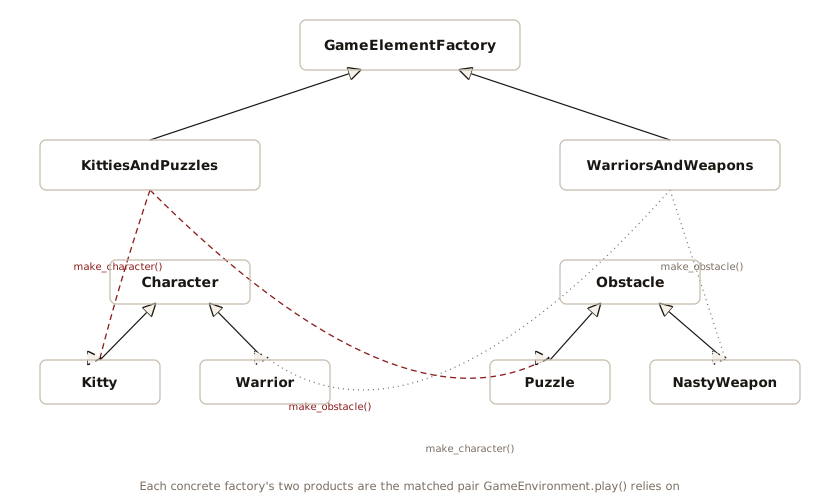
Character and Obstacle are parallel
hierarchies, and each concrete factory declares one method per
hierarchy. KittiesAndPuzzles always pairs a
Kitty with a Puzzle,
WarriorsAndWeapons always pairs a
Warrior with a Weapon, and
GameEnvironment.play() depends on getting such a
matched pair. Choosing the factory chooses both halves at
once:
# abstract_factory_abc.py
from abc import ABC, abstractmethod
from typing import override

class Obstacle(ABC):
    @abstractmethod
    def description(self) -> str: ...

class Character(ABC):
    @abstractmethod
    def interact_with(self, obstacle: Obstacle) -> None: ...

class Kitty(Character):
    @override
    def interact_with(self, obstacle: Obstacle) -> None:
        print("Kitty encounters a", obstacle.description())

class Warrior(Character):
    @override
    def interact_with(self, obstacle: Obstacle) -> None:
        print("Warrior battles a", obstacle.description())

class Puzzle(Obstacle):
    @override
    def description(self) -> str:
        return "Puzzle"

class Weapon(Obstacle):
    @override
    def description(self) -> str:
        return "Weapon"

# The Abstract Factory:
class GameElementFactory(ABC):
    @abstractmethod
    def make_character(self) -> Character: ...
    @abstractmethod
    def make_obstacle(self) -> Obstacle: ...

# Concrete factories:
class KittiesAndPuzzles(GameElementFactory):
    @override
    def make_character(self) -> Character: return Kitty()
    @override
    def make_obstacle(self) -> Obstacle: return Puzzle()

class WarriorsAndWeapons(GameElementFactory):
    @override
    def make_character(self) -> Character: return Warrior()
    @override
    def make_obstacle(self) -> Obstacle: return Weapon()

class GameEnvironment:
    def __init__(self, factory: GameElementFactory) -> None:
        self.character = factory.make_character()
        self.obstacle = factory.make_obstacle()
    def play(self) -> None:
        self.character.interact_with(self.obstacle)

g1 = GameEnvironment(KittiesAndPuzzles())
g2 = GameEnvironment(WarriorsAndWeapons())
g1.play()
#: Kitty encounters a Puzzle
g2.play()
#: Warrior battles a Weapon
Character objects interact with
Obstacle objects, but the types of characters and
obstacles depend on the game you’re playing. You determine the
game by choosing a particular GameElementFactory.
The GameEnvironment controls the setup and play of
the game. Setup and play are simple here, but the initial
conditions and the way the state changes can determine much of a
game’s outcome. GameEnvironment has no place to
vary the rules of play, so a real game would add one: a subclass
overriding play(), or a rules object passed
alongside the factory.
interact_with() dispatches on the character’s
type and obstacle.description() dispatches again on
the obstacle’s. Thus, the pair of calls chooses behavior from
both types. Multiple
Dispatching develops that pair of calls into a
technique.
Obstacle, Character, and
GameElementFactory are abstract base classes. Each
one lists the methods its subclasses must supply, as
@abstractmethods with no body. Suppose you write a
factory subclass and forget make_obstacle(). Python
defines the class, and the TypeError appears when
you create an instance, before
GameEnvironment.__init__() calls anything, the same
way Shape fails in this chapter’s earlier listings
and Partial() did in Surrogate. A
Protocol names the required methods and needs no base
class, which simplifies the Abstract Factory:
# abstract_factory_protocol.py
from typing import Protocol

class Obstacle(Protocol):
    def description(self) -> str: ...

class Character(Protocol):
    def interact_with(self, obstacle: Obstacle) -> None: ...

class GameElementFactory(Protocol):
    def make_character(self) -> Character: ...
    def make_obstacle(self) -> Obstacle: ...

class Kitty:
    def interact_with(self, obstacle: Obstacle) -> None:
        print("Kitty encounters a", obstacle.description())

class Warrior:
    def interact_with(self, obstacle: Obstacle) -> None:
        print("Warrior battles a", obstacle.description())

class Puzzle:
    def description(self) -> str: return "Puzzle"

class Weapon:
    def description(self) -> str: return "Weapon"

# Concrete factories:
class KittiesAndPuzzles:
    def make_character(self) -> Kitty: return Kitty()
    def make_obstacle(self) -> Puzzle: return Puzzle()

class WarriorsAndWeapons:
    def make_character(self) -> Warrior: return Warrior()
    def make_obstacle(self) -> Weapon: return Weapon()

class GameEnvironment:
    def __init__(self, factory: GameElementFactory) -> None:
        self.character = factory.make_character()
        self.obstacle = factory.make_obstacle()
    def play(self) -> None:
        self.character.interact_with(self.obstacle)

class BrokenFactory:
    def make_character(self) -> Kitty: return Kitty()

g1 = GameEnvironment(KittiesAndPuzzles())
g2 = GameEnvironment(WarriorsAndWeapons())
# ty: expected "GameElementFactory", found "BrokenFactory":
# GameEnvironment(BrokenFactory())
g1.play()
#: Kitty encounters a Puzzle
g2.play()
#: Warrior battles a Weapon
The type checker verifies that each concrete class satisfies
the appropriate Protocol: a
GameElementFactory must supply
make_character() and make_obstacle(),
a Character must supply
interact_with(), and an Obstacle must
supply description(). BrokenFactory
supplies make_character() and omits
make_obstacle(). If you uncomment the line that
passes a BrokenFactory to
GameEnvironment, the checker reports
protocol member make_obstacle is not defined on type BrokenFactory.
With the Protocol, the checker reports the omission before
the program runs. That is earlier than the construction-time
TypeError from the abstract base classes in abstract_factory_abc.py,
the same failure Surrogate showed.
Checking against a Protocol is structural typing from Static
Types. Structural typing preserves the purpose of the
interfaces, without the coupling a shared base class
imposes.
Prototype
The factories so far build each object from a class and some arguments. Prototype instead keeps one fully configured instance and makes new objects by copying it. Use Prototype when a ready-made instance is easier to clone than to construct, or when construction is slow and the instances share most of the setup.
The copy module does the cloning.
copy.deepcopy() follows every reference, so the
clone shares no mutable state with the original:
# prototype.py
import copy
from dataclasses import dataclass, field

@dataclass
class Monster:
    name: str
    hp: int
    powers: list[str] = field(default_factory=list)

    def clone(self) -> Monster:
        return copy.deepcopy(self)

goblin = Monster("Goblin", hp=10, powers=["bite"])
# Build a variant by cloning and adjusting:
captain = goblin.clone()
captain.name = "Captain"
captain.hp = 20
captain.powers.append("rally")
print(goblin)
#: Monster(name='Goblin', hp=10, powers=['bite'])
print(captain)
#: Monster(name='Captain', hp=20, powers=['bite', 'rally'])
shallow = copy.copy(goblin)
shallow.powers.append("shared")
print(goblin.powers)  # The original changed too
#: ['bite', 'shared']
# Rebuild through the constructor with new field values:
knight = copy.replace(goblin, name="Knight", hp=30)
print(knight)
#: Monster(name='Knight', hp=30, powers=['bite', 'shared'])
print(knight.powers is goblin.powers)
#: True
Because the clone() method wraps
copy.deepcopy(), captain gets its own
powers list, and appending to it leaves
goblin.powers unchanged. The shallow
lines are a warning, not an example to follow:
copy.copy() duplicates the Monster and
shares its powers list, so changing that list
through one object changes it for the other, with no error to
signal it.
deepcopy() restores the clone’s state without
running the constructor, so a __post_init__() check
never sees the clone (Data
Classes as Types shows which copying calls run it). A
prototype of a validated type is safe because the prototype was
valid, not because the clone was checked. When the variant
differs only in field values, copy.replace() builds
it through the constructor, as knight shows, so a
__post_init__() check runs on the result. Every
field you do not name is passed by reference, which is why
knight shares goblin’s
powers list, the same sharing shallow
showed. Pass a fresh list for that field when the variant must
own one.
deepcopy() copies everything it can reach, and
it has no way to copy an open file, a socket, or a lock, so a
prototype holding one makes deepcopy() raise
TypeError: cannot pickle '_thread.lock' object.
Give such a class a __deepcopy__() that says what
the copy holds instead: a fresh connection, or an empty slot the
clone fills when it first needs one.
You can combine Prototype with a registry. Instead of a registry of classes, keep a registry of prototypical instances and clone the chosen one:
# prototype_registry.py
import copy
from dataclasses import dataclass, field
from typing import Final

@dataclass
class Monster:
    name: str
    hp: int
    powers: list[str] = field(default_factory=list)

PROTOTYPES: Final[dict[str, Monster]] = {
    "goblin": Monster("Goblin", hp=10, powers=["bite"]),
    "troll": Monster("Troll", hp=40,
                     powers=["smash", "regen"]),
}

def spawn(kind: str) -> Monster:
    return copy.deepcopy(PROTOTYPES[kind])

if __name__ == "__main__":
    a = spawn("goblin")
    b = spawn("goblin")
    b.hp = 5
    print(a.hp, b.hp)  # The copies are independent
    print(spawn("troll"))
#: 10 5
#: Monster(name='Troll', hp=40, powers=['smash', 'regen'])
Because spawn() returns an independent object
every time, callers can modify their copy without modifying the
prototype. Compare spawn() with make()
in registry.py. There the
table holds classes and make() calls one. Here the
table holds instances and spawn() copies one. Use
the prototype form when the interesting part of an object is its
configured state rather than its type.
These tests check the two required properties for a prototype registry. Each spawn must be independent, and the stored prototype must never change:
# test_prototype.py
from prototype_registry import PROTOTYPES, spawn

def test_clone_is_independent() -> None:
    a = spawn("goblin")
    b = spawn("goblin")
    b.powers.append("curse")
    assert a.powers == ["bite"]
    assert b.powers == ["bite", "curse"]

def test_prototype_untouched() -> None:
    spawned = spawn("troll")
    spawned.hp = 1
    spawned.powers.append("bellow")
    assert PROTOTYPES["troll"].hp == 40
    # deepcopy: the list is not shared either
    assert PROTOTYPES["troll"].powers == ["smash", "regen"]
Builder
Builder is the last of the creational patterns. It builds a complex object in steps, keeping the step-by-step assembly separate from the finished object. In Java and C++, a class with many optional settings needs a constructor for every useful combination, because those languages have no keyword arguments. That pile of constructors is the telescoping constructor, and Builder is the workaround, a companion class that collects settings one method call at a time. The GoF Design Patterns structure looks like this:
# pizza_builder.py
from dataclasses import dataclass
from typing import Self

@dataclass(frozen=True)
class Pizza:
    size: int
    cheese: bool
    toppings: tuple[str, ...]

class PizzaBuilder:
    def __init__(self) -> None:
        self._size = 12
        self._cheese = True
        self._toppings: list[str] = []

    def size(self, inches: int) -> Self:
        self._size = inches
        return self

    def no_cheese(self) -> Self:
        self._cheese = False
        return self

    def topping(self, name: str) -> Self:
        self._toppings.append(name)
        return self

    def build(self) -> Pizza:
        return Pizza(
            self._size, self._cheese, tuple(self._toppings))

if __name__ == "__main__":
    pizza = (PizzaBuilder()
             .size(16)
             .topping("basil")
             .topping("olives")
             .build())
    print(pizza)
#: Pizza(size=16, cheese=True, toppings=('basil', 'olives'))
Calls can be chained because each setter returns
self. build() freezes the accumulated
settings into an immutable Pizza.
The builder is quietly single-use. build() reads
self._toppings without clearing it, so a second
build() on the same builder returns a pizza
carrying the first one’s toppings, and every
.topping() call in between adds to that same list.
The chained call in __main__ never shows the
problem, because it keeps no reference to the builder after
build() returns. Making the builder reusable means
resetting the fields in build(), and that reset
removes the other reasonable use: configuring a builder once and
building from it twice.
Even without that ambiguity, the builder class solves a problem Python does not have. Keyword arguments with defaults are Python’s built-in builder:
# pizza_direct.py
from dataclasses import dataclass, replace

@dataclass(frozen=True)
class Pizza:
    size: int = 12
    cheese: bool = True
    toppings: tuple[str, ...] = ()

if __name__ == "__main__":
    pizza = Pizza(size=16, toppings=("basil", "olives"))
    print(pizza)
    family = replace(pizza, size=20)
    print(family)
#: Pizza(size=16, cheese=True, toppings=('basil', 'olives'))
#: Pizza(size=20, cheese=True, toppings=('basil', 'olives'))
Every combination of settings is a single call. The call site names each option just as the chain does, and the fields, not a second class, declare the defaults.
A second use for builder chains is to vary an existing
configuration. For a frozen data class, replace()
is Prototype and Builder in one function, copying the configured
state and changing the chosen fields in the copy.
copy.replace() is the general
form of the operation, and works on any object that defines
__replace__().
Testing confirms that the two forms produce the same pizza, and the single-use hazard:
# test_pizza.py
from dataclasses import replace
import pizza_builder as pb
import pizza_direct as pd

def test_builder_and_keywords_agree() -> None:
    built = (pb.PizzaBuilder()
             .size(16).topping("basil").build())
    direct = pd.Pizza(size=16, toppings=("basil",))
    assert (built.size, built.cheese, built.toppings) == (
        direct.size, direct.cheese, direct.toppings)

def test_replace_varies_one_field() -> None:
    base = pd.Pizza()
    variant = replace(base, size=18)
    assert base.size == 12 and variant.size == 18
    assert variant.toppings == base.toppings

def test_second_build_reuses_toppings() -> None:
    builder = pb.PizzaBuilder().topping("basil")
    first = builder.build()
    second = builder.topping("olives").build()
    assert first.toppings == ("basil",)
    assert second.toppings == ("basil", "olives")
The (unrelated) Decorator
pattern has its own Pizza, modeling toppings as
wrapper objects instead of builder-collected fields.
Builder remains useful in Python when construction is
genuinely a process. The steps must come in order, later steps
depend on earlier ones, and some rules apply across several
steps. GameBuilder in Simulation
shows this approach. It assembles a maze in three stages:
creating rooms, connecting doors, then pairing the teleports
that share a target letter. Each stage relies on the previous
stage. No single constructor call can express that. The standard
library’s argparse.ArgumentParser has the same
shape. add_argument() calls accumulate a
specification, and parse_args() is the
build().
The smallest builder in Python is easy to overlook. Appending
parts to a list and finishing with "".join(parts)
builds an immutable string through a mutable intermediate.
PizzaBuilder has the same shape: it collects
toppings in a list and freezes them into a tuple at
build(). The structure is everywhere, so save the
name Builder for construction that is a process in its own
right, with intermediate state and rules that span the steps.
When the “steps” are optional values, a data class with keyword
arguments already does the job.
Which Factory to Use
Match the machinery to what varies:
- When a name maps to a class: use a dictionary. When the set
of classes is closed, write the table by hand and key it by a
Literal, as inshape_table.py, so a bad name fails at the check. When the set is open-ended or spread across modules, let the classes fill the table:__init_subclass__()on an ABC if a subclass must register by existing, a bounded@registerdecorator on a Protocol if the checker should reject an incomplete class. - When the choice is which arguments to pass, not which class,
write an alternative constructor, a
@classmethodthat ends withreturn cls(...). - When construction takes real work beyond calling a constructor (pooling, caching, consulting configuration), write a factory function, and a factory class only when that work has state of its own.
- When you must choose several products together as a matched
set, use Abstract Factory, expressed as a
Protocolrather than a base class. - When the interesting part of an object is its configured
state rather than its type, keep a prototype and copy it. For a
frozen data class,
replace()is that copy. - When construction is a genuine process with ordered steps and rules spanning them, use Builder. When the “steps” are optional values, keyword arguments are the builder.
The static factory() method and the
nested-Factory-class dispatcher are here because
the object-oriented tradition writes factories that way, not
because Python needs them. Both exist to work around languages
where a class is not an object you can put in a dictionary.
Exercises
- Add a class
Triangletoshape_factory_method.py. - Add a class
Triangletoshape_factory_objects.py. - Add a new type of
GameElementFactorycalledGnomesAndFairies, first toabstract_factory_abc.pyand then toabstract_factory_protocol.py. Inabstract_factory_protocol.py, leave outmake_obstacle()at first, pass the factory toGameEnvironment, and confirm the error your type checker reports. Then add it. - Modify
shape_factory_objects.pyto use an Abstract Factory to create different sets of shapes (for example, one type of factory object creates “thick shapes,” another creates “thin shapes,” but each factory object can create all the shapes: circles, squares, triangles, etc.). - Add a rule to both pizza examples: a pizza may carry at most
four toppings. In
pizza_direct.py, enforce it with__post_init__(), as Data Classes as Types does forStars. Inpizza_builder.py, decide whether it belongs intopping()orbuild(). In which version can an invalid pizza exist, even momentarily?stars_class.pyin that chapter shows the same hazard. - Move
CircleandSquareout ofregistry.pyinto a new module,extra_shapes.py. Confirm thatmake("Circle")now raisesKeyErroruntil something importsextra_shapes, and explain which line of which file registers the class, and when it runs. Then makeregistry_demo.pyprint the same key list it printed before the move. - Give
Monsterinprototype_registry.pyaparts: dict[str, int]field and add a prototype that uses it. Changespawn()to usecopy.copy()instead ofcopy.deepcopy(), runtest_prototype.py, and explain which assertion fails and why. Then restoredeepcopy()and add a test that would have caught the bug throughpartsrather thanpowers. - Recreate the
eval()dispatcher described aftershape_factory_objects.py’s listing: acreate_shape()that builds each factory witheval(f"_{kind}.Factory()")instead of consultingFACTORIES. Call it with akindstring that is not a shape name but a Python expression with a side effect, and show that it runs the expression. Then show that theFACTORIESversion raisesKeyErrorfor the same string. - Derive
_Ovalfrom_Circleinshape_factory_method.py, give it its owndraw(), and add acase "Oval"tofactory(). Run the program and confirm thatshape_name()never yields"Oval", then explain why. Write a recursive generatorall_subclasses()that yields a class’s direct subclasses and, through each one’s own__subclasses__(), every class below them. Use it inshape_name()and confirm thatOvalnow appears. - Add a
Hexagontoprotocol_registry.pythat satisfiesShapebut carries no@register, and show whatmake("Hexagon")does. Then write a check that reports every class in the module that satisfiesShapeand is missing fromREGISTRY, so the forgotten decorator is found before anymake()call.@runtime_checkable, which Surrogate shows withisinstance(), also letsissubclass()test a class against a Protocol whose members are all methods. - Fill
PROTOTYPESinprototype_registry.pyby decoration instead of a table literal. Write a@prototype(name)decorator for a function that builds and returns theMonster, so that each decorated function’s result is stored undername. Explain why the decorator takes the name as an argument rather than reading the function’s__name__: write that version and read whattyreports. Then say what the decorated form gains over the table and what it costs.