Factory
When you discover that you need to add new types to a system, the most sensible first step is to use polymorphism to create a common interface to those new types. This separates the rest of the code in your system from the knowledge of the specific types that you are adding. You may add new types without disturbing existing code … or so it seems. At first it would appear that the only place you need to change the code in such a design is the place where you inherit a new type, but that isn’t the case. You must still create an object of your new type, and at the point of creation you must specify the exact constructor to use. Thus, if the code that creates objects appears throughout your application, you have the same problem when adding new types. You must still chase down all the points of your code where type matters. It happens to be the creation of the type that matters here rather than the use of the type (which polymorphism takes care of). The effect is the same. Adding a new type can cause problems.
The solution is to encapsulate object creation. We force the creation of objects to go through a common factory rather than spreading creational code throughout the system. If your program must go through this factory whenever it needs to create one of your objects, then all you must do when you add a new object is to modify the factory.
Since every object-oriented program creates objects, and since it’s likely you will extend your program by adding new types, Factory might be the most common design pattern.
Simple Factory Method
As an example, let’s revisit the Shape system.
We can make the factory a @staticmethod of the base
class:
# shapefact1/shape_factory1.py
import random
from collections.abc import Iterator
from typing import override

class Shape:
    def draw(self) -> None: ...
    def erase(self) -> None: ...
    # Create based on class name:
    @staticmethod
    def factory(kind: str) -> Shape:
        match kind:
            case "Circle":
                return Circle()
            case "Square":
                return Square()
            case _:
                raise ValueError(f"Bad shape creation: {kind}")

class Circle(Shape):
    @override
    def draw(self) -> None: print("Circle.draw")
    @override
    def erase(self) -> None: print("Circle.erase")

class Square(Shape):
    @override
    def draw(self) -> None: print("Square.draw")
    @override
    def erase(self) -> None: print("Square.erase")

def shape_name_gen(n: int) -> Iterator[str]:
    for i in range(n):
        yield random.choice(Shape.__subclasses__()).__name__

if __name__ == "__main__":
    random.seed(4)  # Reproducible shape sequence
    shapes = [Shape.factory(i) for i in shape_name_gen(4)]
    for shape in shapes:
        shape.draw()
        shape.erase()
#: Circle.draw
#: Circle.erase
#: Square.draw
#: Square.erase
#: Circle.draw
#: Circle.erase
#: Square.draw
#: Square.erase
The factory() takes an argument that allows it
to determine what type of Shape to create. It
happens to be a string here but it could be any set of data. The
factory() is now the only other code in the system
that needs to change when you add a new type of
Shape (the initialization data for the objects will
presumably come from somewhere outside the system, rather than
being generated randomly as in the above example).
I have also used a generator (see Iterators). A generator is a special case of a factory, because it takes no arguments to create a new object. Normally you hand some information to a factory to tell it what to create, but a generator has an internal algorithm that tells it what to build.
Inside shape_name_gen(),
Shape.__subclasses__() produces a list of
references to each direct subclass of Shape. It
covers only the first level of inheritance, so a class
inheriting from Circle would not show up in the
list. For a deeper hierarchy, recurse through each subclass’s
own __subclasses__().
You can drive the generator by hand:
# explicit_generator.py
import random
from shapefact1.shape_factory1 import shape_name_gen

random.seed(47)

gen = shape_name_gen(7)
print(next(gen))
#: Square
print(next(gen))
#: Circle
next(gen) produces the next object from the
generator. shape_name_gen() is the factory, and
gen is the generator.
Preventing Direct Creation
To disallow direct access to the classes, you can nest the classes within the factory method, like this:
# shapefact1/nested_shape_factory.py
import random
from collections.abc import Iterator
from typing import override

class Shape:
    def draw(self) -> None: ...
    def erase(self) -> None: ...

def factory(kind: str) -> Shape:
    class Circle(Shape):
        @override
        def draw(self) -> None: print("Circle.draw")
        @override
        def erase(self) -> None: print("Circle.erase")

    class Square(Shape):
        @override
        def draw(self) -> None: print("Square.draw")
        @override
        def erase(self) -> None: print("Square.erase")

    match kind:
        case "Circle":
            return Circle()
        case "Square":
            return Square()
        case _:
            raise ValueError(f"Bad shape creation: {kind}")

def shape_gen(n: int) -> Iterator[Shape]:
    for i in range(n):
        yield factory(random.choice(["Circle", "Square"]))

if __name__ == "__main__":
    random.seed(4)
    # Circle()  # Not defined outside factory()
    for shape in shape_gen(4):
        shape.draw()
        shape.erase()
#: Circle.draw
#: Circle.erase
#: Square.draw
#: Square.erase
#: Circle.draw
#: Circle.erase
#: Square.draw
#: Square.erase
The privacy has a price. The nested class
statements run again on every call, so each call to
factory() defines fresh Circle and
Square classes. Two shapes from different calls
share behavior but not a class: type(a) is type(b)
is False, and isinstance() comparisons
across calls fail with it. When that matters, the practical
compromise is module-level classes with a leading underscore:
discouraged by convention rather than hidden, but defined
once.
The Pythonic Factory: a Dictionary
A factory exists to turn data, such as a name, into an object without scattering constructors through your code. In Python a class is a first-class object. You can store it in a variable and call it to make an instance.
Thus, the simplest factory is a dictionary that maps names to
classes. No factory method or factory class exists. The
dict is the factory. You can go one step further,
so the factory never needs editing when you add a type, by
letting each subclass register itself through
__init_subclass__():
# registry.py
from typing import ClassVar, override

class Shape:
    registry: ClassVar[dict[str, type[Shape]]] = {}

    def __init_subclass__(cls, **kwargs: object) -> None:
        super().__init_subclass__(**kwargs)
        Shape.registry[cls.__name__] = cls

    def draw(self) -> None: ...

class Circle(Shape):
    @override
    def draw(self) -> None: print("Circle.draw")

class Square(Shape):
    @override
    def draw(self) -> None: print("Square.draw")

def make(kind: str) -> Shape:
    return Shape.registry[kind]()

for kind in ["Circle", "Square", "Circle"]:
    make(kind).draw()
#: Circle.draw
#: Square.draw
#: Circle.draw
Adding a Triangle is now a single class
definition. It registers itself, and make() builds
it with no change to the factory. This is the same
self-registration used in Pattern
Refactoring, and it is the most common form of factory in
idiomatic Python. The sections below show the classic
object-oriented factories for contrast.
Know when the registration happens:
__init_subclass__() runs as the subclass’s
class statement executes. In one file that timing
is invisible, but a subclass defined in another module joins the
registry only when that module is imported. The classic failure
is a plugin that “never registered”: the class is fine, the
registry is fine, and nothing ever imported the module that
defines it. The registry also keys on cls.__name__
alone, so two classes that share a name, from different modules,
silently overwrite each other. Key on a qualified name if that
can happen.
Testing confirms that every subclass registers itself, and a
new subclass needs no change to make(). Defining a
fresh Shape inside the test is enough to see it
appear in the registry:
# test_registry.py
from typing import override
import pytest
from registry import Circle, Shape, Square, make

def test_subclasses_auto_register() -> None:
    assert Shape.registry["Circle"] is Circle
    assert Shape.registry["Square"] is Square

def test_make_builds_the_right_type() -> None:
    assert isinstance(make("Circle"), Circle)
    assert isinstance(make("Square"), Square)

def test_new_subclass_registers_itself() -> None:
    class Triangle(Shape):
        @override
        def draw(self) -> None: ...

    assert Shape.registry["Triangle"] is Triangle
    assert isinstance(make("Triangle"), Triangle)

def test_unknown_name_raises() -> None:
    with pytest.raises(KeyError):
        make("Hexagon")
Polymorphic Factories
The static factory() method in the previous
example forces all the creation operations into one spot, so
that’s the only place you need to change the code. However,
GoF Design Patterns emphasizes that the reason for the
Factory Method pattern is so that you can subclass
different types of factories from the basic factory (the above
design is a special case). GoF Design Patterns provides
no example of this, instead repeating the example used for the
Abstract Factory (you’ll see this in the next section).
Here is shape_factory1.py modified so the factory
methods are in a separate class as virtual functions. Notice
also that the code loads the specific Shape classes
dynamically, on demand:
# shapefact2/shape_factory2.py
# Polymorphic factory methods.
import random
from collections.abc import Iterator
from typing import Any, ClassVar, override

class ShapeFactory:
    factories: ClassVar[dict[str, Any]] = {}

    @classmethod
    def add_factory(cls, kind: str, shape_factory: Any) -> None:
        cls.factories[kind] = shape_factory

    # Build and cache each kind's factory on first request:
    @classmethod
    def create_shape(cls, kind: str) -> Shape:
        if kind not in cls.factories:
            cls.factories[kind] = eval(f"{kind}.Factory()")
        return cls.factories[kind].create()

class Shape:
    def draw(self) -> None: ...
    def erase(self) -> None: ...

class Circle(Shape):
    @override
    def draw(self) -> None: print("Circle.draw")
    @override
    def erase(self) -> None: print("Circle.erase")
    class Factory:
        def create(self) -> Circle: return Circle()

class Square(Shape):
    @override
    def draw(self) -> None:
        print("Square.draw")
    @override
    def erase(self) -> None:
        print("Square.erase")
    class Factory:
        def create(self) -> Square: return Square()

def shape_name_gen(n: int) -> Iterator[str]:
    types = Shape.__subclasses__()
    for i in range(n):
        yield random.choice(types).__name__

if __name__ == "__main__":
    random.seed(4)
    shapes = [ShapeFactory.create_shape(i) for i in shape_name_gen(4)]
    for shape in shapes:
        shape.draw()
        shape.erase()
#: Circle.draw
#: Circle.erase
#: Square.draw
#: Square.erase
#: Circle.draw
#: Circle.erase
#: Square.draw
#: Square.erase
Now the factory methods are polymorphic: each type of shape
carries its own nested Factory class whose
create() method builds an object of that type.
ShapeFactory is the dispatcher that finds and
applies the correct one. The actual creation of shapes happens
in ShapeFactory.create_shape(), a class method that
reaches the registry through cls and finds the
appropriate factory object based on an identifier that you pass
it. The factory is immediately used to create the shape object,
but you could imagine a more complex problem where the caller
receives the appropriate factory object and then uses it to
create an object in a more sophisticated way. However, it seems
that much of the time you don’t need the intricacies of the
polymorphic factory method, and a single static method in the
base class (as shown in shape_factory1.py) will
work fine.
ShapeFactory fills its dictionary lazily. The
first request for a kind builds that kind’s factory object (via
eval()) and caches it for later requests.
This version leans on eval() and a
Factory class nested in every shape, neither of
which Python needs. Because classes are already first-class
objects, the registry shown above does the same job. It maps a
name straight to a class and constructs it. Prefer that. A
separate factory class becomes valuable when creating
an object takes real work beyond calling a constructor, such as
pooling, caching, or consulting external configuration.
Abstract Factories
The Abstract Factory pattern looks like the factory objects we’ve seen previously, with not one but several factory methods. Each factory method creates a different kind of object. At the point of creation of the factory object, you decide how the program will use every object that factory creates. The example given in GoF Design Patterns implements portability across various graphical user interfaces (GUIs). You create a factory object appropriate to the GUI that you’re working with, and from then on when you ask it for a menu, button, slider, etc. it will automatically create the appropriate version of that item for the GUI. Thus you’re able to isolate, in one place, the effect of changing from one GUI to another.
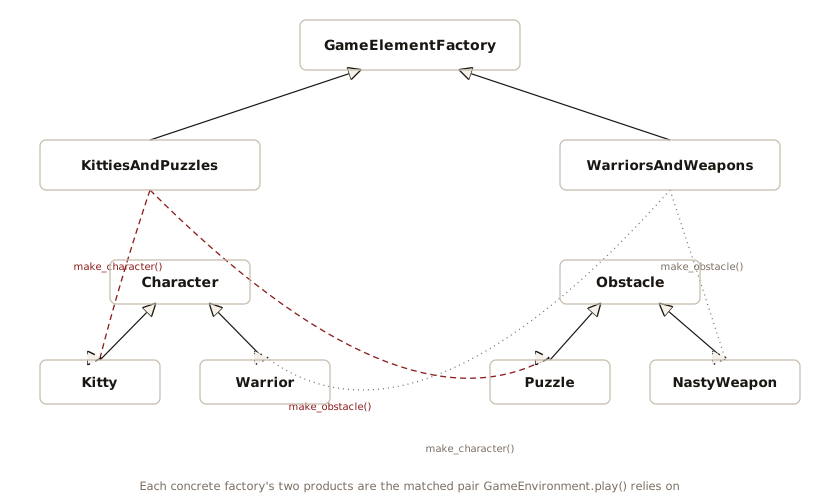
As another example, suppose you are creating a general-purpose gaming environment that supports different types of games. Here’s how it might look using an abstract factory:
# games.py
from typing import override

class Obstacle:
    def action(self) -> str:
        raise NotImplementedError

class Character:
    def interact_with(self, obstacle: Obstacle) -> None: ...

class Kitty(Character):
    @override
    def interact_with(self, obstacle: Obstacle) -> None:
        print("Kitty has encountered a", obstacle.action())

class Warrior(Character):
    @override
    def interact_with(self, obstacle: Obstacle) -> None:
        print("Warrior now battles a", obstacle.action())

class Puzzle(Obstacle):
    @override
    def action(self) -> str:
        return "Puzzle"

class NastyWeapon(Obstacle):
    @override
    def action(self) -> str:
        return "NastyWeapon"

# The Abstract Factory:
class GameElementFactory:
    def make_character(self) -> Character:
        raise NotImplementedError
    def make_obstacle(self) -> Obstacle:
        raise NotImplementedError

# Concrete factories:
class KittiesAndPuzzles(GameElementFactory):
    @override
    def make_character(self) -> Character: return Kitty()
    @override
    def make_obstacle(self) -> Obstacle: return Puzzle()

class WarriorsAndWeapons(GameElementFactory):
    @override
    def make_character(self) -> Character: return Warrior()
    @override
    def make_obstacle(self) -> Obstacle: return NastyWeapon()

class GameEnvironment:
    def __init__(self, factory: GameElementFactory) -> None:
        self.factory = factory
        self.p = factory.make_character()
        self.ob = factory.make_obstacle()
    def play(self) -> None:
        self.p.interact_with(self.ob)

g1 = GameEnvironment(KittiesAndPuzzles())
g2 = GameEnvironment(WarriorsAndWeapons())
g1.play()
#: Kitty has encountered a Puzzle
g2.play()
#: Warrior now battles a NastyWeapon
In this environment, Character objects interact
with Obstacle objects, but there are different
types of Characters and obstacles depending on what kind of game
you’re playing. You determine the kind of game by choosing a
particular GameElementFactory, and then the
GameEnvironment controls the setup and play of the
game. In this example, the setup and play is simple, but those
activities (the initial conditions and the state
change) can determine much of the game’s outcome. Here,
GameEnvironment does not anticipate inheritance,
although it might make sense to do that.
This also contains examples of Multiple Dispatching.
The base classes Obstacle,
Character, and GameElementFactory
(translated from the Java version) force every concrete class to
inherit from them. Note what their
raise NotImplementedError bodies do and do not
enforce. They fail at call time: a concrete factory
that forgets make_obstacle() constructs without
complaint and raises an exception only when the missing method
finally runs. An @abstractmethod fails at
instantiation, the way Partial() did in Surrogate, which catches the
omission as early as possible. The two spellings look
interchangeable in a listing and fail at different moments.
Python does not need that inheritance to keep the same checking.
A Protocol describes the required shape, and any class
with that shape conforms, with no base class to derive from
while still type checking:
# games2.py
# Simplified Abstract Factory.
from typing import Protocol

class Obstacle(Protocol):
    def action(self) -> str: ...

class Character(Protocol):
    def interact_with(self, obstacle: Obstacle) -> None: ...

class GameElementFactory(Protocol):
    def make_character(self) -> Character: ...
    def make_obstacle(self) -> Obstacle: ...

class Kitty:
    def interact_with(self, obstacle: Obstacle) -> None:
        print("Kitty has encountered a", obstacle.action())

class Warrior:
    def interact_with(self, obstacle: Obstacle) -> None:
        print("Warrior now battles a", obstacle.action())

class Puzzle:
    def action(self) -> str: return "Puzzle"

class NastyWeapon:
    def action(self) -> str: return "NastyWeapon"

# Concrete factories:
class KittiesAndPuzzles:
    def make_character(self) -> Kitty: return Kitty()
    def make_obstacle(self) -> Puzzle: return Puzzle()

class WarriorsAndWeapons:
    def make_character(self) -> Warrior: return Warrior()
    def make_obstacle(self) -> NastyWeapon: return NastyWeapon()

class GameEnvironment:
    def __init__(self, factory: GameElementFactory) -> None:
        self.factory = factory
        self.p = factory.make_character()
        self.ob = factory.make_obstacle()
    def play(self) -> None:
        self.p.interact_with(self.ob)

g1 = GameEnvironment(KittiesAndPuzzles())
g2 = GameEnvironment(WarriorsAndWeapons())
g1.play()
#: Kitty has encountered a Puzzle
g2.play()
#: Warrior now battles a NastyWeapon
The concrete classes inherit nothing, but the type checker
still verifies that each one fits the appropriate
Protocol. A GameElementFactory must
supply make_character() and
make_obstacle(), a Character must
supply interact_with(), and an
Obstacle must supply action(). This is
structural typing from Static
Typing. It preserves what the interfaces were for, without
the coupling a shared base class imposes. Python’s version of
interface inheritance is a Protocol, not a shared
base class.
Prototype
The factories so far build each object from a class and some arguments. Prototype takes a different route. It keeps one fully configured instance and makes new objects by copying it. Use it when a ready-made instance is easier to clone than to rebuild, or when construction is expensive and the instances share most of the setup.
The copy module clones any object.
copy.deepcopy() follows every reference, so the
clone shares no mutable state with the original:
# prototype.py
import copy
from dataclasses import dataclass, field

@dataclass
class Monster:
    name: str
    hp: int
    powers: list[str] = field(default_factory=list)

    def clone(self) -> Monster:
        return copy.deepcopy(self)

goblin = Monster("Goblin", hp=10, powers=["bite"])
# Build a variant by cloning and adjusting, not rebuilding:
captain = goblin.clone()
captain.name = "Goblin Captain"
captain.hp = 20
captain.powers.append("rally")
print(goblin)
#: Monster(name='Goblin', hp=10, powers=['bite'])
print(captain)
#: Monster(name='Goblin Captain', hp=20, powers=['bite', 'rally'])
The deep copy is the part that matters. captain
gets its own powers list, so appending to it leaves
goblin.powers unchanged. A shallow copy would share
that list, and editing one monster would corrupt the other. The
clone() method simply wraps
copy.deepcopy().
We can combine prototype with a registry. Instead of a registry of classes, keep a registry of prototypical instances and clone the chosen one:
# prototype_registry.py
import copy
from dataclasses import dataclass, field
from typing import Final

@dataclass
class Monster:
    name: str
    hp: int
    powers: list[str] = field(default_factory=list)

PROTOTYPES: Final[dict[str, Monster]] = {
    "goblin": Monster("Goblin", hp=10, powers=["bite"]),
    "troll": Monster("Troll", hp=40, powers=["smash", "regenerate"]),
}

def spawn(kind: str) -> Monster:
    return copy.deepcopy(PROTOTYPES[kind])

a = spawn("goblin")
b = spawn("goblin")
b.hp = 5
print(a.hp, b.hp)  # The copies are independent
#: 10 5
print(spawn("troll"))
#: Monster(name='Troll', hp=40, powers=['smash', 'regenerate'])
spawn() returns an independent object every
time, so callers can modify their copy without touching the
prototype. Compare this with make() in
registry.py. There the table holds classes and
calls a constructor. Here it holds instances and copies them.
Use the prototype form when the interesting part of an object is
its configured state rather than its type.
These tests show that Prototypes are safe because each spawn is independent, and the stored prototype never changes:
# test_prototype.py
from prototype_registry import PROTOTYPES, spawn

def test_clone_is_independent() -> None:
    a = spawn("goblin")
    b = spawn("goblin")
    b.powers.append("curse")
    assert a.powers == ["bite"]
    assert b.powers == ["bite", "curse"]

def test_prototype_untouched() -> None:
    spawned = spawn("troll")
    spawned.hp = 1
    assert PROTOTYPES["troll"].hp == 40
Builder
The remaining creational pattern in GoF Design Patterns is Builder: separate the construction of a complex object from its representation, assembling it in steps. In Java and C++ it cures the telescoping constructor. A class with many optional settings needs a constructor for every useful combination, because those languages have no keyword arguments. The workaround is a companion class that collects settings one method call at a time. Translated directly into Python, it looks like this:
# pizza_builder.py
from dataclasses import dataclass
from typing import Self

@dataclass(frozen=True)
class Pizza:
    size: int
    cheese: bool
    toppings: tuple[str, ...]

class PizzaBuilder:
    def __init__(self) -> None:
        self._size = 12
        self._cheese = True
        self._toppings: list[str] = []

    def size(self, inches: int) -> Self:
        self._size = inches
        return self

    def no_cheese(self) -> Self:
        self._cheese = False
        return self

    def topping(self, name: str) -> Self:
        self._toppings.append(name)
        return self

    def build(self) -> Pizza:
        return Pizza(
            self._size, self._cheese, tuple(self._toppings))

if __name__ == "__main__":
    pizza = (PizzaBuilder()
             .size(16)
             .topping("basil")
             .topping("olives")
             .build())
    print(pizza)
#: Pizza(size=16, cheese=True, toppings=('basil', 'olives'))
Each setter returns self, annotated with
Self from Static Typing, so
the calls chain. build() freezes the accumulated
settings into an immutable Pizza. The class works,
and it reads well. It also solves a problem Python does not
have. Keyword arguments with defaults are the built-in
builder:
# pizza_direct.py
from dataclasses import dataclass, replace

@dataclass(frozen=True)
class Pizza:
    size: int = 12
    cheese: bool = True
    toppings: tuple[str, ...] = ()

if __name__ == "__main__":
    pizza = Pizza(size=16, toppings=("basil", "olives"))
    print(pizza)
    family = replace(pizza, size=20)
    print(family)
#: Pizza(size=16, cheese=True, toppings=('basil', 'olives'))
#: Pizza(size=20, cheese=True, toppings=('basil', 'olives'))
Every combination of settings is a single call, the call site
names each option just as the chain did, and the defaults live
on the fields instead of inside a second class.
dataclasses.replace() covers the other thing
builder chains are used for: starting from an existing
configuration and varying it. For a frozen data class,
replace() is Prototype and Builder rolled into one
function, copying the configured state and changing chosen
fields on the way. A test confirms the two forms produce the
same pizza:
# test_pizza.py
from dataclasses import replace
import pizza_builder as pb
import pizza_direct as pd

def test_builder_and_keywords_agree() -> None:
    built = (pb.PizzaBuilder()
             .size(16).topping("basil").build())
    direct = pd.Pizza(size=16, toppings=("basil",))
    assert (built.size, built.cheese, built.toppings) == (
        direct.size, direct.cheese, direct.toppings)

def test_replace_varies_one_field() -> None:
    base = pd.Pizza()
    variant = replace(base, size=18)
    assert base.size == 12 and variant.size == 18
    assert variant.toppings == base.toppings
Decorators
has its own Pizza, modeling toppings as wrapper
objects instead of builder-collected fields, to illustrate the
unrelated Decorator pattern.
When does Builder survive in Python? When construction
genuinely is a process. The steps must happen in an order, later
steps depend on earlier ones, and rules span the steps.
GameBuilder in Simulation is
the real thing. It assembles a maze in three stages, creating
rooms, connecting doors, then placing the robot, and each stage
relies on what the previous stage established. No single
constructor call can express that. The standard library’s
argparse.ArgumentParser has the same shape.
add_argument() calls accumulate a specification,
and parse_args() is the build().
The humblest builder in Python hides in plain sight.
Appending parts to a list and finishing with
"".join(parts) builds an immutable product, a
string, through a mutable intermediate, which is Builder’s
essence. PizzaBuilder collecting toppings in a list
and freezing them into a tuple at build() is the
same move. Reserve the pattern, and the name, for construction
that is a process with intermediate state and rules of its own.
When the “steps” are just optional values, keyword arguments and
a data class already are the builder.
Exercises
- Add a class
Triangletoshape_factory1.py. - Add a class
Triangletoshape_factory2.py. - Add a new type of
GameEnvironmentcalledGnomesAndFairiestogames.py. - Modify
shape_factory2.pyso that it uses an Abstract Factory to create different sets of shapes (for example, one particular type of factory object creates “thick shapes,” another creates “thin shapes,” but each factory object can create all the shapes: circles, squares, triangles etc.). - Add a rule to both pizza examples: a pizza may carry at most
four toppings. In
pizza_direct.py, enforce it with__post_init__(). Inpizza_builder.py, decide whether it belongs intopping()orbuild(). In which version can an invalid pizza exist, even momentarily? - Move
CircleandSquareout ofregistry.pyinto a new module,extra_shapes.py. Confirm thatmake("Circle")now raisesKeyErroruntilextra_shapesis imported, and explain exactly which line of which file performs the registration, and when it runs.