Simulation
A simulation models a set of objects that act on their own
and interact through shared state. The first example, a pack of
rats mapping a maze, is worked from end to end. It puts asyncio
tasks, a shared coordination object, and structural typing
together in one small program. Concurrency
introduces the asyncio mechanics
(async def, await,
gather, run).
Rats & Mazes
The problem has three types.
A maze knows its own layout and little else. Given a coordinate, it reports whether each neighboring cell is a wall or an opening, and it can hand out an entry point. The maze never decides anything. It only answers questions.
A blackboard is the shared surface on which every
rat writes. The blackboard is a classic coordination technique.
Independent agents read from and write to one common data
structure instead of talking to each other directly. Here the
blackboard owns the maze, records which cells the rats have
explored, hands out rat numbers, and launches new rats. The rats
run as cooperative asyncio tasks. They take turns
instead of running at the same instant, so the design needs no
lock. Nothing interrupts a rat partway through an update.
A rat explores. Each rat runs as its own task. From its current cell it looks at the four neighbors and tries to claim the open ones. By claiming a cell, a rat both marks it visited and reserves it. This way, no two rats ever cover the same ground. When a rat finds more than one open neighbor, it keeps the first for itself and spawns a new rat down each of the others, then yields so its siblings can run. When it can claim nothing, it has reached a dead end and its task ends. When the last rat dies, the maze is fully mapped.
The rat does not import the blackboard. It only needs an
object with matching methods, so a Protocol
describes what it expects. This is structural typing from Static
Typing. The rat works with anything that can claim a cell,
spawn a rat, record a message, and hand out a number.
# rats_and_mazes/rat.py
import asyncio
from dataclasses import dataclass, field
from typing import Final, Protocol

# South, north, west, east
DIRECTIONS: Final[list[tuple[int, int]]] = [
    (0, 1), (0, -1), (-1, 0), (1, 0)]

class Recorder(Protocol):
    def claim(self, x: int, y: int) -> bool: ...
    def spawn(self, x: int, y: int) -> None: ...
    def log(self, message: str) -> None: ...
    def next_number(self) -> int: ...

@dataclass
class Rat:
    blackboard: Recorder
    x: int
    y: int
    number: int = field(init=False)

    def __post_init__(self) -> None:
        self.number = self.blackboard.next_number()
        self.blackboard.log(
            f"Rat {self.number} starts at {(self.x, self.y)}.")

    async def run(self) -> None:
        while True:
            neighbors = [
                (self.x + dx, self.y + dy) for dx, dy in DIRECTIONS]
            moves = [pos for pos in neighbors
                     if self.blackboard.claim(*pos)]
            if not moves:
                self.blackboard.log(
                    f"Rat {self.number} dead-ends "
                    f"at {(self.x, self.y)}.")
                return
            for branch in moves[1:]:
                self.blackboard.spawn(*branch)
            self.x, self.y = moves[0]
            await asyncio.sleep(0)  # Yield so sibling rats can run
Initializing number requires calling
blackboard.next_number(), a side-effecting method,
not a static default. Marking it field(init=False)
leaves it out of the generated __init__, and
__post_init__ runs immediately after that
__init__ finishes, so it can fill in
number and log the rat’s start, once
blackboard, x, and y
already hold their values.
The maze is a grid of characters. A * is a wall
and a space is an opening. Out-of-bounds coordinates count as
walls, so the rats stay inside.
# rats_and_mazes/maze.py
from enum import StrEnum
from pathlib import Path
from typing import Self

type Coord = tuple[int, int]  # (column, row)

class Maze:
    class Cell(StrEnum):
        WALL = "*"
        OPEN = " "

    def __init__(self, rows: list[str]) -> None:
        self.height = len(rows)
        self.width = max((len(r) for r in rows), default=0)
        self.rows = [
            r.ljust(self.width, self.Cell.WALL) for r in rows]

    @classmethod
    def from_text(cls, text: str) -> Self:
        rows = [line for line in text.splitlines()
                if line and not line.lstrip().startswith("#")]
        return cls(rows)

    @classmethod
    def from_file(cls, filename: str) -> Self:
        return cls.from_text(
            Path(filename).read_text(encoding="utf-8"))

    def is_open(self, x: int, y: int) -> bool:
        return (0 <= y < self.height and 0 <= x < self.width
                and self.rows[y][x] == self.Cell.OPEN)

    def entry(self) -> Coord:
        for y in range(self.height):
            for x in range(self.width):
                if self.is_open(x, y):
                    return x, y
        raise ValueError("the maze has no open cell")
Cell nests inside Maze because it
only names concepts Maze uses, and it is a
StrEnum rather than an Enum so its
members keep acting like real strings. WALL still
works as the fill character for ljust(), and
comparing self.rows[y][x] against
Cell.OPEN still works, because a
StrEnum member is its string value.
The blackboard holds everything the rats share.
claim() is the heart of the program. It tests and
marks a cell in one step with no await in between,
so a single rat gets each cell even when several reach it. This
is the read-modify-write hazard Concurrency
demonstrated, avoided by construction: a race needs a suspension
point inside the update, and claim() contains none
(exercise 3 inserts one and watches the guarantee fail).
explore() claims the entry, releases the first rat,
then awaits every task, including the ones spawned along the
way:
# rats_and_mazes/blackboard.py
import asyncio
import itertools
from maze import Coord, Maze
from rat import Rat

class Blackboard:
    def __init__(self, maze: Maze) -> None:
        self.maze = maze
        self.visited: set[Coord] = set()
        self.tasks: list[asyncio.Task[None]] = []
        self.messages: list[str] = []
        self._numbers = itertools.count(1)

    def claim(self, x: int, y: int) -> bool:
        # No await between the test and the add, so this is atomic
        if self.maze.is_open(x, y) and (x, y) not in self.visited:
            self.visited.add((x, y))
            return True
        return False

    def spawn(self, x: int, y: int) -> None:
        rat = Rat(self, x, y)
        self.tasks.append(asyncio.create_task(rat.run()))

    def next_number(self) -> int:
        return next(self._numbers)

    def log(self, message: str) -> None:
        self.messages.append(message)

    async def explore(self) -> None:
        start = self.maze.entry()
        self.claim(*start)
        self.spawn(*start)
        # Wait for every rat, including ones spawned while we wait
        while pending := [t for t in self.tasks if not t.done()]:
            await asyncio.gather(*pending)

    def render(self) -> str:
        lines = []
        for y in range(self.maze.height):
            row = []
            for x in range(self.maze.width):
                if not self.maze.is_open(x, y):
                    row.append("#")
                elif (x, y) in self.visited:
                    row.append(".")
                else:
                    row.append(" ")
            lines.append("".join(row))
        return "\n".join(lines)
The maze layout lives in a text file. The loader skips blank lines and the path comment, so the file is the maze and nothing else.
# rats_and_mazes/amaze.txt
*********************
* *           *     *
* * * ******* *** * *
* * *       *     * *
* ***** *** ******* *
*     * *   *     * *
***** *** ***** *** *
*   *     *     *   *
* * ******* *** * ***
* *         *   *   *
* ***** * ********* *
*     * * *         *
***** * *** *********
*     *             *
*********************
Running it turns the rats loose and prints what they mapped.
# rats_and_mazes/rats_and_mazes.py
import asyncio
from blackboard import Blackboard
from maze import Maze

async def main() -> None:
    maze = Maze.from_file("amaze.txt")
    blackboard = Blackboard(maze)
    await blackboard.explore()
    print("Mapped maze (# wall, . visited):")
    print(blackboard.render())
    print(f"{len(blackboard.tasks)} rats mapped "
          f"{len(blackboard.visited)} cells.")

asyncio.run(main())
#: Mapped maze (# wall, . visited):
#: #####################
#: #.#...........#.....#
#: #.#.#.#######.###.#.#
#: #.#.#.......#.....#.#
#: #.#####.###.#######.#
#: #.....#.#...#.....#.#
#: #####.###.#####.###.#
#: #...#.....#.....#...#
#: #.#.#######.###.#.###
#: #.#.........#...#...#
#: #.#####.#.#########.#
#: #.....#.#.#.........#
#: #####.#.###.#########
#: #.....#.............#
#: #####################
#: 9 rats mapped 139 cells.
Because claiming is atomic, the rats always cover every cell reachable from the entry, no matter how the tasks interleave. Testing verifies this by comparing the cells the rats visited against a flood fill of the same maze.
# rats_and_mazes/test_rats_and_mazes.py
import asyncio
from typing import Final
from blackboard import Blackboard
from maze import Coord, Maze

LAYOUT: Final[str] = """\
*********
*       *
*** *** *
*   *   *
* ***** *
*       *
*********
"""

def flood(maze: Maze, start: Coord) -> set[Coord]:
    seen: set[Coord] = set()
    stack = [start]
    while stack:
        x, y = stack.pop()
        if (x, y) in seen or not maze.is_open(x, y):
            continue
        seen.add((x, y))
        stack += [(x + 1, y), (x - 1, y), (x, y + 1), (x, y - 1)]
    return seen

def test_rats_map_every_reachable_cell() -> None:
    maze = Maze.from_text(LAYOUT)
    blackboard = Blackboard(maze)
    asyncio.run(blackboard.explore())
    assert blackboard.visited == flood(maze, maze.entry())
We can create a GUI demonstration using the same model.
rats_view.py runs the exploration to completion,
records the order in which rats claimed cells, and replays that
order on a tkinter canvas: walls in gray, then each
claimed cell turning green in turn, so you watch the pack move
through the maze from the entry outward. Like every windowed
view in this book, the harness skips it
(tools/data/norun.txt lists all three of this
chapter’s views):
# rats_and_mazes/rats_view.py
import asyncio
import tkinter as tk
from typing import Final, override
from blackboard import Blackboard
from maze import Coord, Maze

CELL: Final[int] = 26

class RecordingBlackboard(Blackboard):
    def __init__(self, maze: Maze) -> None:
        super().__init__(maze)
        self.order: list[Coord] = []

    @override
    def claim(self, x: int, y: int) -> bool:
        claimed = super().claim(x, y)
        if claimed:
            self.order.append((x, y))
        return claimed

def show(layout: str = "amaze.txt", step_ms: int = 60) -> None:
    maze = Maze.from_file(layout)
    board = RecordingBlackboard(maze)
    asyncio.run(board.explore())

    root = tk.Tk()
    root.title("Rats and Mazes")
    canvas = tk.Canvas(root, highlightthickness=0,
                       width=maze.width * CELL,
                       height=maze.height * CELL)
    canvas.pack()

    def box(x: int, y: int, color: str) -> None:
        canvas.create_rectangle(
            x * CELL, y * CELL, (x + 1) * CELL, (y + 1) * CELL,
            fill=color, outline="gray")

    for y in range(maze.height):
        for x in range(maze.width):
            box(x, y, "white" if maze.is_open(x, y) else "dimgray")

    cells = iter(board.order)

    def step() -> None:
        cell = next(cells, None)
        if cell is not None:
            box(cell[0], cell[1], "palegreen")
            root.after(step_ms, step)

    step()
    root.mainloop()

if __name__ == "__main__":
    show()
Jeremy Meyer wrote the original Java version of this example.
A Robot in a Maze
Concurrency is one way to build a simulation. Object-oriented
design is another. This second example, adapted from my
Atomic Kotlin book, walks a single robot through a
maze. It shows how polymorphism removes conditionals. A
Room asks its occupant what to do, and each type of
occupant answers for itself.
The occupants are Items.
Room.enter() calls
occupant.interact(), and the return value is the
room in which the robot ends up. A wall keeps the robot where it
is, food is eaten and the robot moves in, a teleport returns a
distant room. No if or elif on the
type of occupant appears anywhere:
# robot_explorer/items.py
from enum import Enum, auto
from typing import TYPE_CHECKING, ClassVar, override

if TYPE_CHECKING:
    from world import Room

class Urge(Enum):
    NORTH = auto()
    SOUTH = auto()
    EAST = auto()
    WEST = auto()

class Item:
    symbol: ClassVar[str] = ""

    def interact(self, robot: Robot, room: Room) -> Room:
        return room  # Default: the robot enters the room

    def __str__(self) -> str:
        return self.symbol

class Robot(Item):
    symbol = "R"
    room: Room  # Set by the builder when the robot is placed

    def __init__(self) -> None:
        self.finished = False  # Set when the robot reaches the end

    def move(self, urge: Urge) -> None:
        self.room = self.room.doors.open(urge).enter(self)

class Wall(Item):
    symbol = "#"

    @override
    def interact(self, robot: Robot, room: Room) -> Room:
        return robot.room  # Cannot pass: stay put

class Food(Item):
    symbol = "."

    @override
    def interact(self, robot: Robot, room: Room) -> Room:
        room.occupant = Empty()  # Eaten
        return room

class Teleport(Item):
    symbol = ""  # Set per target letter
    target_room: Room  # Paired up by the builder

    def __init__(self, target: str) -> None:
        self.target = target

    @override
    def interact(self, robot: Robot, room: Room) -> Room:
        return self.target_room

    @override
    def __str__(self) -> str:
        return self.target

class Empty(Item):
    symbol = "_"

    @override
    def interact(self, robot: Robot, room: Room) -> Room:
        return room

class Edge(Item):
    symbol = "/"

    @override
    def interact(self, robot: Robot, room: Room) -> Room:
        return robot.room  # The void outside the maze: stay put

class EndGame(Item):
    symbol = "!"

    @override
    def interact(self, robot: Robot, room: Room) -> Room:
        robot.finished = True  # Recorded, not printed
        return room

def item_factory(symbol: str) -> Item:
    for item_type in Item.__subclasses__():
        if symbol == item_type.symbol:
            return item_type()
    return Teleport(symbol)  # Anything else is a teleport target
world.py imports Item,
Robot, and Urge from
items.py, so from world import Room
here would be circular. if TYPE_CHECKING: is
False at runtime, so that import never runs, and no
cycle forms. It is True only for a type checker
reading the file, which is the only thing Room is
for. Every use below is an annotation (room: Room,
-> Room), never a runtime lookup.
Robot holds its two pieces of state in different
ways. __init__ assigns finished, so
each robot owns its own flag from the start. The code only
declares room, written as room: Room
with no value. That line stores nothing, not even
None. It is a declaration, not a placeholder. It
promises the type checker that a Room will be
there, which GameBuilder guarantees when it places
the robot and sets robot.room. The attribute does
not exist until then, so reading it earlier would raise
AttributeError, and the builder runs first so that
never happens. Declaring it this way keeps the type
Room instead of Room | None, so no
code that reads room has to check for
None.
item_factory() turns a maze character into an
Item. It searches
Item.__subclasses__() for a matching
symbol, so adding a new kind of item needs no
change here. Define the subclass with its symbol and the factory
finds it. This is the registry idea from Factory,
using the class hierarchy as the registry.
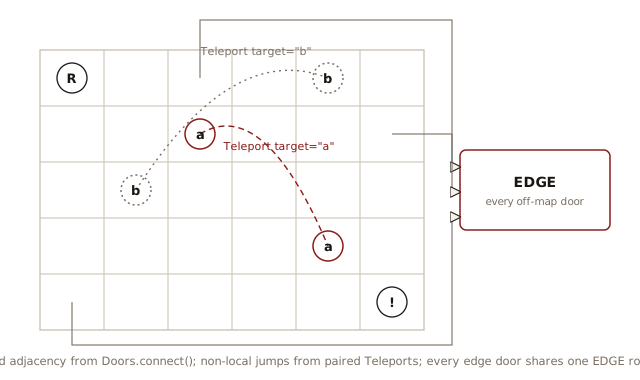
A Room holds one item and connects to its
neighbors through a Doors object. Doors that lead
nowhere point at one shared EDGE room, the void
outside the maze, so the robot can try any direction without a
special case:
# robot_explorer/world.py
from typing import Final
from items import Edge, Item, Robot, Urge

type Coord = tuple[int, int]  # (row, col)
type RoomMap = dict[Coord, Room]

class Room:
    def __init__(self, occupant: Item) -> None:
        self.occupant = occupant
        self.doors = Doors()

    def enter(self, robot: Robot) -> Room:
        return self.occupant.interact(robot, self)

    def __repr__(self) -> str:
        return f"Room({self.occupant})"

class Doors:
    def __init__(self) -> None:
        self.neighbors: dict[Urge, Room] = {}

    def connect(self, row: int, col: int,
                rooms: RoomMap) -> None:
        for urge, coord in {
            Urge.NORTH: (row - 1, col),
            Urge.SOUTH: (row + 1, col),
            Urge.EAST: (row, col + 1),
            Urge.WEST: (row, col - 1),
        }.items():
            if coord in rooms:
                self.neighbors[urge] = rooms[coord]

    def open(self, urge: Urge) -> Room:
        return self.neighbors.get(urge, EDGE)

# Created once both classes exist; its own doors stay unset
EDGE: Final[Room] = Room(Edge())
GameBuilder assembles the maze in three stages:
a room for every character, then the connections between rooms,
then the teleport pairs. Each stage depends on the one before
it, so splitting them into labeled passes keeps the construction
readable instead of tangling it into one loop.
run() walks a string of moves, and
show_maze() renders the current state:
# robot_explorer/game.py
# Build the maze in three stages, then run it.

from items import Empty, Robot, Teleport, Urge, item_factory
from world import Room, RoomMap

class GameBuilder:
    def __init__(self, maze: str) -> None:
        self.rooms: RoomMap = {}
        teleports: list[Room] = []
        # Stage 1: a Room for every character
        for row, line in enumerate(maze.splitlines()):
            for col, char in enumerate(line):
                occupant = item_factory(char)
                if isinstance(occupant, Robot):
                    room = Room(Empty())
                    self.robot = occupant
                    self.robot.room = room
                else:
                    room = Room(occupant)
                self.rooms[row, col] = room
                if isinstance(occupant, Teleport):
                    teleports.append(room)
        # Stage 2: connect each room to its neighbors
        for (row, col), room in self.rooms.items():
            room.doors.connect(row, col, self.rooms)
        # Stage 3: pair the teleports that share a target letter
        def target(room: Room) -> str:
            assert isinstance(room.occupant, Teleport)
            return room.occupant.target

        teleports.sort(key=target)
        pairs = iter(teleports)
        for room1, room2 in zip(pairs, pairs):
            assert isinstance(room1.occupant, Teleport)
            assert isinstance(room2.occupant, Teleport)
            room1.occupant.target_room = room2
            room2.occupant.target_room = room1

    def show_maze(self) -> str:
        rows: list[str] = []
        current = -1
        for (row, _), room in self.rooms.items():
            if row != current:
                rows.append("")
                current = row
            if room is self.robot.room:
                rows[-1] += str(self.robot)
            else:
                rows[-1] += str(room.occupant)
        return "\n".join(rows)

    def run(self, solution: str) -> None:
        moves = {"n": Urge.NORTH, "s": Urge.SOUTH,
                 "e": Urge.EAST, "w": Urge.WEST}
        for char in "".join(solution.split()):
            self.robot.move(moves[char])

string_maze = """
###############################
#R#.____#____.#_______#_______#
#_###_#_###_#_#_#_#####_#####_#
#___#_#___#_#_#_#.#__b__#___#_#
###_#_###_#_#_###_#_#####_#_#_#
#.#_#_#.__#_#__.#_#__b__#_#___#
#_#_#_#_###_###_#_#####_#_#####
#_#_#_#__.#_#_#_____#___#_____#
#_#_#_###_#_#_#_#####_#######_#
#.#___#___#_#___#____.#_____#_#
#_#####_###_#_###_#####_#_###_#
#___#a__#.__#.__#__.#___#_#___#
#_#_#_###_#####_###_###_###_#_#
#_#.#_#___#!______#_____#___#_#
#_#_#_###_#############_#_###_#
#_#_#__a#_______________#___#_#
#_#####_###_###########_###_#_#
#_____#.__#_#___#_____#_#___#_#
#_#_#####_###_#_#_###_###_###_#
#.#___________#___#____.__#___#
###############################
""".strip()

solution = (
    "sseesssssseennnnnnnneesseesswwsseesswwsswwsseesseeeenneessee"
    "nneeeesseeeenneennwwnneenneennnnwwwwnnnneesseennnnwwwwwwssww"
    "eesswwsswwwwsseesseeeesswwwwwwwwwwwwwwnnnneennnnnnnnnneessss"
    "eesssswwsseesswwww"
)

game = GameBuilder(string_maze)
print("start:")
print(game.show_maze())
#: start:
#: ###############################
#: #R#.____#____.#_______#_______#
#: #_###_#_###_#_#_#_#####_#####_#
#: #___#_#___#_#_#_#.#__b__#___#_#
#: ###_#_###_#_#_###_#_#####_#_#_#
#: #.#_#_#.__#_#__.#_#__b__#_#___#
#: #_#_#_#_###_###_#_#####_#_#####
#: #_#_#_#__.#_#_#_____#___#_____#
#: #_#_#_###_#_#_#_#####_#######_#
#: #.#___#___#_#___#____.#_____#_#
#: #_#####_###_#_###_#####_#_###_#
#: #___#a__#.__#.__#__.#___#_#___#
#: #_#_#_###_#####_###_###_###_#_#
#: #_#.#_#___#!______#_____#___#_#
#: #_#_#_###_#############_#_###_#
#: #_#_#__a#_______________#___#_#
#: #_#####_###_###########_###_#_#
#: #_____#.__#_#___#_____#_#___#_#
#: #_#_#####_###_#_#_###_###_###_#
#: #.#___________#___#____.__#___#
#: ###############################
game.run(solution)
if game.robot.finished:
    print("Game over!")
print("\nfinal:")
print(game.show_maze())
#: Game over!
#:
#: final:
#: ###############################
#: #_#.____#_____#_______#_______#
#: #_###_#_###_#_#_#_#####_#####_#
#: #___#_#___#_#_#_#.#__b__#___#_#
#: ###_#_###_#_#_###_#_#####_#_#_#
#: #.#_#_#___#_#___#_#__b__#_#___#
#: #_#_#_#_###_###_#_#####_#_#####
#: #_#_#_#___#_#_#_____#___#_____#
#: #_#_#_###_#_#_#_#####_#######_#
#: #.#___#___#_#___#_____#_____#_#
#: #_#####_###_#_###_#####_#_###_#
#: #___#a__#___#___#___#___#_#___#
#: #_#_#_###_#####_###_###_###_#_#
#: #_#.#_#___#R______#_____#___#_#
#: #_#_#_###_#############_#_###_#
#: #_#_#__a#_______________#___#_#
#: #_#####_###_###########_###_#_#
#: #_____#___#_#___#_____#_#___#_#
#: #_#_#####_###_#_#_###_###_###_#
#: #.#___________#___#_______#___#
#: ###############################
Running it prints the maze before and after the walk. The
robot eats the food along its path, jumps through both teleports
(a, then b), and reaches the
! that ends the game.
Stage 3 pairs the teleports with a small idiom worth
decoding. pairs = iter(teleports) makes one
iterator, and zip(pairs, pairs) pulls from that
same iterator twice per loop, so each pass consumes two rooms:
the first and second a, then the two
bs, with the sort by target letter lining the
partners up beforehand. The near-miss is
zip(teleports, teleports), which walks two
independent passes over the list and pairs every room with
itself. One iterator, referenced twice, is the whole trick. The
assert isinstance lines that follow are for the
type checker as much as for safety: each proves to the checker
that the occupant really is a Teleport before the
code touches target_room.
The maze rendering, show_maze(), returns a
string, so the model’s correctness is something a test can pin
down with no window in sight. Build the maze, run the solution,
and check that the robot finished on the ! square
and that the final rendering matches, food eaten and all:
# robot_explorer/test_robot.py
from typing import Final
from game import GameBuilder, solution, string_maze
from items import EndGame

FINISHED: Final[str] = """
###############################
#_#.____#_____#_______#_______#
#_###_#_###_#_#_#_#####_#####_#
#___#_#___#_#_#_#.#__b__#___#_#
###_#_###_#_#_###_#_#####_#_#_#
#.#_#_#___#_#___#_#__b__#_#___#
#_#_#_#_###_###_#_#####_#_#####
#_#_#_#___#_#_#_____#___#_____#
#_#_#_###_#_#_#_#####_#######_#
#.#___#___#_#___#_____#_____#_#
#_#####_###_#_###_#####_#_###_#
#___#a__#___#___#___#___#_#___#
#_#_#_###_#####_###_###_###_#_#
#_#.#_#___#R______#_____#___#_#
#_#_#_###_#############_#_###_#
#_#_#__a#_______________#___#_#
#_#####_###_###########_###_#_#
#_____#___#_#___#_____#_#___#_#
#_#_#####_###_#_#_###_###_###_#
#.#___________#___#_______#___#
###############################
""".strip()

def test_solution_walks_the_robot_to_the_end() -> None:
    game = GameBuilder(string_maze)
    game.run(solution)
    room = game.robot.room
    assert isinstance(room.occupant, EndGame)  # Finished on the "!"
    assert game.robot.finished  # And the model recorded it
    assert game.show_maze() == FINISHED  # Food eaten, robot moved

def test_walls_block_and_food_is_eaten() -> None:
    game = GameBuilder("R.#")  # Robot, food, wall in one row
    start = game.robot.room
    game.run("e")  # East: eat the food and move in
    assert "." not in game.show_maze()  # Food gone
    assert game.robot.room is not start
    blocked = game.robot.room
    game.run("e")  # East again: a wall, so stay put
    assert game.robot.room is blocked
That same model drives a graphical view.
maze_view.py imports the maze and the moves, draws
each room as a colored cell, and steps the robot along the
solution on a timer. The view is the only part that touches the
screen.
# robot_explorer/maze_view.py
import tkinter as tk
from typing import Final
from game import GameBuilder, solution, string_maze
from items import Urge

CELL: Final[int] = 20
FILL: Final[dict[str, str]] = {
    "#": "dimgray", "!": "tomato", ".": "khaki",
    "_": "white", "R": "royalblue"}
MOVES: Final[dict[str, Urge]] = {
    "n": Urge.NORTH, "s": Urge.SOUTH,
    "e": Urge.EAST, "w": Urge.WEST}

def show(maze: str = string_maze, moves: str = solution,
         step_ms: int = 80) -> None:
    game = GameBuilder(maze)
    rows = maze.splitlines()
    width = max(len(row) for row in rows)
    root = tk.Tk()
    root.title("Robot in a Maze")
    canvas = tk.Canvas(root, highlightthickness=0,
                       width=width * CELL, height=len(rows) * CELL)
    canvas.pack()

    def draw() -> None:
        canvas.delete("all")
        for (row, col), room in game.rooms.items():
            symbol = ("R" if room is game.robot.room
                      else str(room.occupant))
            canvas.create_rectangle(
                col * CELL, row * CELL,
                (col + 1) * CELL, (row + 1) * CELL,
                fill=FILL.get(symbol, "palegreen"), outline="gray")

    queue = list("".join(moves.split()))

    def step() -> None:
        draw()
        if queue:
            game.robot.move(MOVES[queue.pop(0)])
            root.after(step_ms, step)

    step()
    root.mainloop()

if __name__ == "__main__":
    show()
Two patterns from earlier chapters carry the design. Polymorphism replaces a type switch, and a factory builds objects from data. Neither needs concurrency.
Order from Noise
The two simulations so far confirm designs. The rats cover
every reachable cell because claim() is atomic. The
robot reaches the goal because polymorphism handles every
encounter. In each case we knew what should happen and ran the
program to check it. This final example is different. Its result
appears in no line of its code. That is simulation’s other
purpose. It discovers behavior instead of confirming it.
In 1787 Ernst Chladni sprinkled sand across a metal plate and drew a violin bow along its edge. The bow made the plate ring. A ringing plate does not move evenly. Standing waves divide it into regions that swing up and down, separated by nodal lines that stay still. The vibration bounces sand out of the moving regions. When a grain lands on a still line, nothing kicks it away again. Within seconds the random motion sweeps the sand into sharp, symmetric curves. Bowing a different spot rings the plate in a different mode and draws a different figure.
The model needs almost nothing. amplitude() is
the standing-wave field of a square plate ringing in mode
(m, n). The formula is borrowed physics, an
approximation for a plate with free edges. Treat it as given.
All that matters here is its shape. It is zero along curves, and
those curves are the nodal lines. A Grain is a
position. step() is the entire simulation. Every
grain takes one random step, scaled by how strongly the plate
vibrates at that grain’s location. Grains never look at each
other. They remember nothing. Nothing in the code knows the
pattern exists.
# chladni_plate/chladni.py
import math
import random
from dataclasses import dataclass

type Mode = tuple[int, int]  # Vibration pattern (m, n)

def amplitude(x: float, y: float, mode: Mode) -> float:
    m, n = mode
    return abs(
        math.cos(m * math.pi * x) * math.cos(n * math.pi * y)
        - math.cos(n * math.pi * x) * math.cos(m * math.pi * y))

def bounce(v: float) -> float:
    if v < 0.0:
        return -v
    if v > 1.0:
        return 2.0 - v
    return v

@dataclass
class Grain:
    x: float
    y: float

class Plate:
    def __init__(self, grains: int, mode: Mode,
                 seed: int | None = None) -> None:
        self.rng = random.Random(seed)
        self.mode = mode
        self.grains = [
            Grain(self.rng.random(), self.rng.random())
            for _ in range(grains)]

    def step(self, kick: float = 0.05) -> None:
        for g in self.grains:
            a = amplitude(g.x, g.y, self.mode)
            g.x = bounce(
                g.x + self.rng.uniform(-kick, kick) * a)
            g.y = bounce(
                g.y + self.rng.uniform(-kick, kick) * a)

    def agitation(self) -> float:
        return sum(
            amplitude(g.x, g.y, self.mode)
            for g in self.grains) / len(self.grains)

    def render(self, width: int = 60, height: int = 30) -> str:
        counts: list[list[int]] = [
            [0] * width for _ in range(height)]
        for g in self.grains:
            col = min(int(g.x * width), width - 1)
            row = min(int(g.y * height), height - 1)
            counts[row][col] += 1
        shades = " .:*#"
        return "\n".join(
            "".join(shades[min(c, len(shades) - 1)]
                    for c in row).rstrip()
            for row in counts)
bounce() reflects a kicked grain off the edge
instead of letting it leave the plate. agitation()
measures the mean vibration strength directly under the grains.
Grains scattered at random feel the field’s average, so
agitation starts high. A grain resting on a nodal line feels
zero. One number summarizes how settled the sand is.
render() draws grain density as characters, in the
same spirit as Blackboard.render(), so the model
can show its state without a window. The demo shakes the plate
1200 times and lets the numbers tell the story:
# chladni_plate/chladni_demo.py
from chladni import Plate

plate = Plate(grains=2000, mode=(2, 3), seed=42)
steps = 0
for target in (0, 100, 400, 1200):
    for _ in range(target - steps):
        plate.step()
    steps = target
    print(f"steps {target:4}: "
          f"agitation {plate.agitation():.3f}")
print(plate.render())
#: steps    0: agitation 0.585
#: steps  100: agitation 0.073
#: steps  400: agitation 0.005
#: steps 1200: agitation 0.000
#:  *.                     #                       #
#:  :##                    #                       #
#:     ##                  ##                      #
#:       ##                 ##.                    #
#:         ##                 ###                  .#
#:           ##                  ######              ##########
#:             ##                      ########
#:               ##                           ###
#:                 ##                           ##
#:                   ##                          #*
#:                     ##                         #
#:                       ##                       #
#: #######                 ##                      #
#:       *##                 ##                    #:
#:         ##                  ##                   #
#:           #                   ##                  #:
#:           ##                    ##                 ##*
#:            #                      ##                 #######
#:             #                       ##
#:             #                         ##
#:             :#                          ##
#:              ##                           ##
#:               ##*                           ##
#:                 ########                      ##
#: ######*###              ######                  ##
#:           ##                  ###                 ##
#:            #                    .##                 ##
#:            #                      ##                  ##.
#:            #                       #                    ##.
#:            #                       #                    .:##
Agitation collapses toward zero, and the picture shows why.
The grains have gathered on the nodal lines of mode
(2, 3). Nothing steered them there. A loud region
flings its grains around until a random wander happens to cross
a quiet line, where the kicks shrink toward nothing. Noise can
carry a grain into a quiet place. It cannot carry the grain back
out. The randomness is not fighting the order. It is the engine
that produces it.
What can a test assert about a million random kicks? Not
where any particular grain ends up. It pins down the aggregate
instead. Shaking must collapse agitation, and no kick may ever
throw a grain off the plate. Seeding random.Random
makes any failure reproducible.
# chladni_plate/test_chladni.py
from chladni import Plate

def test_noise_settles_grains_onto_quiet_lines() -> None:
    plate = Plate(grains=500, mode=(2, 3), seed=1)
    before = plate.agitation()
    for _ in range(400):
        plate.step()
    assert plate.agitation() < before / 10

def test_kicks_never_knock_grains_off_the_plate() -> None:
    plate = Plate(grains=200, mode=(3, 5), seed=2)
    for _ in range(300):
        plate.step(kick=0.2)
    assert all(0.0 <= g.x <= 1.0 and 0.0 <= g.y <= 1.0
               for g in plate.grains)
The tkinter view shows what the text version cannot: the collapse as it happens, and the pattern surviving a change of rules. Each grain keeps one color from a small palette, so you can watch individual grains mix while the collective figure forms. Every 200 frames the view switches the plate to a new mode. The old figure is suddenly parked on loud regions of the new field. It bursts back into chaos, mixes, and condenses into a different figure. The order was never a property of the grains. It belongs to the field on which they sit.
# chladni_plate/chladni_view.py
import itertools
import tkinter as tk
from typing import Final
from chladni import Mode, Plate

SIZE: Final[int] = 560
DOT: Final[int] = 3
COLORS: Final[list[str]] = [
    "gold", "coral", "palegreen", "skyblue", "plum"]
MODES: Final[list[Mode]] = [(1, 2), (2, 3), (3, 4), (3, 5)]

def show(grains: int = 1200, step_ms: int = 30,
         frames_per_mode: int = 200) -> None:
    plate = Plate(grains, MODES[0])
    root = tk.Tk()
    root.title(f"Chladni Plate {plate.mode}")
    canvas = tk.Canvas(root, width=SIZE, height=SIZE,
                       background="black", highlightthickness=0)
    canvas.pack()
    palette = itertools.cycle(COLORS)
    dots = [
        canvas.create_oval(0, 0, DOT, DOT, outline="",
                           fill=next(palette))
        for _ in plate.grains]
    modes = itertools.cycle(MODES[1:] + MODES[:1])
    frames = itertools.count(1)

    def frame() -> None:
        if next(frames) % frames_per_mode == 0:
            plate.mode = next(modes)
            root.title(f"Chladni Plate {plate.mode}")
        for _ in range(3):
            plate.step()
        for dot, g in zip(dots, plate.grains):
            canvas.moveto(dot, g.x * SIZE - DOT / 2,
                          g.y * SIZE - DOT / 2)
        root.after(step_ms, frame)

    frame()
    root.mainloop()

if __name__ == "__main__":
    show()
itertools.cycle() constructs an infinite
iterator from any finite iterable. It yields elements from the
source item in sequence and cycles back to the beginning when it
reaches the end. itertools.count() creates an
infinite iterator yielding evenly spaced numerical values. The
first argument is the starting point, the second is the step
size (defaults to one).
The chapter began by defining a simulation as objects that act on their own and interact through shared state. The grains push that definition to its limit. The shared state is the plate, and the grains only read it. They never sense each other. Even so, structure the agents never encode appears in the aggregate. This is emergence: global order arising from local rules that never mention it. The three simulations form a progression. The rats cooperate through a blackboard. The robot follows a script. The grains know nothing. The less the agents understand, the more the run can tell you, because the outcome lives in the interactions rather than the instructions. When behavior emerges, reading the code is not enough. Run it.
Other Maze Resources
A discussion of algorithms to create mazes.
A discussion of algorithms for collision detection and steering behavior for autonomous moving objects.
Exercises
- Test a
Ratwith a fake blackboard. BecauseRatdepends only on theRecorderProtocol, you can drive it with a stand-in. Write a fake whoseclaim()returns a scripted sequence of results and whosespawn()only records the coordinates it receives, run one rat withasyncio.run(rat.run()), and assert which cell the rat kept for itself and which cells it spawned. You need no realBlackboard,Maze, or task scheduling. - Report the cells the rats never reach. After
explore()finishes, compareblackboard.visitedagainst every open cell of theMazeand print the open cells that no rat claimed. Build a maze for which that set is not empty, and explain what makes a cell unreachable. - Break the atomicity of
claim(). Insert anawait asyncio.sleep(0)between the membership test andself.visited.add(...), then runtest_rats_and_mazes.pyseveral times. What goes wrong when two rats reach the same cell during that gap, and why does the originalclaim(), with noawaitinside it, need no lock? - Add a new kind of
Itemto the robot maze. Define aCoinsubclass with the symbol$whoseinteract()removes itself the wayFooddoes and adds one to a coin count carried by theRobot. Place a few$characters in the maze and report how many the robot collects. You shouldn’t need to touchitem_factory(),Room, orGameBuilder. Explain why the factory finds your new item on its own. - Compute the solution instead of hard-coding it. Write a
function that takes a
GameBuilderand searches the rooms for a path from the robot’s room to theEndGameroom, the wayflood()searches maze cells intest_rats_and_mazes.py. Turn that path into a move string, feed it torun(), and assert that the robot finishes on the!square, astest_robot.pydoes. - Freeze the plate. Run the Chladni view with
MODESstarting at(2, 2). Work out whatamplitude()returns wheneverm == n, and explain why the result is neither chaos nor a figure. Then explain why the main diagonal shows up in every figure this plate makes. Swappingxandyin the two terms ofamplitude()is the clue. - Change the physics. Replace the body of
amplitude()withabs(math.sin(m * math.pi * x) * math.sin(n * math.pi * y)), the standing waves of a membrane fixed at its edges, like a drumhead. Predict the figures before you run the view. Why are the nodal lines now straight? - Tune the noise. Rerun
chladni_demo.pypassingkick=0.005and thenkick=0.5toplate.step(), printing agitation at the same checkpoints. One setting produces order too slowly and the other never sharpens. Explain both failures, and why an intermediate kick avoids them.