State Machines
Recall State: a surrogate object that forwards calls to a swappable implementation. While State allows the client programmer to change the implementation, StateMachine imposes a structure to automatically change the implementation from one object to the next. The current implementation represents the state that a system is in, and the system behaves differently from one state to the next (because it uses State).
The code that moves the system from one state to the next is
often a Template Method, as seen in the following
framework for a basic state machine. Each state can be
run() to perform its behavior, and (in this design)
you can also pass it an “input” object so it can tell you what
new state to move to based on that “input.” The key distinction
between this design and the next is that here, each
State object decides what other states it can move
to, based on the “input,” whereas in the subsequent design a
single table holds all of the state transitions. Another way to
put it is that here, each State object has its own
little State table, and in the subsequent design
there is a single master state transition table for the whole
system:
# state.py
# A State has an operation, and can be moved
# into the next State given an Input:

class State:
    def run(self) -> None:
        raise NotImplementedError("run not implemented")
    def next(self, event: object) -> State:
        raise NotImplementedError("next not implemented")
This class is unnecessary. However, it allows us to say that
something is a State object in code, and provide a
slightly different error message when a derived class fails to
implement all the methods. We could have gotten nearly the same
effect by saying:
class State: passbecause we would still get exceptions if code called
run() or next() on a derived type that
hadn’t implemented them.
The StateMachine keeps track of the current
state, which the constructor initializes. The
run_all() method takes a sequence of input objects.
This method not only moves to the next state, but it also calls
run() for each state object. Thus you can see it’s
an expansion of the idea of the State pattern,
since run() does something different depending on
the state that the system is in:
# state_machine.py
from collections.abc import Iterable
from state import State

class StateMachine:
    def __init__(self, initial_state: State) -> None:
        self.current_state = initial_state
        self.current_state.run()
    # Template method:
    def run_all(self, inputs: Iterable[object]) -> None:
        for i in inputs:
            print(i)
            self.current_state = self.current_state.next(i)
            self.current_state.run()
run_all() is the template method: it fixes the
flow (report the input, transition, run the new state), while
the varying behavior lives in each State’s
run() and next(). As Template Method puts it,
subclasses supply the steps, not the flow. The constructor also
runs the initial state, the construction-starts-the-engine
choice that chapter warned about. It is safe here because the
state objects are stateless singletons, fully formed before any
machine exists. A State whose run()
read attributes off the machine would revive the trap.
In this style of StateMachine, each state decides the next state. As an example, here’s a fancy mousetrap that can move through several states in the process of trapping a mouse. The possible moves a mouse can make are the inputs to the state machine:
# mouse_action.py
from enum import StrEnum

class MouseAction(StrEnum):
    APPEARS = "mouse appears"
    RUNS_AWAY = "mouse runs away"
    ENTERS = "mouse enters trap"
    ESCAPES = "mouse escapes"
    TRAPPED = "mouse trapped"
    REMOVED = "mouse removed"
Each possible move by a mouse is a member of the
MouseAction enumeration (Data
Classes as Types introduces Enum). Because it
is a StrEnum, each member is its string value.
Members also compare equal to their equivalent string. The
members still hash and look up correctly, so they work as
dictionary keys, and MouseAction("mouse appears")
returns the matching member, which is how the code below parses
the test input.
For test code, a text file provides the sequence of mouse inputs:
# mouse_moves.txt
mouse appears
mouse runs away
mouse appears
mouse enters trap
mouse escapes
mouse appears
mouse enters trap
mouse trapped
mouse removed
mouse appears
mouse runs away
mouse appears
mouse enters trap
mouse trapped
mouse removed
Here’s the first version of the mousetrap program. Each
State subclass defines its run()
behavior, and also establishes its next state with an
if-else clause:
# mouse_trap.py
from pathlib import Path
from typing import ClassVar, override
from mouse_action import MouseAction
from state import State
from state_machine import StateMachine

class Waiting(State):
    @override
    def run(self) -> None:
        print("Waiting: Broadcasting cheese smell")

    @override
    def next(self, event: object) -> State:
        match event:
            case MouseAction.APPEARS:
                return MouseTrap.luring
            case _:
                return MouseTrap.waiting

class Luring(State):
    @override
    def run(self) -> None:
        print("Luring: Presenting Cheese, door open")

    @override
    def next(self, event: object) -> State:
        match event:
            case MouseAction.RUNS_AWAY:
                return MouseTrap.waiting
            case MouseAction.ENTERS:
                return MouseTrap.trapping
            case _:
                return MouseTrap.luring

class Trapping(State):
    @override
    def run(self) -> None:
        print("Trapping: Closing door")

    @override
    def next(self, event: object) -> State:
        match event:
            case MouseAction.ESCAPES:
                return MouseTrap.waiting
            case MouseAction.TRAPPED:
                return MouseTrap.holding
            case _:
                return MouseTrap.trapping

class Holding(State):
    @override
    def run(self) -> None:
        print("Holding: Mouse caught")

    @override
    def next(self, event: object) -> State:
        match event:
            case MouseAction.REMOVED:
                return MouseTrap.waiting
            case _:
                return MouseTrap.holding

class MouseTrap(StateMachine):
    waiting: ClassVar[State] = Waiting()
    luring: ClassVar[State] = Luring()
    trapping: ClassVar[State] = Trapping()
    holding: ClassVar[State] = Holding()

    def __init__(self) -> None:
        super().__init__(MouseTrap.waiting)

text = Path("mouse_moves.txt").read_text()
moves = [line.strip() for line in text.splitlines()
         if line.strip() and not line.startswith("#")]
MouseTrap().run_all([MouseAction(m) for m in moves])
#: Waiting: Broadcasting cheese smell
#: mouse appears
#: Luring: Presenting Cheese, door open
#: mouse runs away
#: Waiting: Broadcasting cheese smell
#: mouse appears
#: Luring: Presenting Cheese, door open
#: mouse enters trap
#: Trapping: Closing door
#: mouse escapes
#: Waiting: Broadcasting cheese smell
#: mouse appears
#: Luring: Presenting Cheese, door open
#: mouse enters trap
#: Trapping: Closing door
#: mouse trapped
#: Holding: Mouse caught
#: mouse removed
#: Waiting: Broadcasting cheese smell
#: mouse appears
#: Luring: Presenting Cheese, door open
#: mouse runs away
#: Waiting: Broadcasting cheese smell
#: mouse appears
#: Luring: Presenting Cheese, door open
#: mouse enters trap
#: Trapping: Closing door
#: mouse trapped
#: Holding: Mouse caught
#: mouse removed
#: Waiting: Broadcasting cheese smell
MouseTrap holds all the possible states as class
attributes and sets up the initial state. The code at the bottom
of the file builds a MouseTrap and runs it through
the whole sequence of moves read from the text file.
While the use of match inside the
next() methods is perfectly reasonable, managing a
large number of these could become difficult. Another approach
is to create tables inside each State object
defining the various next states based on the input. You cannot
write a table inside its class, because its entries name the
other states, which do not all exist until every class
definition runs. In Python that is no obstacle. Define the
classes first, then fill in the tables at module level, after
all the state objects exist.
The StateT class is an implementation of
State that adds a transitions dict
mapping each input to its next state (so the same
StateMachine class from the previous example still
serves). Its next() looks the input up in that
dict. The subclasses now define only their
run() behavior. The transitions live in the tables
filled in at the bottom of the file:
# mouse_trap2.py
# A better mousetrap using tables
from pathlib import Path
from typing import ClassVar, override
from mouse_action import MouseAction
from state import State
from state_machine import StateMachine

class StateT(State):
    def __init__(self) -> None:
        self.transitions: dict[object, State] = {}

    @override
    def next(self, event: object) -> State:
        if event in self.transitions:
            return self.transitions[event]
        raise RuntimeError(
            "Input not supported for current state")

class Waiting(StateT):
    @override
    def run(self) -> None:
        print("Waiting: Broadcasting cheese smell")

class Luring(StateT):
    @override
    def run(self) -> None:
        print("Luring: Presenting Cheese, door open")

class Trapping(StateT):
    @override
    def run(self) -> None:
        print("Trapping: Closing door")

class Holding(StateT):
    @override
    def run(self) -> None:
        print("Holding: Mouse caught")

class MouseTrap(StateMachine):
    waiting: ClassVar[StateT] = Waiting()
    luring: ClassVar[StateT] = Luring()
    trapping: ClassVar[StateT] = Trapping()
    holding: ClassVar[StateT] = Holding()

    def __init__(self) -> None:
        super().__init__(MouseTrap.waiting)

# Every state object now exists, so each table can name
# its next states directly:
MouseTrap.waiting.transitions = {
    MouseAction.APPEARS: MouseTrap.luring,
}
MouseTrap.luring.transitions = {
    MouseAction.RUNS_AWAY: MouseTrap.waiting,
    MouseAction.ENTERS: MouseTrap.trapping,
}
MouseTrap.trapping.transitions = {
    MouseAction.ESCAPES: MouseTrap.waiting,
    MouseAction.TRAPPED: MouseTrap.holding,
}
MouseTrap.holding.transitions = {
    MouseAction.REMOVED: MouseTrap.waiting,
}

text = Path("mouse_moves.txt").read_text()
moves = [line.strip() for line in text.splitlines()
         if line.strip() and not line.startswith("#")]
MouseTrap().run_all([MouseAction(m) for m in moves[:9]])
#: Waiting: Broadcasting cheese smell
#: mouse appears
#: Luring: Presenting Cheese, door open
#: mouse runs away
#: Waiting: Broadcasting cheese smell
#: mouse appears
#: Luring: Presenting Cheese, door open
#: mouse enters trap
#: Trapping: Closing door
#: mouse escapes
#: Waiting: Broadcasting cheese smell
#: mouse appears
#: Luring: Presenting Cheese, door open
#: mouse enters trap
#: Trapping: Closing door
#: mouse trapped
#: Holding: Mouse caught
#: mouse removed
#: Waiting: Broadcasting cheese smell
The demonstration stops after the first nine moves, which between them exercise every transition in the trap. The rest of the input file only repeats them, so the output continues exactly as in the first version.
If you must create and maintain many State
classes, this approach is an improvement, since it’s easier to
quickly read and understand the state transitions from looking
at the table.
The two versions also answer a question this input file never
asks: what happens on an unexpected input? They answer
it differently. Version 1’s case _ arms return the
current state, so an input a state does not recognize is
silently ignored, and the machine stays put. Version 2’s table
holds only the explicit transitions, and its next()
raises an exception on anything else. Neither is wrong, but the
choice deserves to be deliberate. Ignoring suits a machine fed
from a noisy source that includes events not meant for it.
Failing fast suits a table you are still building, where a
missing entry is a bug you want to hear about, and it is the
policy the table-driven engine below adopts as well.
Table-Driven State Machine
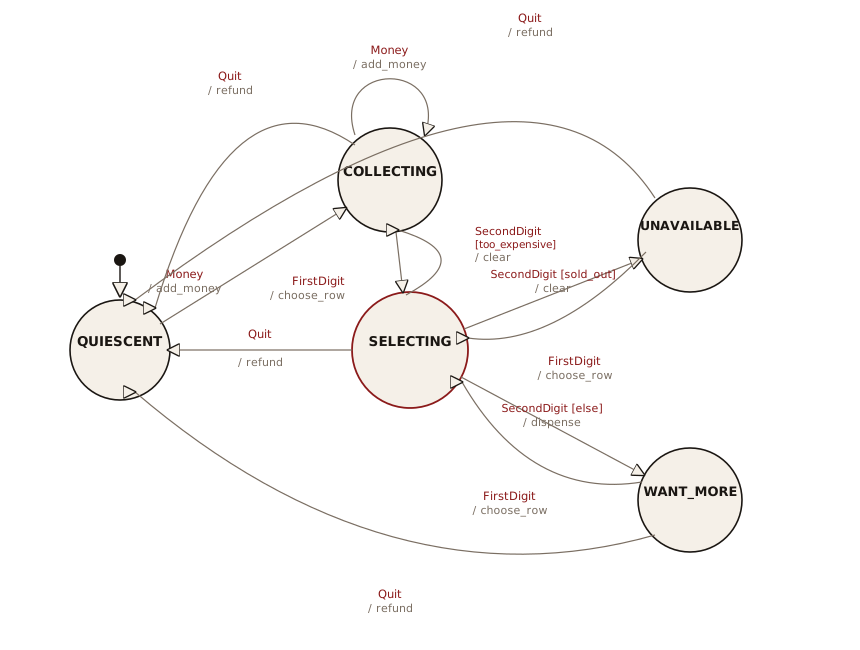
The previous design keeps each state’s transitions inside the state class. A pure state machine can go further and represent the entire machine as a single transition table. All the behavior then lives in one place, so you can build and maintain it directly from a state-transition diagram.
For a given current state and input, a transition row answers three questions: is there a condition to check, what action runs during the transition, and what state do we move to next. As a table:
{(current_state, InputType): [(condition, action, next_state), ...]}The original Java version of this example needed two extra
class hierarchies, Condition and
Transition, because in Java a method is not a value
you can store in a table. Python functions are first-class, so
those hierarchies vanish. A condition is any callable returning
a bool, an action is any callable, and the table is
an ordinary dict.
The Engine
For the current state and the type of the incoming event, the engine walks the candidate transitions in order, takes the first whose condition passes (or has no condition), runs that transition’s action, and moves to the next state:
# tabledriven/state_machine.py
# A generic table-driven state machine.
from collections.abc import Callable
from enum import Enum
from typing import Any

# (condition, action, next_state); condition and action may be None.
# A state is an Enum member, so a misspelled state is a type error
# rather than a silent dead end.
type Transition = tuple[
    Callable[..., bool] | None, Callable[..., None] | None, Enum
]
type Table = dict[tuple[Enum, type], list[Transition]]

class StateMachine:
    def __init__(self, initial: Enum, table: Table) -> None:
        self.state = initial
        self.table = table

    def handle(self, event: Any) -> None:
        for condition, action, next_state in self.table.get(
                (self.state, type(event)), []):
            if condition is None or condition(event):
                if action is not None:
                    action(event)
                self.state = next_state
                return
        raise RuntimeError(
            f"no transition from {self.state!r} "
            f"on {type(event).__name__}")
Several candidate transitions can share one
(state, input) key, told apart by their conditions.
The engine tries them top to bottom, which is how a single input
can lead to different states depending on a test. Note that the
lookup keys on type(event) exactly: a
dictionary probe, not an isinstance() walk. That is
what lets the vending machine below treat
FirstDigit and SecondDigit as distinct
inputs even though both derive from Digit, and it
cuts the other way too: define a further subclass of an event
type and it matches none of its parent’s rows. An event’s
dispatch class must appear in the table verbatim.
A Vending Machine
The machine is now completely defined by a table. It collects
money, takes a two-digit selection, then either dispenses the
item, reports it sold out, or clears a selection that costs more
than the money inserted. The conditions and actions are plain
methods, stored directly in the table. The states are an
Enum, so the type checker catches a misspelled
state name instead of letting it fail silently at runtime:
# tabledriven/vending_machine.py
from dataclasses import dataclass
from enum import Enum, auto
from state_machine import StateMachine, Table

class State(Enum):
    QUIESCENT = auto()
    COLLECTING = auto()
    SELECTING = auto()
    UNAVAILABLE = auto()
    WANT_MORE = auto()

@dataclass
class Money:
    name: str
    value: int

    def __str__(self) -> str:
        return self.name

class Quit:
    def __str__(self) -> str:
        return "Quit"

@dataclass
class Digit:
    name: str
    value: int

    def __str__(self) -> str:
        return self.name

class FirstDigit(Digit):
    pass
class SecondDigit(Digit):
    pass

@dataclass
class ItemSlot:
    price: int
    quantity: int

class VendingMachine(StateMachine):
    def __init__(self) -> None:
        self.amount = 0  # Money inserted, in cents
        self.row = 0  # The first selection digit
        self.message = ""  # Last action, for a view to display
        # A 4x4 grid of items; column c costs (c + 1) * 25 cents:
        self.items = [[ItemSlot((c + 1) * 25, 5) for c in range(4)]
                      for _ in range(4)]
        self.items[3][0] = ItemSlot(25, 0)  # One sold-out slot
        table: Table = {
            (State.QUIESCENT, Money):
                [(None, self.add_money, State.COLLECTING)],
            (State.COLLECTING, Money):
                [(None, self.add_money, State.COLLECTING)],
            (State.COLLECTING, Quit):
                [(None, self.refund, State.QUIESCENT)],
            (State.COLLECTING, FirstDigit):
                [(None, self.choose_row, State.SELECTING)],
            (State.SELECTING, Quit):
                [(None, self.refund, State.QUIESCENT)],
            (State.SELECTING, SecondDigit): [
                (self.too_expensive, self.clear, State.COLLECTING),
                (self.sold_out, self.clear, State.UNAVAILABLE),
                (None, self.dispense, State.WANT_MORE),
            ],
            (State.UNAVAILABLE, Quit):
                [(None, self.refund, State.QUIESCENT)],
            (State.UNAVAILABLE, FirstDigit):
                [(None, self.choose_row, State.SELECTING)],
            (State.WANT_MORE, Quit):
                [(None, self.refund, State.QUIESCENT)],
            (State.WANT_MORE, FirstDigit):
                [(None, self.choose_row, State.SELECTING)],
        }
        super().__init__(State.QUIESCENT, table)

    def _slot(self, col: SecondDigit) -> ItemSlot:
        return self.items[self.row][col.value]

    # Conditions:
    def too_expensive(self, col: SecondDigit) -> bool:
        return self._slot(col).price > self.amount

    def sold_out(self, col: SecondDigit) -> bool:
        return self._slot(col).quantity == 0

    # Actions record a message instead of printing, so the model never
    # touches the screen; a view reads vm.message and displays it.
    def add_money(self, money: Money) -> None:
        self.amount += money.value
        self.message = f"Total = {self.amount}"

    def choose_row(self, digit: FirstDigit) -> None:
        self.row = digit.value
        self.message = f"Row {digit}"

    def clear(self, col: SecondDigit) -> None:
        slot = self._slot(col)
        self.message = (f"Clearing selection: costs {slot.price}, "
                        f"quantity {slot.quantity}")

    def dispense(self, col: SecondDigit) -> None:
        slot = self._slot(col)
        slot.quantity -= 1
        self.amount -= slot.price
        self.message = f"Dispensing; remaining {self.amount}"

    def refund(self, event: object) -> None:
        self.message = f"Returning {self.amount}"
        self.amount = 0

if __name__ == "__main__":
    events = [
        Money("quarter", 25), Money("quarter", 25),
        Money("dollar", 100),
        FirstDigit("A", 0), SecondDigit("two", 1),  # Buy [0][1]
        FirstDigit("A", 0), SecondDigit("two", 1),  # Buy it again
        FirstDigit("C", 2), SecondDigit("three", 2),  # Too expensive
        FirstDigit("D", 3), SecondDigit("one", 0),  # Sold out
        Quit(),  # Refund and reset
    ]
    machine = VendingMachine()
    for event in events:
        machine.handle(event)
        print(f"{event}: {machine.message}")  # Text view
#: quarter: Total = 25
#: quarter: Total = 50
#: dollar: Total = 150
#: A: Row A
#: two: Dispensing; remaining 100
#: A: Row A
#: two: Dispensing; remaining 50
#: C: Row C
#: three: Clearing selection: costs 75, quantity 5
#: D: Row D
#: one: Clearing selection: costs 25, quantity 0
#: Quit: Returning 50
Adding a state or an input is now a local change: an entry in
the table and a method or two. Nothing here needs a
switch, reflection, or a
Condition/Transition class hierarchy.
The language’s first-class functions and its dict
supply what those patterns existed to provide.
Because the machine is deterministic, a test can drive it through a sequence of events and check where it lands. The cases worth pinning down are a successful purchase, the two conditional branches (too expensive and sold out), a refund, and the error when no transition matches:
# tabledriven/test_vending.py
import pytest
from vending_machine import (
    FirstDigit,
    Money,
    Quit,
    SecondDigit,
    State,
    VendingMachine,
)

def feed(vm: VendingMachine, *events: object) -> None:
    for event in events:
        vm.handle(event)

def test_buy_dispenses_and_charges() -> None:
    vm = VendingMachine()
    assert vm.state is State.QUIESCENT
    # Item [0][1], 50c
    feed(vm, Money("quarter", 25), Money("quarter", 25),
         FirstDigit("A", 0), SecondDigit("two", 1))
    assert vm.state is State.WANT_MORE
    assert vm.amount == 0  # 50 in, 50 spent
    assert vm.items[0][1].quantity == 4  # One dispensed from five
    assert vm.message == "Dispensing; remaining 0"

def test_too_expensive_clears_back_to_collecting() -> None:
    vm = VendingMachine()
    # 50c item, 25c in
    feed(vm, Money("quarter", 25),
         FirstDigit("A", 0), SecondDigit("two", 1))
    assert vm.state is State.COLLECTING
    assert vm.amount == 25  # Money kept
    assert vm.items[0][1].quantity == 5  # Nothing dispensed

def test_sold_out_goes_to_unavailable() -> None:
    vm = VendingMachine()
    # [3][0] is sold out
    feed(vm, Money("quarter", 25),
         FirstDigit("D", 3), SecondDigit("one", 0))
    assert vm.state is State.UNAVAILABLE
    assert vm.items[3][0].quantity == 0

def test_quit_refunds_and_resets() -> None:
    vm = VendingMachine()
    feed(vm, Money("dollar", 100), Quit())
    assert vm.state is State.QUIESCENT
    assert vm.amount == 0

def test_no_transition_raises() -> None:
    vm = VendingMachine()  # QUIESCENT has no transition for Quit
    with pytest.raises(RuntimeError):
        vm.handle(Quit())
Because the actions set vm.message instead of
printing, the model never draws anything, and the same machine
can drive more than one view. The text demo in
vending_machine.py reads message and
prints it.
Using tkinter we can create a GUI representation
of the vending machine. The panel reads amount, the
stock, and message and shows them on screen. The
coin and item buttons turn presses into events for
handle(), and the GUI catches a click that the
state machine rejects (a selection before any money, say) and
shows it rather than crashing. The button loop builds sixteen
commands with partial(select, r, c), not with a
lambda: sixteen lambdas closing over r and
c would all see the loop’s final values, the
late-binding trap from Function
Objects. Because it requires user interaction the harness
skips it (tools/data/norun.txt):
# tabledriven/vending_view.py
import tkinter as tk
from functools import partial
from vending_machine import (
    FirstDigit,
    Money,
    Quit,
    SecondDigit,
    VendingMachine,
)

def show() -> None:
    vm = VendingMachine()
    root = tk.Tk()
    root.title("Vending Machine")
    display = tk.Label(root, width=34, anchor="w")
    display.grid(row=0, column=0, columnspan=4, sticky="we")
    buttons: list[list[tk.Button]] = []

    def render() -> None:
        display.config(text=f"Inserted {vm.amount}c   {vm.message}")
        for r, row in enumerate(vm.items):
            for c, slot in enumerate(row):
                out = slot.quantity == 0
                qty = "OUT" if out else f"x{slot.quantity}"
                buttons[r][c].config(
                    text=f"{r}{c}\n{slot.price}c\n{qty}",
                    state="disabled" if out else "normal")

    def send(event: object) -> None:
        try:
            vm.handle(event)
        except RuntimeError:
            vm.message = "not allowed yet"
        render()

    def select(r: int, c: int) -> None:
        send(FirstDigit(f"row {r}", r))
        send(SecondDigit(f"col {c}", c))

    tk.Button(root, text="+25c",
              command=lambda: send(Money("quarter", 25))
              ).grid(row=1, column=0, sticky="we")
    tk.Button(root, text="+$1",
              command=lambda: send(Money("dollar", 100))
              ).grid(row=1, column=1, sticky="we")
    tk.Button(root, text="Refund",
              command=lambda: send(Quit())
              ).grid(row=1, column=2, columnspan=2, sticky="we")

    for r in range(4):
        button_row: list[tk.Button] = []
        for c in range(4):
            b = tk.Button(root, width=6, height=3,
                          command=partial(select, r, c))
            b.grid(row=2 + r, column=c)
            button_row.append(b)
        buttons.append(button_row)

    render()
    root.mainloop()

if __name__ == "__main__":
    show()
Exercises
- Using State, make a
class called
UnpredictablePersonwhich changes the kind of response to itshello()method depending on its currentMood. Add an additional kind ofMoodcalledProzac. - Apply the table-driven
StateMachinefromtabledriven/state_machine.pyto a washing-machine problem. - Create a StateMachine system whereby the current
state along with the input determines the next state. Each state
stores a reference back to the controller object so that it can
request the state change. Use a
dictto map astrnaming a state to its state object. In each state subclass, override anext_state()method that holds its own transition table. The input tonext_state()is a single word read from a text file containing one word per line. - Modify the previous exercise so that you can configure the state machine by editing a single transition table.
- Modify the “mood” exercise (exercise 1) so that it becomes a
state machine using
state_machine.py. - Create an elevator state machine system using
state_machine.py. - Create a heating/air-conditioning system using
state_machine.py. - A generator produces objects, like a factory but
taking no arguments. Write a
mouse_move_generator()(usingyield) that produces correctMouseActionmoves in sequence, where each possible move depends on the previous one (it is another state machine). Have it accept anintfor the number of moves to produce, then stop.