State Machines
While State has a way to allow the client programmer to change the implementation, StateMachine imposes a structure to automatically change the implementation from one object to the next. The current implementation represents the state that a system is in, and the system behaves differently from one state to the next (because it uses State).
The code that moves the system from one state to the next is often a Template Method, as seen in the following framework for a basic state machine.
Each state can be run() to perform its behavior, and
(in this design) you can also pass it an “input” object so it can
tell you what new state to move to based on that “input”. The key
distinction between this design and the next is that here, each
State object decides what other states it can move to,
based on the “input”, whereas in the subsequent design all of the
state transitions are held in a single table. Another way to put it
is that here, each State object has its own little
State table, and in the subsequent design there is a
single master state transition table for the whole system:
# state.py
# A State has an operation, and can be moved
# into the next State given an Input:

class State:
    def run(self) -> None:
        raise NotImplementedError("run not implemented")
    def next(self, input: object) -> State:
        raise NotImplementedError("next not implemented")
This class is unnecessary. However, it allows us to say that
something is a State object in code, and provide a
slightly different error message when all the methods are not
implemented. We could have gotten basically the same effect by
saying:
class State: passbecause we would still get exceptions if run() or
next() were called for a derived type, and they hadn’t
been implemented.
The StateMachine keeps track of the current state,
which is initialized by the constructor. The run_all()
method takes a list of Input objects. This method not
only moves to the next state, but it also calls run()
for each state object; thus you can see it’s an expansion of the
idea of the State pattern, since run()
does something different depending on the state that the system is
in:
# state_machine.py
# Takes a list of Inputs to move from State to
# State using a template method.
from collections.abc import Iterable

from state import State


class StateMachine:
    def __init__(self, initial_state: State) -> None:
        self.current_state = initial_state
        self.current_state.run()
    # Template method:
    def run_all(self, inputs: Iterable[object]) -> None:
        for i in inputs:
            print(i)
            self.current_state = self.current_state.next(i)
            self.current_state.run()
I’ve also treated run_all() as a template method.
This is typical, but certainly not required; you could conceivably
want to override it, but typically the behavior change will occur in
State’s run() instead.
At this point the basic framework for this style of
StateMachine (where each state decides the next states) is
complete. As an example, I’ll use a fancy mousetrap that can move
through several states in the process of trapping a mouse1. The mouse classes and
information are stored in the mouse package, including
a class representing all the possible moves that a mouse can make,
which will be the inputs to the state machine:
# mouse/mouse_action.py
from enum import StrEnum


class MouseAction(StrEnum):
    APPEARS = "mouse appears"
    RUNS_AWAY = "mouse runs away"
    ENTERS = "mouse enters trap"
    ESCAPES = "mouse escapes"
    TRAPPED = "mouse trapped"
    REMOVED = "mouse removed"
Each possible move by a mouse is a member of the
MouseAction enumeration. Because it is a
StrEnum, each member is its string value:
str needs no help, and a member even compares equal to
its string. The members still hash and look up correctly, so they
work as dictionary keys, and
MouseAction("mouse appears") returns the matching
member, which is how the test input below is parsed.
For creating test code, a sequence of mouse inputs is provided from a text file:
# mouse/mouse_moves.txt
mouse appears
mouse runs away
mouse appears
mouse enters trap
mouse escapes
mouse appears
mouse enters trap
mouse trapped
mouse removed
mouse appears
mouse runs away
mouse appears
mouse enters trap
mouse trapped
mouse removed
With these tools in place, it’s now possible to create the first
version of the mousetrap program. Each State subclass
defines its run() behavior, and also establishes its
next state with an if-else clause:
# mousetrap1/mouse_trap.py
# State Machine pattern using match to determine the next state.
import sys
from pathlib import Path

sys.path += ['..', '../mouse']
from mouse_action import MouseAction  # type: ignore
from state import State
from state_machine import StateMachine

# A different subclass for each state:

class Waiting(State):
    def run(self) -> None:
        print("Waiting: Broadcasting cheese smell")

    def next(self, input: object) -> State:
        match input:
            case MouseAction.APPEARS:
                return MouseTrap.luring
            case _:
                return MouseTrap.waiting

class Luring(State):
    def run(self) -> None:
        print("Luring: Presenting Cheese, door open")

    def next(self, input: object) -> State:
        match input:
            case MouseAction.RUNS_AWAY:
                return MouseTrap.waiting
            case MouseAction.ENTERS:
                return MouseTrap.trapping
            case _:
                return MouseTrap.luring

class Trapping(State):
    def run(self) -> None:
        print("Trapping: Closing door")

    def next(self, input: object) -> State:
        match input:
            case MouseAction.ESCAPES:
                return MouseTrap.waiting
            case MouseAction.TRAPPED:
                return MouseTrap.holding
            case _:
                return MouseTrap.trapping

class Holding(State):
    def run(self) -> None:
        print("Holding: Mouse caught")

    def next(self, input: object) -> State:
        match input:
            case MouseAction.REMOVED:
                return MouseTrap.waiting
            case _:
                return MouseTrap.holding

class MouseTrap(StateMachine):
    waiting: State
    luring: State
    trapping: State
    holding: State

    def __init__(self) -> None:
        # Initial state
        StateMachine.__init__(self, MouseTrap.waiting)

# Static variable initialization:
MouseTrap.waiting = Waiting()
MouseTrap.luring = Luring()
MouseTrap.trapping = Trapping()
MouseTrap.holding = Holding()

text = Path("../mouse/mouse_moves.txt").read_text()
moves = [line.strip() for line in text.splitlines()
         if line.strip() and not line.startswith('#')]
MouseTrap().run_all([MouseAction(m) for m in moves])
MouseTrap holds all the possible states as class
attributes and sets up the initial state. The code at the bottom of
the file builds a MouseTrap and runs it through the
whole sequence of moves read from the text file.
While the use of match inside the
next() methods is perfectly reasonable, managing a
large number of these could become difficult. Another approach is to
create tables inside each State object defining the
various next states based on the input.
Initially, this seems like it ought to be quite simple. You
should be able to define a static table in each State
subclass that defines the transitions in terms of the other
State objects. However, it turns out that this approach
generates cyclic initialization dependencies. To solve the problem,
I’ve had to delay the initialization of the tables until the first
time that the next() method is called for a particular
State object. Initially, the next()
methods can appear a little strange because of this.
The StateT class is an implementation of
State (so that the same StateMachine class
can be used from the previous example) that adds a
transitions dict mapping each input to its next state.
Its base-class next() looks the input up in that
dict. Each subclass fills its own
transitions lazily, the first time next()
is called while transitions is still None,
then delegates to the base next():
# mousetrap2/mouse_trap2.py
# A better mousetrap using tables
import sys
from pathlib import Path
from typing import Any

sys.path += ['..', '../mouse']
from mouse_action import MouseAction  # type: ignore
from state import State
from state_machine import StateMachine


class StateT(State):
    def __init__(self) -> None:
        self.transitions: dict[Any, Any] | None = None
    def next(self, input: object) -> State:
        assert self.transitions is not None
        if input in self.transitions:
            return self.transitions[input]
        else:
            raise Exception("Input not supported for current state")

class Waiting(StateT):
    def run(self) -> None:
        print("Waiting: Broadcasting cheese smell")
    def next(self, input: object) -> State:
        # Lazy initialization:
        if not self.transitions:
            self.transitions = {
              MouseAction.APPEARS : MouseTrap.luring
            }
        return StateT.next(self, input)

class Luring(StateT):
    def run(self) -> None:
        print("Luring: Presenting Cheese, door open")
    def next(self, input: object) -> State:
        # Lazy initialization:
        if not self.transitions:
            self.transitions = {
              MouseAction.ENTERS : MouseTrap.trapping,
              MouseAction.RUNS_AWAY : MouseTrap.waiting
            }
        return StateT.next(self, input)

class Trapping(StateT):
    def run(self) -> None:
        print("Trapping: Closing door")
    def next(self, input: object) -> State:
        # Lazy initialization:
        if not self.transitions:
            self.transitions = {
              MouseAction.ESCAPES : MouseTrap.waiting,
              MouseAction.TRAPPED : MouseTrap.holding
            }
        return StateT.next(self, input)

class Holding(StateT):
    def run(self) -> None:
        print("Holding: Mouse caught")
    def next(self, input: object) -> State:
        # Lazy initialization:
        if not self.transitions:
            self.transitions = {
              MouseAction.REMOVED : MouseTrap.waiting
            }
        return StateT.next(self, input)

class MouseTrap(StateMachine):
    waiting: State
    luring: State
    trapping: State
    holding: State

    def __init__(self) -> None:
        # Initial state
        StateMachine.__init__(self, MouseTrap.waiting)

# Static variable initialization:
MouseTrap.waiting = Waiting()
MouseTrap.luring = Luring()
MouseTrap.trapping = Trapping()
MouseTrap.holding = Holding()

text = Path("../mouse/mouse_moves.txt").read_text()
moves = [line.strip() for line in text.splitlines()
         if line.strip() and not line.startswith('#')]
mouse_moves = [MouseAction(m) for m in moves]
MouseTrap().run_all(mouse_moves)
The rest of the code is identical; the difference is in the
next() methods and the StateT class.
If you have to create and maintain a lot of State
classes, this approach is an improvement, since it’s easier to
quickly read and understand the state transitions from looking at
the table.
Table-Driven State Machine
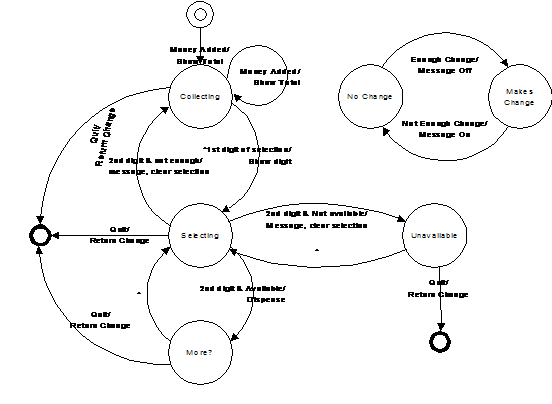
The previous design keeps each state’s transitions inside the state class. A pure state machine can go further and represent the entire machine as a single transition table. All the behavior then lives in one place, so you can build and maintain it directly from a state-transition diagram.
For a given current state and input, a transition row answers three questions: is there a condition to check, what action runs during the transition, and what state do we move to next. As a table:
{(current_state, InputType): [(condition, action, next_state), ...]}The original Java version of this example needed two extra class
hierarchies, Condition and Transition,
because in Java a method is not a value you can store in a table.
Python functions are first-class, so those hierarchies vanish: a
condition is any callable returning a bool, an action
is any callable, and the table is an ordinary dict.
The Engine
The engine is tiny. For the current state and the type of the incoming event, it walks the candidate transitions in order, takes the first whose condition passes (or has no condition), runs that transition’s action, and moves to the next state:
# tabledriven/state_machine.py
# A generic table-driven state machine.
#
# The whole machine is one transition table. Because Python
# functions are first-class, a transition's condition and action are
# just callables.
from collections.abc import Callable
from enum import Enum
from typing import Any

# (condition, action, next_state); condition and action may be None.
# A state is any Enum member, so a misspelled state is a type error
# rather than a silent dead end.
type Transition = tuple[
    Callable[..., bool] | None, Callable[..., None] | None, Enum
]
type Table = dict[tuple[Enum, type], list[Transition]]


class StateMachine:
    def __init__(self, initial: Enum, table: Table) -> None:
        self.state = initial
        self.table = table

    def handle(self, event: Any) -> None:
        for condition, action, next_state in self.table.get(
                (self.state, type(event)), []):
            if condition is None or condition(event):
                if action is not None:
                    action(event)
                self.state = next_state
                return
        raise RuntimeError(
            f"no transition from {self.state!r} "
            f"on {type(event).__name__}")
Several candidate transitions can share one
(state, input) key, told apart by their conditions. The
engine tries them top to bottom, which is how a single input can
lead to different states depending on a test.
A Vending Machine
The machine is now entirely a table. It collects money, takes a
two-digit selection, then either dispenses the item, reports it sold
out, or clears a selection that costs more than the money inserted.
The conditions and actions are plain methods, stored directly in the
table. The states are an Enum, so a misspelled state
name is caught by the type checker instead of failing silently at
run time:
# tabledriven/vending_machine.py
# A vending machine expressed entirely as a transition table.
from enum import Enum, auto

from state_machine import StateMachine, Table


class State(Enum):
    QUIESCENT = auto()
    COLLECTING = auto()
    SELECTING = auto()
    UNAVAILABLE = auto()
    WANT_MORE = auto()


class Money:
    def __init__(self, name: str, value: int) -> None:
        self.name = name
        self.value = value

    def __str__(self) -> str:
        return self.name


class Quit:
    def __str__(self) -> str:
        return "Quit"


class Digit:
    def __init__(self, name: str, value: int) -> None:
        self.name = name
        self.value = value

    def __str__(self) -> str:
        return self.name


class FirstDigit(Digit):
    pass
class SecondDigit(Digit):
    pass


class ItemSlot:
    def __init__(self, price: int, quantity: int) -> None:
        self.price = price
        self.quantity = quantity


class VendingMachine(StateMachine):
    def __init__(self) -> None:
        self.amount = 0    # money inserted, in cents
        self.row = 0       # the first selection digit
        self.message = ""  # last action, for a view to display
        # A 4x4 grid of items; column c costs (c + 1) * 25 cents:
        self.items = [[ItemSlot((c + 1) * 25, 5) for c in range(4)]
                      for _ in range(4)]
        self.items[3][0] = ItemSlot(25, 0)  # one sold-out slot
        table: Table = {
            (State.QUIESCENT, Money):
                [(None, self.add_money, State.COLLECTING)],
            (State.COLLECTING, Money):
                [(None, self.add_money, State.COLLECTING)],
            (State.COLLECTING, Quit):
                [(None, self.refund, State.QUIESCENT)],
            (State.COLLECTING, FirstDigit):
                [(None, self.choose_row, State.SELECTING)],
            (State.SELECTING, Quit):
                [(None, self.refund, State.QUIESCENT)],
            (State.SELECTING, SecondDigit): [
                (self.too_expensive, self.clear, State.COLLECTING),
                (self.sold_out, self.clear, State.UNAVAILABLE),
                (None, self.dispense, State.WANT_MORE),
            ],
            (State.UNAVAILABLE, Quit):
                [(None, self.refund, State.QUIESCENT)],
            (State.UNAVAILABLE, FirstDigit):
                [(None, self.choose_row, State.SELECTING)],
            (State.WANT_MORE, Quit):
                [(None, self.refund, State.QUIESCENT)],
            (State.WANT_MORE, FirstDigit):
                [(None, self.choose_row, State.SELECTING)],
        }
        super().__init__(State.QUIESCENT, table)

    def _slot(self, col: SecondDigit) -> ItemSlot:
        return self.items[self.row][col.value]

    # Conditions:
    def too_expensive(self, col: SecondDigit) -> bool:
        return self._slot(col).price > self.amount

    def sold_out(self, col: SecondDigit) -> bool:
        return self._slot(col).quantity == 0

    # Actions record a message instead of printing, so the model never
    # touches the screen; a view reads vm.message and displays it.
    def add_money(self, money: Money) -> None:
        self.amount += money.value
        self.message = f"Total = {self.amount}"

    def choose_row(self, digit: FirstDigit) -> None:
        self.row = digit.value
        self.message = f"Row {digit}"

    def clear(self, col: SecondDigit) -> None:
        slot = self._slot(col)
        self.message = (f"Clearing selection: costs {slot.price}, "
                        f"quantity {slot.quantity}")

    def dispense(self, col: SecondDigit) -> None:
        slot = self._slot(col)
        slot.quantity -= 1
        self.amount -= slot.price
        self.message = f"Dispensing; amount remaining {self.amount}"

    def refund(self, event: object) -> None:
        self.message = f"Returning {self.amount}"
        self.amount = 0


if __name__ == "__main__":
    events = [
        Money("quarter", 25), Money("quarter", 25),
        Money("dollar", 100),
        FirstDigit("A", 0), SecondDigit("two", 1),    # buy [0][1]
        FirstDigit("A", 0), SecondDigit("two", 1),    # buy it again
        FirstDigit("C", 2), SecondDigit("three", 2),  # too expensive
        FirstDigit("D", 3), SecondDigit("one", 0),    # sold out
        Quit(),  # refund and reset
    ]
    machine = VendingMachine()
    for event in events:
        machine.handle(event)
        print(f"{event}: {machine.message}")  # a plain text view
Adding a state or an input is now a local change: an entry in the
table and a method or two. There is no switch, no
reflection, and no Condition or Transition
class hierarchy. The language’s first-class functions and its
dict supply what those patterns existed to provide.
Because the machine is deterministic, a test can drive it through a sequence of events and check where it lands. The cases worth pinning down are a successful purchase, the two conditional branches (too expensive and sold out), a refund, and the error when no transition matches:
# tabledriven/test_vending.py
import pytest
from vending_machine import (
    FirstDigit,
    Money,
    Quit,
    SecondDigit,
    State,
    VendingMachine,
)


def feed(vm: VendingMachine, *events: object) -> None:
    for event in events:
        vm.handle(event)


def test_buy_dispenses_and_charges() -> None:
    vm = VendingMachine()
    assert vm.state is State.QUIESCENT
    # item [0][1], 50c
    feed(vm, Money("quarter", 25), Money("quarter", 25),
         FirstDigit("A", 0), SecondDigit("two", 1))
    assert vm.state is State.WANT_MORE
    assert vm.amount == 0                 # 50 in, 50 spent
    assert vm.items[0][1].quantity == 4   # one dispensed from five
    assert vm.message == "Dispensing; amount remaining 0"


def test_too_expensive_clears_back_to_collecting() -> None:
    vm = VendingMachine()
    # 50c item, 25c in
    feed(vm, Money("quarter", 25),
         FirstDigit("A", 0), SecondDigit("two", 1))
    assert vm.state is State.COLLECTING
    assert vm.amount == 25                # money kept
    assert vm.items[0][1].quantity == 5   # nothing dispensed


def test_sold_out_goes_to_unavailable() -> None:
    vm = VendingMachine()
    # [3][0] is sold out
    feed(vm, Money("quarter", 25),
         FirstDigit("D", 3), SecondDigit("one", 0))
    assert vm.state is State.UNAVAILABLE
    assert vm.items[3][0].quantity == 0


def test_quit_refunds_and_resets() -> None:
    vm = VendingMachine()
    feed(vm, Money("dollar", 100), Quit())
    assert vm.state is State.QUIESCENT
    assert vm.amount == 0


def test_no_transition_raises() -> None:
    vm = VendingMachine()  # QUIESCENT has no transition for Quit
    with pytest.raises(RuntimeError):
        vm.handle(Quit())
Because the actions set vm.message instead of
printing, the model never draws anything, and the same machine
drives more than one view. The text demo in
vending_machine.py reads message and
prints it; the panel below reads amount, the stock, and
message and shows them on screen.
vending_view.py is a tkinter front for the
machine: the coin and item buttons turn presses into events for
handle(), and a click that the state machine rejects (a
selection before any money, say) is caught and shown rather than
crashing. It is the only file that draws, so the harness skips it
(tools/norun.txt):
# tabledriven/vending_view.py
# A tkinter front panel for the vending machine. The model
# (vending_machine.py) holds the state machine and the money and stock
# logic; this file only draws and turns button presses into events.
import tkinter as tk
from functools import partial

from vending_machine import (
    FirstDigit,
    Money,
    Quit,
    SecondDigit,
    VendingMachine,
)


def show() -> None:
    "Open the vending-machine panel."
    vm = VendingMachine()
    root = tk.Tk()
    root.title("Vending Machine")
    display = tk.Label(root, width=34, anchor="w")
    display.grid(row=0, column=0, columnspan=4, sticky="we")
    buttons: list[list[tk.Button]] = []

    def render() -> None:
        display.config(text=f"Inserted {vm.amount}c   {vm.message}")
        for r, row in enumerate(vm.items):
            for c, slot in enumerate(row):
                out = slot.quantity == 0
                qty = "OUT" if out else f"x{slot.quantity}"
                buttons[r][c].config(
                    text=f"{r}{c}\n{slot.price}c\n{qty}",
                    state="disabled" if out else "normal")

    def send(event: object) -> None:
        try:
            vm.handle(event)
        except RuntimeError:
            vm.message = "not allowed yet"
        render()

    def select(r: int, c: int) -> None:
        send(FirstDigit(f"row {r}", r))
        send(SecondDigit(f"col {c}", c))

    tk.Button(root, text="+25c",
              command=lambda: send(Money("quarter", 25))
              ).grid(row=1, column=0, sticky="we")
    tk.Button(root, text="+$1",
              command=lambda: send(Money("dollar", 100))
              ).grid(row=1, column=1, sticky="we")
    tk.Button(root, text="Refund",
              command=lambda: send(Quit())
              ).grid(row=1, column=2, columnspan=2, sticky="we")

    for r in range(4):
        button_row: list[tk.Button] = []
        for c in range(4):
            b = tk.Button(root, width=6, height=3,
                          command=partial(select, r, c))
            b.grid(row=2 + r, column=c)
            button_row.append(b)
        buttons.append(button_row)

    render()
    root.mainloop()


if __name__ == "__main__":
    show()
Exercises
The Proxy and State patterns that several of these exercises build on are covered in Fronting for an Implementation.
- Create an example of the “virtual proxy.”
- Create an example of the “Smart reference” proxy where you keep count of the number of method calls to a particular object.
- Create a program similar to certain DBMS systems that only allow a certain number of connections at any time. To implement this, use a singleton-like system that controls the number of “connection” objects that it creates. When a user is finished with a connection, the system must be informed so that it can check that connection back in to be reused. To guarantee this, provide a proxy object instead of a reference to the actual connection, and design the proxy so that it will cause the connection to be released back to the system.
- Using the State, make a class called
UnpredictablePersonwhich changes the kind of response to itshello()method depending on what kind ofMoodit’s in. Add an additional kind ofMoodcalledProzac. - Create a simple copy-on-write implementation.
- Apply the table-driven
StateMachinefromtabledriven/state_machine.pyto a washing-machine problem. - Create a StateMachine system whereby the current state
along with the input determines the next state. Each state stores a
reference back to the controller object so that it can request the
state change. Use a
dictto map astrnaming a state to its state object. In each state subclass, override anext_state()method that holds its own transition table. The input tonext_state()is a single word read from a text file containing one word per line. - Modify the previous exercise so that the state machine can be configured by editing a single transition table.
- Modify the “mood” exercise (exercise 4) so that it becomes a
state machine using
state_machine.py. - Create an elevator state machine system using state_machine.py
- Create a heating/air-conditioning system using state_machine.py
- A generator produces objects, like a factory but taking
no arguments. Write a
mouse_move_generator(usingyield) that produces correctMouseActionmoves in sequence, where each possible move depends on the previous one (it is another state machine). Have it accept anintfor the number of moves to produce, then stop.